
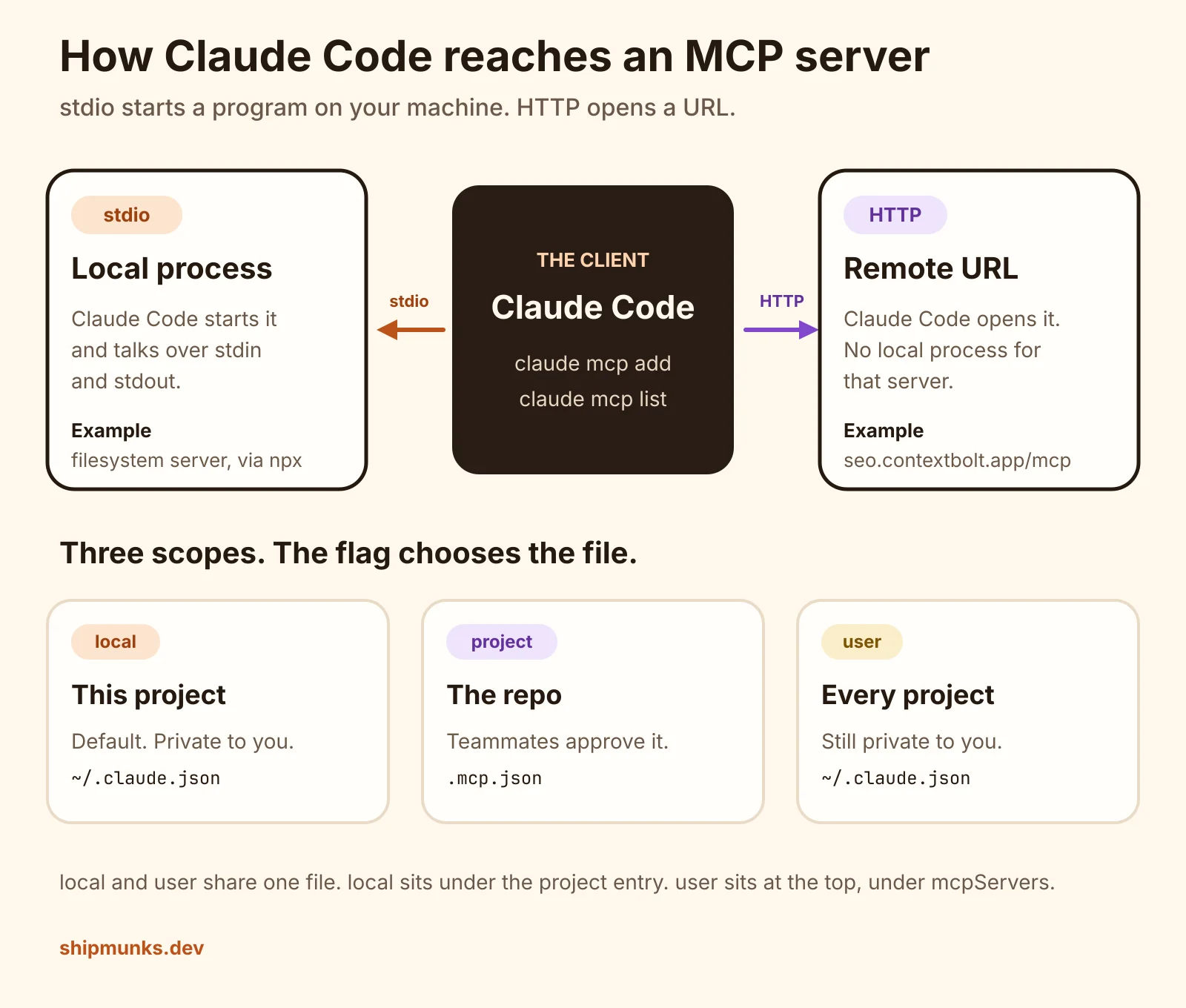
A filesystem server on your machine, and a remote HTTP server, added with the real commands. Plus where each scope writes the config.
On this page
The short answer
Add an MCP server from your terminal with claude mcp add, in the project folder, before you open a Claude session. A local server is a program Claude Code starts and talks to over stdin and stdout. A remote server is a URL, passed with --transport http, and claude mcp list prints whether it connected or still needs a sign-in.
Before you start
- Claude Code installed. This run used
2.1.310 (Claude Code). - Node.js on your PATH if the server starts with
npx. The health check below used Nodev24.22.1. - A project folder. Local scope is tied to that folder.
- For a hosted server, the login it asks for. The HTTP server in this run wanted one, and I did not complete it.
The quickstart is the page these commands come from. The protocol underneath is the MCP specification (revision 2026-07-28, checked October 24, 2026).
Add the server
Two ways across. stdio is a process on your machine. HTTP is a URL. The same claude mcp add command registers either one, and the scope flag picks the file it writes.
-
Install the Claude Code CLI.
Install from Anthropic’s setup page, then check the binary:
terminal claude --versionterminal 2.1.310 (Claude Code)That is the version used for every command below, on October 24, 2026. The shell was a throwaway git repo at
/tmp/shipmunks-mcp-lab/project, so project scope had a root to write into. Run the commands in your own project the same way: in the terminal, not inside aclaudechat. Inside a session you use/mcpfor servers that are already configured. -
Add a stdio server.
stdio means Claude Code starts a program and exchanges JSON-RPC messages on that program’s standard input and output. No port, no URL.
The server here is the public filesystem reference server,
@modelcontextprotocol/server-filesystem. Its README says it may touch only the directories you pass on the command line, and that Node.js 24 or later is the requirement when you run it throughnpx. I passed one notes folder that held a single text file.terminal claude mcp add --scope local --transport stdio filesystem -- npx -y @modelcontextprotocol/server-filesystem /tmp/shipmunks-mcp-lab/project/notesterminal Added stdio MCP server filesystem with command: npx -y @modelcontextprotocol/server-filesystem /tmp/shipmunks-mcp-lab/project/notes to local config File modified: /home/ubuntu/.claude.json [project: /tmp/shipmunks-mcp-lab/project]The
--is the separator. Claude Code’s flags stay on the left. The program and its arguments stay on the right.--scope localis the default, written out here so the line shows which of the three scopes it is. Pass a directory you are willing to let an agent read and write. Swap the path for yours. -
Add a remote HTTP server.
Streamable HTTP is the spec’s name for a remote server at a URL. Claude Code’s flag for it is
--transport http. Nothing is installed for that server.This one is ContextBolt SEO, which we make. The MCP endpoint is
https://seo.contextbolt.app/mcp.terminal claude mcp add --scope local --transport http contextbolt-seo https://seo.contextbolt.app/mcpterminal Added HTTP MCP server contextbolt-seo with URL: https://seo.contextbolt.app/mcp to local config File modified: /home/ubuntu/.claude.json [project: /tmp/shipmunks-mcp-lab/project]The name
contextbolt-seois one I chose. The URL is the part that matters. I passed no token and no header. -
Read the status with claude mcp list.
addwrites the config. The status comes from a second command, which actually connects:terminal claude mcp listterminal Checking MCP server health… filesystem: npx -y @modelcontextprotocol/server-filesystem /tmp/shipmunks-mcp-lab/project/notes - ✔ Connected contextbolt-seo: https://seo.contextbolt.app/mcp (HTTP) - ! Needs authenticationclaude mcp getprints the scope and the command or URL.claude mcp get filesystem filesystem: Scope: Local config (private to you in this project) Status: ✔ Connected Type: stdio Command: npx Args: -y @modelcontextprotocol/server-filesystem /tmp/shipmunks-mcp-lab/project/notes Environment: To remove this server, run: claude mcp remove filesystem -s localclaude mcp get contextbolt-seo contextbolt-seo: Scope: Local config (private to you in this project) Status: ! Needs authentication Type: http URL: https://seo.contextbolt.app/mcp To remove this server, run: claude mcp remove contextbolt-seo -s localConnected means the filesystem process started. Needs authentication means the URL was reached and wants a login. I stopped there for the HTTP server. I did not run
claude mcp login, I did not open a browser, and I did not start aclaudesession, so I never called a tool on either server.A request to that URL with no token came back HTTP 401. The
www-authenticateheader asked for a Bearer token with scopemcp. That matches the list status. It is not a bad URL. -
Save a shared server in .mcp.json.
A server’s scope is fixed when you add it. Moving it means removing that entry and adding it again. I took the filesystem server off local scope and put it on project scope, which is the one that lands in the repo:
terminal claude mcp remove filesystem --scope local claude mcp add --scope project --transport stdio filesystem -- npx -y @modelcontextprotocol/server-filesystem /tmp/shipmunks-mcp-lab/project/notesterminal Added stdio MCP server filesystem with command: npx -y @modelcontextprotocol/server-filesystem /tmp/shipmunks-mcp-lab/project/notes to project config File modified: /tmp/shipmunks-mcp-lab/project/.mcp.jsonThe file it wrote:
.mcp.json { "mcpServers": { "filesystem": { "type": "stdio", "command": "npx", "args": [ "-y", "@modelcontextprotocol/server-filesystem", "/tmp/shipmunks-mcp-lab/project/notes" ], "env": {} } } }On Windows the filesystem README launches
npxthroughcmd /c. I did not run that. I am on Linux.The next
claude mcp listdid not connect yet:terminal filesystem: npx -y @modelcontextprotocol/server-filesystem /tmp/shipmunks-mcp-lab/project/notes - ⏸ Pending approval (run `claude` to approve)That pause is deliberate. A cloned repo should not be able to start a process on your machine until you say so. The docs say to run
claudein the folder and approve the server. This shell was not interactive, so I used the other switch those docs name,enableAllProjectMcpServers, in the user settings file~/.claude/settings.json. That approves every project server, which is broader than approving one. After it was set,claude mcp get filesystemreported scopeProject config (shared via .mcp.json)and status✔ Connected.
Where the config is saved
Three scopes, two files. I ran all three flags.
| Scope | Flag | File | Available to |
|---|---|---|---|
| local | --scope local, the default | ~/.claude.json, under this project | Only you, this project |
| project | --scope project | .mcp.json in the project root | Anyone who clones the repo, after they approve it |
| user | --scope user | ~/.claude.json, top-level mcpServers | Only you, every project |
After the local HTTP entry was removed, I added the same URL at user scope:
claude mcp add --scope user --transport http contextbolt-seo https://seo.contextbolt.app/mcpAdded HTTP MCP server contextbolt-seo with URL: https://seo.contextbolt.app/mcp to user config
File modified: /home/ubuntu/.claude.jsoncontextbolt-seo:
Scope: User config (available in all your projects)
Status: ! Needs authentication
Type: http
URL: https://seo.contextbolt.app/mcp
To remove this server, run: claude mcp remove contextbolt-seo -s userThe user entry in ~/.claude.json is only this object. The rest of that file is install metadata, and it is not part of the server config, so it is not quoted here.
{
  "contextbolt-seo": {
    "type": "http",
    "url": "https://seo.contextbolt.app/mcp"
  }
}
While both servers were still on local scope, the project entry in the same file held both. This is the mcpServers value under that project path, before I removed it:
{
  "filesystem": {
    "type": "stdio",
    "command": "npx",
    "args": [
      "-y",
      "@modelcontextprotocol/server-filesystem",
      "/tmp/shipmunks-mcp-lab/project/notes"
    ],
    "env": {}
  },
  "contextbolt-seo": {
    "type": "http",
    "url": "https://seo.contextbolt.app/mcp"
  }
}
claude mcp list from the final state, with the filesystem server on project scope and ContextBolt on user scope:
Checking MCP server health…

contextbolt-seo: https://seo.contextbolt.app/mcp (HTTP) - ! Needs authentication
filesystem: npx -y @modelcontextprotocol/server-filesystem /tmp/shipmunks-mcp-lab/project/notes - ✔ Connected
If CLAUDE_CONFIG_DIR is set, Claude Code reads .claude.json from that directory instead of your home folder. I left it unset, so the path was /home/ubuntu/.claude.json. On your machine that path is your own home directory. The reference also lists paths Claude Code does not read, including ~/.claude/mcp.json and .claude/.mcp.json. A file in one of those spots is invisible to claude mcp list.
What we tested
Checked
Claude Code 2.1.310, Node v24.22.1, in /tmp/shipmunks-mcp-lab/project. No token was passed to any command. The HTTP server was added and listed. Its sign-in was not completed, and no tool was called.
| Check | Result |
|---|---|
| filesystem, scope local | ✔ Connected |
| contextbolt-seo, scope local | ! Needs authentication |
| filesystem added again at local | exit 1, already exists |
add with no -- before npx | error: unknown option ‘-y’ |
| filesystem, scope project, before approval | ⏸ Pending approval |
| filesystem, scope project, after the user settings switch | ✔ Connected |
| contextbolt-seo, scope user | ! Needs authentication |
The same package was also started directly under Node v22.23.4, with stdin closed. It printed Secure MCP Filesystem Server running on stdio and exited 0 before a 20 second timeout. The Connected status above was measured with Node 24, which is the version the package’s README asks for.
Errors and the fix
Four of these happened in the run. The last two are from the quickstart’s troubleshooting, and I did not hit them.
| What you see | In this run | Fix |
|---|---|---|
error: unknown option ‘-y’ | Yes. The command was claude mcp add broken-stdio npx -y @modelcontextprotocol/server-filesystem /tmp/shipmunks-mcp-lab/project/notes with no separator. Exit code 1. | Put -- before the server command, then run it again. |
MCP server filesystem already exists in local config | Yes. A second add of the same name at the same scope exited 1. | claude mcp remove filesystem --scope local, or pick another name. If the name is in more than one scope, the docs say remove reports that and you pass --scope. |
! Needs authentication | Yes, for https://seo.contextbolt.app/mcp. The URL returned HTTP 401 with no token. | Start claude, run /mcp, and choose Authenticate. Servers that take a static token instead use --header on add. I did not do either. |
⏸ Pending approval | Yes, the moment the filesystem server moved to .mcp.json. | Run claude in the project and approve that server. Approving every project server from user settings also cleared it here, and that switch is wider than one approval. |
✘ Failed to connect on a fresh stdio server | Not in this run. The filesystem server connected on the first list. | The quickstart says the first check can fail while npx is still downloading. Wait and run claude mcp list again. If it still fails, run the same command yourself in the terminal and read the error. |
A URL entry with no type | Not in this run. claude mcp add wrote “type”: “http” for me. | The reference says an entry with a url and no type is skipped, because a missing type is read as stdio. Add “type”: “http”. |
Startup can also sit past the default 30 second limit while npx downloads. The quickstart’s variable for that is MCP_TIMEOUT, in milliseconds, set on the claude command. I did not need to raise it. The list commands in this run finished in a few seconds, because the package was already cached.
Sign in when the server asks
For the filesystem server, Connected is the end of the setup. It is a local process with no account.
For ContextBolt SEO, Needs authentication is the end of what I ran. The next step, which I did not take, is the one in the quickstart for a server that requires sign-in: start claude, open /mcp, select the server, and authenticate in the browser. There is no token in this post, and the .mcp.json from the run does not contain one.
Once that server is signed in, a plain thing to ask it is whether a new page is indexed. The checks themselves are in How to get a new website indexed by Google.
How to get a new website indexed by Google The order to do it in, what each Search Console status means, and how long to wait. GuideChoosing the database behind that site is a separate job. Supabase vs Firebase works out the monthly bill at 1,000, 10,000, and 50,000 users.
Supabase vs Firebase: the bill at 1k, 10k, 50k The monthly bill at 1,000, 10,000, and 50,000 users, worked from the current price lists. BlogMore on this topic lives under AI agents and tools.
FAQ
Do I run claude mcp add inside a Claude Code chat?
No. Run it in your terminal, in the project folder, before you start a session. Inside a session, the /mcp command manages servers you have already added. Anthropic’s quickstart says the same thing.
Which scope should I use?
Local is the default: private to you, and only in this project. Project writes .mcp.json so anyone who clones the repo can use the server after they approve it. User puts the server in every project you open, still private to you.
Why does claude mcp list say Needs authentication when add succeeded?
add writes the config. list is the command that connects. On October 24, 2026, https://seo.contextbolt.app/mcp answered a request with no token with HTTP 401 and asked for a Bearer token. The list status was Needs authentication. I did not finish that sign-in.
Why is a server in .mcp.json stuck on Pending approval?
Claude Code will not start a project server until you approve it. The prompt is there so a repository you clone cannot launch a process on your machine by itself. Run claude in that folder and approve the server. claude mcp list then health-checks it.
What does the double dash before npx do?
It marks the end of Claude Code’s own flags. Everything after it is the program that starts the server. I left it out once, and the command failed with: error: unknown option ‘-y’.
Can I commit .mcp.json?
Yes, when the entry is the command and the URL, which is what project scope is for. The file from this run had no token in it. Keep API keys out of the file. Pass those with an env flag or a header at add time, and do not paste the value into the repo.
Sources
- Connect to MCP servers (Claude Code Docs) Checked
- Connect Claude Code to tools via MCP (Claude Code Docs) Checked
- Set up Claude Code (Claude Code Docs) Checked
- Specification (Model Context Protocol) Checked
- stdio transport (Model Context Protocol) Checked
- Streamable HTTP transport (Model Context Protocol) Checked
- Filesystem MCP Server (Model Context Protocol servers) Checked