
The details page says the sitemap could not be read when the fetch failed. Here is how to tell that from a file Google already fetched, using a server run on 24 Oct 2026.
On this page
The short answer
Sitemap could not be read means Google did not fetch the file. Couldn’t fetch is the same failure on the main Sitemaps report. Check the status code, the body, robots.txt, and redirects before you edit the XML. A new sitemap can show both lines while Google has not processed it yet.
Before you start
- The exact sitemap URL from the Search Console row, not a close variant
- A terminal, so you can request that URL yourself
- The property that matches the host.
httpandhttpsare different properties, andwwwis a different host
What the two lines mean
The Sitemaps report has three statuses for the last request. Success means the sitemap was fetched and read with no errors. Couldn’t fetch means Google could not fetch the sitemap. Sitemap had errors means Google fetched it, read part of it, and hit errors.
Open the row. If the details page says “Sitemap could not be read,” Google’s help says the fetch failed. If it says the sitemap can be read but has errors, you are in the other bucket, and the page lists the errors.
I could not open that screen. Search Console only shows it inside a verified property, and this test had none. What I could do is serve the usual broken files and record what came back. Where the help page names a status, I cite that page. Where it does not, I say so.
The help page’s own reasons for Couldn’t fetch are: robots.txt blocks the sitemap, the site has a manual action, the URL is a 404, some other error such as the server being down, and low crawl demand. A manual action and low crawl demand are real entries on that list. I did not reproduce either one.
Two sentences on that page sit next to each other and do not say the same thing. One says the sitemap should be fetched immediately. Another says some of these errors are temporary, and that Google retries for a few days. Build and submit a sitemap adds that submitting a sitemap is a hint and does not guarantee Google will download it. The claim that a brand-new sitemap shows Couldn’t fetch, or Sitemap could not be read, simply because it has not been processed yet comes from barryhunter on Google’s community forum (18 Oct 2022), not from the help page. The post says that until the sitemap is processed it can display Couldn’t fetch, or the longer Sitemap could not be read, and that in reality it just means Google has not fetched it yet.
The Type column has an official version of “not yet.” Unknown means the file is not a known sitemap type, or the sitemap has not been processed yet.
Does not clear it
Rewrite the XML first
Broken XML matters after a fetch. If Google never got the file, a cleaner sitemap does not change the status.
Do this first
Request the exact URL
- status code
- body
- robots.txt
- redirect
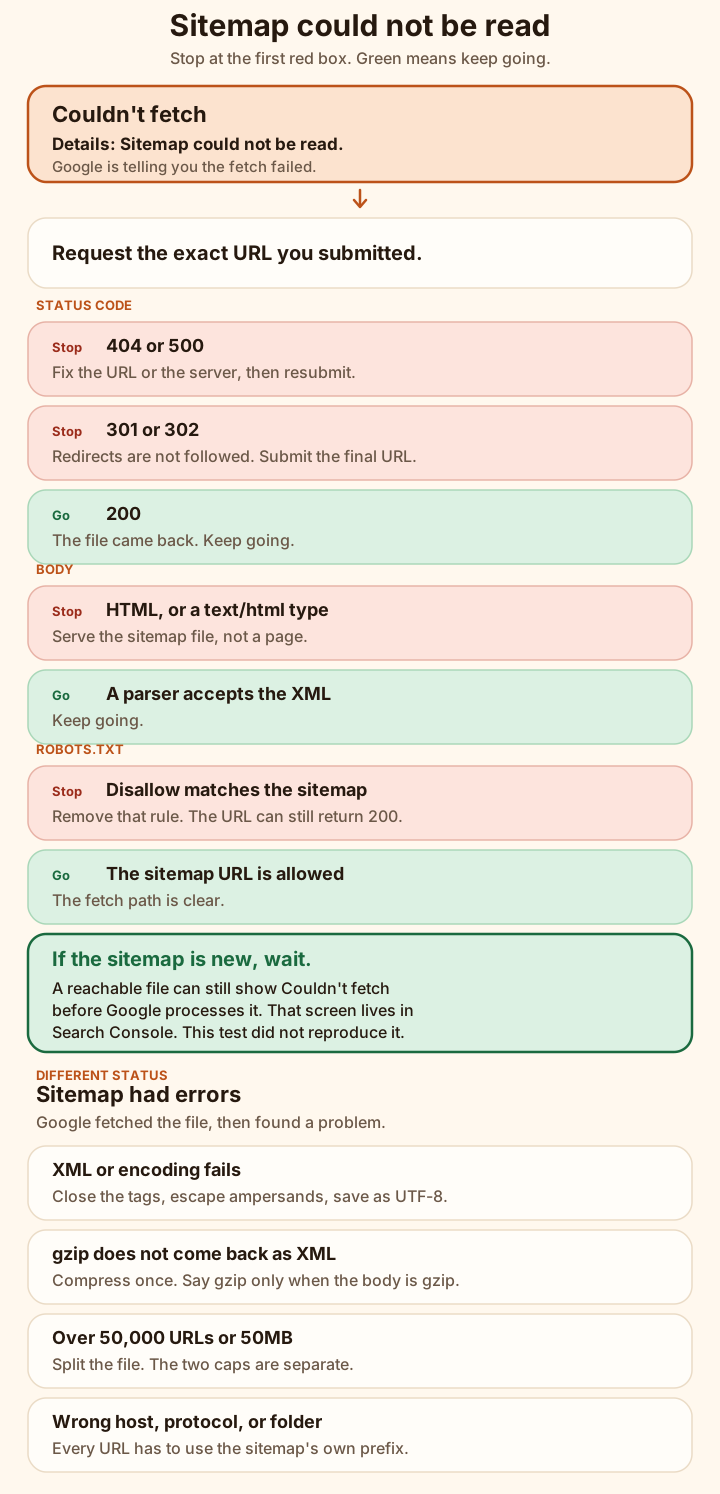
Work down this tree
Fetch failures are the red boxes. The green boxes are a file Google could get. The last four rows are the other status, Sitemap had errors. Same words people type into search. Different repair.
The steps below are that tree, with the responses from the test server.
Fix the cause you have
Nine checks. Stop at the first one that fails.
-
Request the exact URL you submitted.
Copy it from the report. Do not fix it up. The help page says the report shows the exact URL you submitted, and that a sitemap for
http://example.comdoes not appear on thehttpsproperty or thewwwproperty.On 24 Oct 2026 the good file was one URL, served at
http://127.0.0.1:8765/ok.xml.ok.xml <?xml version="1.0" encoding="UTF-8"?> <urlset xmlns="http://www.sitemaps.org/schemas/sitemap/0.9"> <url><loc>http://127.0.0.1:8765/page</loc></url> </urlset>curl -I http://127.0.0.1:8765/ok.xml HTTP/1.1 200 OK Content-Type: application/xml; charset=utf-8 Content-Length: 161 Date: Sat, 24 Oct 2026 12:16:14 GMT Connection: keep-alive Keep-Alive: timeout=5xmllint (libxml 2.9.14) exited 0 on the downloaded body. The same body validated against the sitemap schema on sitemaps.org:
/tmp/sitemap-lab/body-_ok.xml validates.That is the control. Every failure below was a change to this file, or to the way it was served.
-
Read the status code.
A 404 is the case the help page names outright: the URL is wrong, or the file is not there. I served
/gone.xmlas a missing sitemap, and/missing-child.xmlas a child of a sitemap index.curl -I http://127.0.0.1:8765/gone.xml HTTP/1.1 404 Not Found Content-Type: text/plain; charset=utf-8 Content-Length: 10 Date: Sat, 24 Oct 2026 12:16:14 GMT Connection: keep-alive Keep-Alive: timeout=5/missing-child.xmlreturned the same status line. The index that pointed at it did not./index.xmlreturned 200, and it validated against the sitemap index schema. The index can be fine while one child is a 404. Fix: make every child URL in the index return 200, or remove the dead row. The help page also lists an “HTTP error” that shows the status code, and says a general HTTP error can be a 404 too. I cannot tell you which of those labels a property would show.A dead server is the other fetch failure I could force.
/boom.xmlreturned 500. The help page files that under “some other general error,” with server unavailability as the example.curl -I http://127.0.0.1:8765/boom.xml HTTP/1.1 500 Internal Server Error Content-Type: text/plain; charset=utf-8 Content-Length: 12 Date: Sat, 24 Oct 2026 12:16:14 GMT Connection: keep-alive Keep-Alive: timeout=5Fix for a 404: submit the URL that exists. Fix for a 500: the server has to answer before the sitemap matters. Google retries for a few days, then stops. After the file stays up, resubmit.
-
Check that the body is a sitemap.
Two different files, same status code.
/html-type.xmlwas the good sitemap, byte for byte, 161 bytes. The only change was the header.curl -I http://127.0.0.1:8765/html-type.xml HTTP/1.1 200 OK Content-Type: text/html; charset=utf-8 Content-Length: 161 Date: Sat, 24 Oct 2026 12:16:14 GMT Connection: keep-alive Keep-Alive: timeout=5xmllint exited 0. The body is a sitemap. The header says it is a web page. Google’s error list does not mention Content-Type. I will not invent a Search Console label for this header. Serve
application/xmlortext/xmlanyway. Atext/htmlheader is how the next file arrives, and that one is not a sitemap./html-body.xmlwas an HTML page with a 200. This is the shape of a soft 404, a login wall, or a bot challenge. I served the HTML. I did not run a challenge page.curl -I http://127.0.0.1:8765/html-body.xml HTTP/1.1 200 OK Content-Type: text/html; charset=utf-8 Content-Length: 182 Date: Sat, 24 Oct 2026 12:16:14 GMT Connection: keep-alive Keep-Alive: timeout=5xmllint on the HTML body /tmp/sitemap-lab/body-_html-body.xml:3: parser error : Opening and ending tag mismatch: meta line 3 and headxmllint exited 1. If Google fetches this, the documented bucket is a file that is not a supported format, or a parsing error. Both of those are “had errors,” which means the fetch succeeded and the body was useless. Fix: the sitemap URL has to return the sitemap. Not your homepage, not an interstitial.
-
See whether robots.txt blocks that URL.
curl cannot see this. The file I disallowed was valid XML, and the server returned 200.
curl -I http://127.0.0.1:8765/secret-sitemap.xml HTTP/1.1 200 OK Content-Type: application/xml; charset=utf-8 Content-Length: 161 Date: Sat, 24 Oct 2026 12:16:14 GMT Connection: keep-alive Keep-Alive: timeout=5The robots.txt on the same server:
robots.txt User-agent: * Disallow: /secret-sitemap.xml Sitemap: http://127.0.0.1:8765/ok.xmlPython 3.12.3
urllib.robotparserread that file and answered:urllib.robotparser http://127.0.0.1:8765/secret-sitemap.xml can_fetch('*') = False http://127.0.0.1:8765/ok.xml can_fetch('*') = TrueGoogle’s help says it respects robots.txt when fetching sitemaps, and that you have to remove the rule. That is a Couldn’t fetch reason. A 200 from curl does not clear it.
Disallow: /blocks the sitemap along with everything else. A rule that only matches the sitemap path does the same to that one URL. -
Submit the URL after the redirect.
The report field for the sitemap URL says redirects are not followed. I served a 301 and a 302. Both pointed at
/ok.xml, the file that validated.curl -I http://127.0.0.1:8765/old.xml HTTP/1.1 301 Moved Permanently Content-Type: text/plain; charset=utf-8 Location: http://127.0.0.1:8765/ok.xml Content-Length: 6 Date: Sat, 24 Oct 2026 12:16:14 GMT Connection: keep-alive Keep-Alive: timeout=5curl -I http://127.0.0.1:8765/temp.xml HTTP/1.1 302 Found Content-Type: text/plain; charset=utf-8 Location: http://127.0.0.1:8765/ok.xml Content-Length: 6 Date: Sat, 24 Oct 2026 12:16:14 GMT Connection: keep-alive Keep-Alive: timeout=5curl -Idoes not follow the redirect, which is the request you want. Fix: submithttp://127.0.0.1:8765/ok.xml, the URL inLocation. Do not submit/old.xmland hope. If your host redirectshttptohttps, or the apex towww, the URL in the report has to be the one that returns 200. -
Validate the XML and the encoding.
These all returned 200 with an XML content type. The failure was in the bytes. They matter once a fetch has succeeded. On the help page they are parsing errors, under “Sitemap had errors,” not under Couldn’t fetch.
An unclosed urlset tag:
xmllint on the unclosed file /tmp/sitemap-lab/body-_broken.xml:6: parser error : Premature end of data in tag urlset line 2A raw
&in a URL, which XML treats as the start of an entity:xmllint on a raw ampersand /tmp/sitemap-lab/body-_amp.xml:3: parser error : EntityRef: expecting ';' <url><loc>http://127.0.0.1:8765/page?a=1&b=2</loc></url>A file declared as UTF-8 with the Latin-1 byte
0xE9in a comment. xmllint exited 1:xmllint on a non-UTF-8 byte /tmp/sitemap-lab/body-_latin1.xml:2: parser error : Input is not proper UTF-8, indicate encoding ! Bytes: 0xE9 0x20 0x2D 0x2DThe protocol says the file must be UTF-8. Fix: close the tag, escape the ampersand, and save the file as UTF-8. The corrected URL from that file is the same path with an XML entity in place of the raw ampersand:
escaped query string <loc>http://127.0.0.1:8765/page?a=1&b=2</loc>Two results that are easy to misread.
A file with no namespace was well-formed. xmllint’s well-formedness check exited 0. The sitemap schema did not:
xmllint schema check, no namespace /tmp/sitemap-lab/body-_nons.xml:2: element urlset: Schemas validity error : Element 'urlset': No matching global declaration available for the validation root. /tmp/sitemap-lab/body-_nons.xml fails to validateGoogle calls that an incorrect namespace. The namespace to put on a sitemap is
http://www.sitemaps.org/schemas/sitemap/0.9.A file that was the good sitemap with one blank line in front failed xmllint:
XML declaration allowed only at the start of the document. Google’s help says leading whitespace will not stop processing. Take the blank line out. Do not treat the xmllint error as proof that Google refused the file.One more encoding trap. The same
0xE9byte, with the declaration changed to ISO-8859-1, passed xmllint and passed Python’s XML parser. Python’s UTF-8 decoder still rejected it:'utf-8' codec can't decode byte 0xe9 in position 54: invalid continuation byte. A parser that trusts the declaration is not a UTF-8 check. The protocol requires UTF-8. Google’s error list does not give this declaration its own name. -
Decompress a gzip sitemap before you trust it.
The protocol lets you gzip a sitemap. The uncompressed file still has to be at most 50MB. Google’s name for a failed uncompress is “Compression error.” Five ways of serving the same good sitemap:
A gzip body with
Content-Encoding: gzip. The header at 12:16:14 UTC:curl -I http://127.0.0.1:8765/gzip-ok.xml HTTP/1.1 200 OK Content-Type: application/xml Content-Encoding: gzip Content-Length: 151 Date: Sat, 24 Oct 2026 12:16:14 GMT Connection: keep-alive Keep-Alive: timeout=5The raw body started with the bytes
1f8b0800.filesaidgzip compressed data, from Unix, original size modulo 2^32 161. Python’s ElementTree, which does not decompress, saidnot well-formed (invalid token): line 1, column 0. Aftercurlwas told to honor content encoding,filesaidXML 1.0 document, ASCII text, and both xmllint and ElementTree accepted it. That is the working form.The same gzip bytes with no
Content-Encoding.curlleft them compressed. ElementTree failed the same way.gzip -tpassed, so the gzip itself was valid. A client that believesContent-Type: application/xmland does not sniff gzip never sees a sitemap. xmllint exited 0 on those bytes anyway, because this libxml is built with zlib and sniffs gzip. A clean xmllint run is not proof the response is XML.A plain XML body with
Content-Encoding: gzip. The header said gzip.filesaidXML 1.0 document, ASCII text.gzip -tprintedgzip: /tmp/sitemap-lab/gz-_gzip-lie.xml: not in gzip formatand exited 1. At 12:17:00 UTC I sent that same body and header again so the error text was not hidden:curl honoring a false gzip header curl: (61) Error while processing content unencoding: incorrect header checkcurl exited 61. Fix: if the body is XML, do not send
Content-Encoding: gzip. If the body is gzip, send that header, or serve a.gzfile and document it.Gzip of gzip, with one
Content-Encoding: gzip. One decompress left a body thatfilestill called gzip, magic1f8b0800, and ElementTree rejected it. A second decompress produced XML that xmllint accepted. One pass was not enough.A
.gzfile served asContent-Type: application/gzipand no content encoding stayed gzip under curl. Same 151 byte payload as the working file. Gunzip it, then parse it. Do not point a parser at the compressed bytes and call the exit code a verdict, unless you know that parser sniffs gzip. -
Split a file past 50,000 URLs or 50MB.
The protocol caps one sitemap at 50,000 URLs and 50MB, which it defines as 52,428,800 bytes. Google’s help repeats both caps: “Too many URLs,” and “Sitemap file size error” for a file larger than 50MB uncompressed. They are separate. I hit each one on its own, and both files were well-formed.
/too-many.xmlhad 50,001locentries and was 2,700,164 bytes. Under the byte cap. Over the URL cap. xmllint exited 0 in 44ms.curl -I http://127.0.0.1:8765/too-many.xml HTTP/1.1 200 OK Content-Type: application/xml; charset=utf-8 Content-Length: 2700164 Date: Sat, 24 Oct 2026 12:16:14 GMT Connection: keep-alive Keep-Alive: timeout=5/too-big.xmlhad 29,926 URLs. The first URL was 1,727 characters, under the protocol’s 2,048 character limit, so the size was not a side effect of an illegal URL. The file was 52,430,462 bytes. That is 1,662 bytes over 52,428,800. xmllint exited 0 in 112ms.curl -I http://127.0.0.1:8765/too-big.xml HTTP/1.1 200 OK Content-Type: application/xml; charset=utf-8 Content-Length: 52430462 Date: Sat, 24 Oct 2026 12:16:14 GMT Connection: keep-alive Keep-Alive: timeout=5Fix: split into more than one sitemap and list them in a sitemap index. An index has the same two caps, applied to the child sitemaps rather than the page URLs. Gzip does not raise the cap. The limit is the uncompressed size.
-
Make every URL use the sitemap host and protocol.
/wrong-urls.xmlwas well-formed. xmllint exited 0. The schema’s only complaint was the relative URL/page, because alocunder 12 characters failsminLength. It did not mention the other bad URLs.The protocol rule is stricter than that schema check. A sitemap may only list URLs that use its protocol and host, and that start with its directory. If the sitemap is on a port, every URL needs that port. I checked the downloaded file against that rule:
location check for /wrong-urls.xml sitemap http://127.0.0.1:8765/wrong-urls.xml required prefix http://127.0.0.1:8765/ DROP https://127.0.0.1:8765/page :: protocol https: != http:; does not start with http://127.0.0.1:8765/ DROP http://example.com/page :: host example.com != 127.0.0.1:8765; does not start with http://127.0.0.1:8765/ DROP http://127.0.0.1:9999/page :: host 127.0.0.1:9999 != 127.0.0.1:8765; does not start with http://127.0.0.1:8765/ DROP /page :: not an absolute URL KEEP http://127.0.0.1:8765/pageA second file lived at
/catalog/sitemap.xml. Same check:location check for /catalog/sitemap.xml sitemap http://127.0.0.1:8765/catalog/sitemap.xml required prefix http://127.0.0.1:8765/catalog/ KEEP http://127.0.0.1:8765/catalog/show DROP http://127.0.0.1:8765/images/a :: does not start with http://127.0.0.1:8765/catalog/The URL under
/catalog/was kept. The images URL was dropped. That is the protocol’s own example, a sibling folder.Google’s names, once it has fetched the file, are “URL not allowed” and the www / protocol path-mismatch errors.
httpson anhttpsitemap is the example they give. There is a separate, documented way to list URLs from other verified sites. I did not submit a cross-site sitemap, and a normal file does not get that exception.Fix: every
locuses the same scheme, host, and port as the sitemap URL, and sits in that directory or below it. Put the final URL in the sitemap, not a redirect and not a relative path.
What we tested
Checked
One HTTP server on 127.0.0.1 port 8765, requested at 12:16:14 UTC. curl 8.5.0 for the headers. xmllint from libxml 2.9.14 for well-formedness, and the sitemaps.org schemas for the two files that should validate. Python 3.12.3 for UTF-8 checks, ElementTree, and urllib.robotparser. The false gzip error text is from a second request at 12:17:00 UTC with the same body and header. No Search Console property, so no status label from Google’s own screen.
| Fault | What came back | Fix |
|---|---|---|
| Good sitemap | 200, application/xml, schema valid | None. This is the control. |
| XML with a text/html type | 200, text/html, xmllint passed | Serve an XML type. Google does not name this header. |
| HTML page | 200, text/html, xmllint failed | Return the sitemap file. |
| robots.txt Disallow | HTTP 200, robotparser refused it | Remove the rule. |
| 301 and 302 | Location was the good file | Submit the final URL. |
| 404 and 500 | 404 Not Found, 500 Internal Server Error | Fix the URL or the server, then resubmit. |
| Bad XML or encoding | Unclosed tag, raw ampersand, and a non-UTF-8 byte each failed xmllint | Close tags, escape ampersands, save as UTF-8. |
| gzip mistakes | False gzip made curl exit 61. Double gzip was still gzip after one pass. | Compress once, and only say gzip when the body is gzip. |
| 50,001 URLs | 2,700,164 bytes, xmllint passed in 44ms | Split. Under 50MB, over the URL cap. |
| 52,430,462 bytes | 29,926 URLs, xmllint passed in 112ms | Split. 1,662 bytes over 52,428,800. |
| Wrong host or protocol | Well-formed. Schema only rejected /page for length. | Use the sitemap’s own prefix. |
| Index child 404 | Index validated. Child returned 404. | Point the index at files that return 200. |
When the file is already fine
If the URL returns 200, the body parses, robots.txt allows it, and the URL does not redirect, you have done the checks this test can settle. A new sitemap can still say Couldn’t fetch. The help page tells you the fetch should be immediate and also tells you to wait through a temporary error. The community post says the label often means Google has not fetched it yet, and that a real failure comes with a specific error once Google tries. I cannot show you that screen. I can show you that a clean file is not the same thing as a Success row.
Give it a few days. If it is still Couldn’t fetch and the file is unchanged, resubmit after you have confirmed the live URL. Google stops retrying a sitemap that keeps failing. Resubmitting is how you ask again.
Success is not indexing. A sitemap that reads Success is a list of URLs. How to get a new website indexed by Google is what to do after that, with the other SEO guides. A page Google fetched and then chose not to store is a different report: Crawled, currently not indexed.
If you would rather ask than click around Search Console, ContextBolt SEO, which we make, can check a page’s index status from inside Claude. Add the MCP server to Claude Code first, then ask.
How to get a new website indexed by Google The sitemap is one step. Here is the order for a new domain, and what the Pages report means after Google can fetch the file. Guide Add an MCP server to Claude Code One local stdio server and one remote HTTP server, added with claude mcp add, plus the three scopes and the errors from a real run. GuideFAQ
What does sitemap could not be read mean?
On the sitemap details page, that line means the fetch failed. Google’s Sitemaps report help says so directly. It does not mean Google parsed your XML and rejected a tag.
Is Couldn’t fetch the same error?
It is the same failure, one level up. The main Sitemaps report says Couldn’t fetch. Open the row and the details page says Sitemap could not be read. A file Google did fetch, with problems inside it, is a different status: Sitemap had errors.
Why does a new sitemap say Couldn’t fetch when the file is fine?
The help page says a sitemap should be fetched immediately, and that some fetch errors are temporary. It also says submitting a sitemap does not guarantee Google will download it. On Google’s own community forum, the long-standing explanation is that a new sitemap can show Couldn’t fetch, and Sitemap could not be read, until Google processes it. That screen lives inside a verified property. The test server below could not reproduce it.
Should I fix the XML first?
No. Request the exact URL and read the status code, the body, robots.txt, and any redirect. Broken XML matters after a fetch. If Google never got the file, a cleaner sitemap does not change the status.
Will fixing the sitemap get my pages indexed?
No. A sitemap that reads Success tells Google which URLs exist. Google’s build-a-sitemap guide says that is a hint, not a promise to index them. Indexing is a separate job, covered in How to get a new website indexed by Google.