
The price of the subscriptions you still have, rewritten as one month. What goes in, what stays out, and a worksheet you can copy.
On this page
The short answer
MRR is the monthly price of subscriptions that are active or past due. Divide an annual price by 12, use the price after a discount that repeats, and leave out trials, taxes, one-off fees, and usage charges. Ending MRR equals starting MRR plus new and expansion, minus contraction and churn.
Before you start
You need a list of subscriptions, not a bank export. Cash collected this month and MRR are different numbers, and the rest of this guide is about telling them apart.
- Every subscription, with its status: active, past due, trialing, unpaid, or canceled
- The price the customer pays, and whether any discount is still on the plan next month
- One currency you will report MRR in
If the product site is new and Google has not indexed it yet, that is a different job. How to get a new website indexed by Google is the order to do that in.
Steps
Six steps. Do them in order. The worksheet further down uses one rule when a dashboard disagrees with the bank: Stripe’s published definition, written out so you can do it by hand.
-
List every subscription that still counts.
Keep a subscription if it is active, or if a renewal failed and it is still past due. Drop trials, canceled subscriptions, and anything marked unpaid.
Stripe Billing analytics defines MRR as the monthly-normalized value of
activeandpast_duesubscriptions. A subscription stops counting when it is canceled or markedunpaid. Stripe’s revenue.mrr metric is the same pair of statuses: active and past due.A failed payment does not, by itself, remove the line. The status does. While it is past due, the monthly price stays in MRR and the cash column stays at zero. When the status flips to unpaid, that monthly price moves to churn.
-
Turn each price into one month.
A monthly price goes in as it is. Divide a yearly price by 12, and count that twelfth every month of the year, including the months when the card is not charged. Stripe calls this the monthly-normalized value. A quarterly plan covers three months, so this worksheet divides that price by 3.
Stripe’s docs walk through it with their own figures, not ours: 100 subscribers on a $100 monthly plan and 50 on a $600 yearly plan. That is (100 × 100) + (50 × (600 / 12)) = $12,500.
Paddle’s help center does the same job for an annual charge. Divide the invoice by the plan length, then divide by 12. A weekly plan there is the charge divided by the length, times 4.33. A daily plan uses 30. For a normal monthly or yearly SaaS plan, you only need the divide-by-12 rule.
Booking the whole $240 in January, and then zero for the other eleven months, is cash. It is not MRR.
-
Use the price after a repeating discount.
If a $20 plan is $15 because $5 comes off every renewal, the line is $15. The $20 price is a list price. MRR is what you expect to collect again.
Stripe always subtracts permanent recurring discounts. Two switches on the Billing overview, under Configure, also let you subtract other recurring discounts and one-time discounts. Stripe calls subtracting them the more conservative reading, because the number sits closer to what those customers are worth now. The switches apply to subscription coupons, line-item coupons, and stacked coupons. A change takes 24 to 48 hours to show in the charts.
Lemon Squeezy’s May 2025 MRR update subtracts percentage discounts that apply forever, whether the discount is the whole price or part of it. The charts also draw a second line with those discounts put back, so you can see what the discounts cost you. Stores that already had an MRR chart may still be on the older “Cumulative MRR” line, which updates in real time. New stores get the daily snapshot. Look at which title is on your chart before you compare it with this worksheet.
Paddle’s help center ignores a one-time coupon and uses the underlying price. A discount that repeats is factored in.
The worksheet follows the repeating-discount rule. A coupon that applied to one invoice, and is gone next month, does not change next month’s MRR. This month, if that coupon is on this month’s recurring charge, use the net price for this month only.
-
Leave out trials, tax, one-off fees, and usage.
A trial has not been paid. Leave it out until the paid period starts.
On Stripe, an item-level trial comes out of MRR item by item. Other items on the same subscription still count. An older trial, the kind set with
trial_endon the whole subscription, takes the entire subscription out until it converts. Free plans are out too. So are metered, usage-based products. Usage revenue is a separate Stripe metric, and it is not added into MRR.Stripe’s MRR also excludes any tax applied to the subscription.
Paddle’s help center leaves out free trials, one-time payments, and metered charges. Paddle Billing’s MRR endpoint says the total includes new subscriptions, upgrades, downgrades, and churn, and that it does not include one-time payments or a deduction for Paddle fees.
A setup fee is a one-time charge. It can be a large deposit and still be $0 of MRR. Put it in the cash column and leave the MRR column blank.
A refund is cash going back. Stripe’s definition follows the subscription, not the refund. Canceling the subscription, or marking it unpaid, is what removes the MRR. Refunding an invoice while the subscription stays active does not, on that definition, take the monthly price out. Paddle’s Explore page lists refunds as their own metric, next to MRR, not inside it. Paddle’s revenue metric is before refunds. Do not subtract a refund from MRR a second time if you already removed the subscription.
-
Add it up in one currency.
Pick the currency you will say out loud. Convert every other price once, write the rate next to the row, and add the converted monthly amount. Do not also add the original euros or pounds.
Stripe’s MRR growth figure has a foreign-exchange line for this. Their example: a plan worth $100 last period is worth $95 this period because the other currency moved. That $5 is an FX adjustment, not churn and not contraction. Stripe also says product filters on some billing charts are unavailable when you process more than one currency, so do not expect the dashboard to slice a mixed-currency account the way a single-currency one slices.
Paddle Billing returns the MRR series in your primary balance currency, converted with the exchange rate at the time of each transaction. If your primary currency changes, amounts stay in the old currency until the next payout period. You do not pick a fresh rate every month for an old subscription.
Lemon Squeezy’s customer object reports
mrras an integer number of cents, in USD. A multi-currency store still gets a dollar figure there. The docs do not publish the rate rule, so treat that field as their dollar answer and keep your own rate written down if you rebuild the number by hand.Here is the worksheet’s rule, labeled as an example rate and not a market quote. One more customer pays €18 a month, and the rate you write on the row is €1 = $1.10. That customer adds $19.80. They are not part of the $1,105 ledger in the worked example below. If you later change the rate, the difference is an FX line. It is not a new customer, and it is not churn.
-
Split the change since last month.
Ending MRR = starting MRR + new + expansion, minus contraction, minus churn.
New is someone paying you for the first time. Expansion is an upgrade from someone who already pays. Contraction is a downgrade. Churn is a cancellation, and on Stripe it is also a subscription marked unpaid.
Stripe’s growth figure adds reactivation as well, and the FX adjustment from the step above. Paddle describes MRR growth as new, expansion, and reactivation, minus contraction and churn. A customer who left and came back is reactivation, not new. The worksheet folds a return into new if you do not track reactivation yet. Write that choice down, and do not switch it next month.
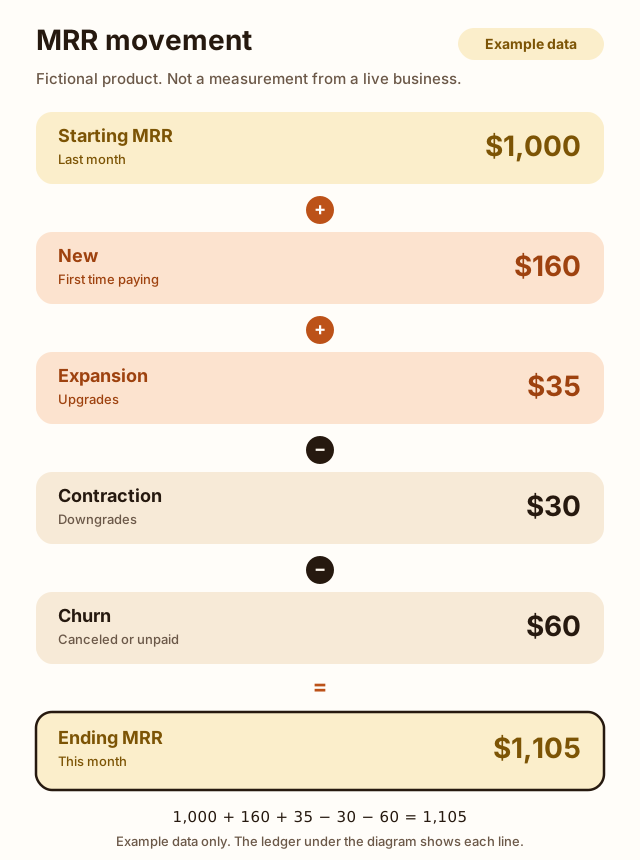
The picture in the next section is that formula with example numbers. The ledger after it is where each number comes from.
The movement
Ending MRR is a stock. The movement is how the stock changed. Both have to land on the same number, or a row is missing.
1,000 + 160 + 35 − 30 − 60 = 1,105. The next section is the customer list behind those five figures. Every figure in it is example data, chosen so the arithmetic can be checked. None of it is a company we run, and none of it was measured.
A worked example
Call the product Lumen Inbox. It is fictional. Customers A to E are labels, so a row can be followed from September into October. They are not real people. The snapshot dates, 30 September and 31 October, are part of the example too.
September’s MRR is $1,000.
| Line | Customers | Monthly each | MRR |
|---|---|---|---|
| Full price | 25 | $20 | $500 |
| Discount, $5 off every month | 6 | $15 | $90 |
| Annual, $240 a year | 8 | $20 | $160 |
| Team | 3 | $50 | $150 |
| Past due, still retrying | 5 | $20 | $100 |
500 + 90 + 160 + 150 + 100 = 1,000.
Four things happen in October. Each one is example data.
- New, $160. Six people start the $20 monthly plan (6 × 20 = 120). Two people start the annual plan (2 × 20 = 40).
- Expansion, $35. Customer A moves from the $15 discounted plan to the $50 team plan. 50 − 15 = 35.
- Contraction, $30. Customer B moves from the $50 team plan back to the $20 plan. 50 − 20 = 30.
- Churn, $60. Customer C cancels a $20 monthly plan, and that $20 charge is refunded. Customer D’s $20 plan goes from past due to unpaid, so it leaves MRR. Customer E cancels an annual plan, which removes its $20 monthly equivalent. 20 + 20 + 20 = 60.
1,000 + 160 + 35 − 30 − 60 = 1,105.
October’s ledger is the stock you would report on the 31st.
| Line | Customers | MRR | Cash in October |
|---|---|---|---|
| Full price, $20 | 31 | $620 | $620 |
| Discount repeats, net $15 | 5 | $75 | $75 |
| Annual, billed in January | 7 | $140 | $0 |
| Annual, new this month | 2 | $40 | $480 |
| Team, $50 | 3 | $150 | $150 |
| Past due, still retrying | 4 | $80 | $0 |
620 + 75 + 140 + 40 + 150 + 80 = 1,105 of MRR.
The annual rows are the September 8, plus 2 new, minus Customer E: 9 plans, $180 of MRR. Seven of them were charged in January, so October cash from those seven is $0. The two new ones pay $240 each in October, which is $480 of cash and $40 of MRR. That gap is the whole point of dividing by 12.
Cash from the subscriptions is 620 + 75 + 0 + 480 + 150 + 0 = 1,325.
Three more October items never enter the $1,105:
- Trials. Two people are on a trial. Nothing has been charged. MRR $0, cash $0.
- Setup fees. Six customers pay a $100 setup fee. That is $600 of cash and $0 of MRR.
- Sales tax. $86 is collected on top of the prices above. Stripe excludes tax from MRR, and this worksheet does too. The $86 is cash, if your provider is collecting it for you.
Customer C’s $20 refund is cash leaving. It is already inside the $60 of churn, because the subscription was canceled. Do not subtract $20 from MRR again.
1,325 + 600 + 86 − 20 = 1,991 of example cash. MRR for the same month is $1,105. In this example the two should not match. On a real sheet they match only when every plan is monthly, nothing is past due, and there is no tax, setup fee, annual prepay, or refund. The October full-price row is 31 customers, not 25 + 6: Customer B joined it by downgrading, and Customer C left it.
The four past-due customers are the check on failed payments. Their $80 is inside the $1,105. Their cash is $0. Customer D is the one who did not stay past due: once the subscription is unpaid, the $20 is churn, not a line in October.
Copy the worksheet
The sheet has two jobs. stock and exclude are the subscriptions you have today. movement is the bridge from last month. The notes column marks every filled row as example data. Replace the rows. Do not add the example on top of your own customers.
section,line,customers,amount,period,counts_toward_mrr,monthly_amount,notes
stock,"Full price monthly",31,20,month,yes,620,"Example data for a fictional product. Replace these rows with your own."
stock,"Discount repeats",5,15,month,yes,75,"Example data. Amount is the net price after the discount."
stock,"Annual, billed earlier",7,240,year,yes,140,"Example data. Monthly amount is customers times amount divided by 12."
stock,"Annual, new this month",2,240,year,yes,40,"Example data. Cash this month is 480. MRR is 40."
stock,"Team monthly",3,50,month,yes,150,"Example data."
stock,"Past due, still retrying",4,20,month,yes,80,"Example data. Counted while past due. Cash this month is 0."
exclude,Trials,2,0,month,no,0,"Example data. Leave trials out."
exclude,"Setup fees",6,100,once,no,0,"Example data. 600 of cash, 0 of MRR."
exclude,"Sales tax collected",1,86,tax,no,0,"Example data. Tax stays out of MRR."
movement,starting_mrr,,,,,1000,"Example data. Prior month."
movement,new,,,,,160,"Example data. 6 times 20, plus 2 times 20."
movement,expansion,,,,,35,"Example data. One customer from 15 to 50."
movement,contraction,,,,,30,"Example data. One customer from 50 to 20."
movement,churn,,,,,60,"Example data. Three lines at 20 each, canceled or unpaid."
movement,ending_mrr,,,,,1105,"Example data. 1000 + 160 + 35 - 30 - 60."
monthly_amount is the MRR for that row. For a yearly row it is customers times the yearly amount, divided by 12. A row with counts_toward_mrr set to no contributes 0, whatever the cash was.
The form uses the same October lines. It adds the 7 older annual plans and the 2 new ones together, because both are $20 of MRR. It will not reproduce the $1,991 cash figure. That difference is intentional.
What the dashboards count
Calculate it once by hand. Then open the dashboard and see which of its switches disagree with the sheet. The first month is for finding those switches. After that, change the sheet or the switches, and stop changing both.
Stripe
Stripe’s number will match this worksheet if the discount switches are on and you are not mixing in usage revenue. Past-due subscriptions still count. Unpaid and canceled do not. Tax is already out. Stripe also lets you decide when a subscriber counts as active: when the subscription starts, which it calls the common choice, or only after the first payment arrives. Use the second if you do not want an unpaid first invoice treated as an active subscriber. That switch sits with the MRR settings. The customer MRR changes report is the log of new subscribers, upgrades, downgrades, reactivations, and churn, which is the movement in the diagram, one customer at a time.
Report dates in the downloadable files are UTC. The charts use your account’s time zone. A month can fail to match by a day for that reason alone. It is not a missing customer.
Lemon Squeezy
Subscription statuses are On trial, Active, Paused, Past due, Unpaid, Cancelled, and Expired. Past due means a renewal failed and Lemon Squeezy is retrying it. Unpaid means the retries failed. Their May 2025 MRR post does not say which of those statuses the chart includes. It does say a subscription set to cancel in the future now stays in MRR until it actually ends. The older chart left those out. It also says stores that mix trials and active subscriptions are one of the cases the new chart was built for. It does not say the trial itself is valued at zero.
So the worksheet’s trial rule is Stripe’s and Paddle’s, applied here as our rule, not a quote from Lemon Squeezy. Check the first trial that converts and see whether your chart moves on the conversion day or on the day the trial started. Write down what you see. Paused is its own status, and the MRR post does not define it. Use the same choice for a paused plan next month that the chart used this month.
The customer mrr field is cents, in USD. $19.99 is the integer 1999. That 1999 is the shape of the field in their API docs, not a customer of ours.
Paddle
Two Paddle pages are both still up, and they do not describe fees the same way. The help center says tax and Paddle’s fees are considered in the MRR calculation, and that foreign-currency subscriptions are converted to your primary currency at current exchange rates. The Billing metrics API says the MRR total does not deduct Paddle fees, skips one-time payments, and converts at the exchange rate on each transaction into the primary balance currency. MRR for the day, on the help center page, is calculated at 6am UTC.
Trust the screen you actually use. If the help center total and the Billing total disagree, write down which one the worksheet is tied to. Do not average them.
Paddle’s movement words match the diagram: churn deducts, expansion adds the upgrade, contraction subtracts the downgrade. One-time payments and metered charges stay out. A free trial stays out. A one-time coupon stays off the price, and a repeating discount comes off it.
More money notes for a one-person SaaS sit on Money and ops.
How to get a new website indexed by Google Before anyone can pay you, Google has to find the site. Search Console, the sitemap, and what each indexing status means. GuideFAQ
How do you calculate MRR?
Add the monthly price of every subscription that is active or past due. Divide a yearly price by 12 before you add it. Stripe Billing analytics defines MRR as that monthly-normalized sum. In Stripe’s own example, 100 subscribers at $100 a month and 50 at $600 a year come to $12,500.
Do annual plans count toward MRR?
Yes. Divide the yearly price by 12 and include that amount every month of the term, including months when the card is not charged. Paddle’s help center divides an annual charge by the plan length and then by 12.
Should free trials be included in MRR?
No. Stripe excludes subscription items that are still on a trial, and a trial set with trial_end excludes the whole subscription until it converts. Paddle’s help center does not count free trials. Add the subscription when the paid period starts.
Do discounts reduce MRR?
Subtract a discount that keeps repeating. Stripe always removes permanent recurring discounts, and you can also subtract other recurring discounts and one-time discounts. Lemon Squeezy’s May 2025 MRR charts subtract recurring discounts that apply forever.
Does a failed payment lower MRR?
Not while the subscription is only past due. Stripe includes past_due subscriptions in MRR and drops them when the subscription is canceled or marked unpaid. The failed charge still shows up as missing cash.
Are taxes, refunds, and setup fees part of MRR?
Not on this worksheet, and not in Stripe’s MRR, which excludes taxes and metered usage. A setup fee is a one-time charge, so it stays out. A refund changes MRR when you cancel the subscription, not merely because the money went back. Paddle’s metrics API leaves one-time payments out of MRR and does not deduct Paddle fees from that total.
Sources
- Monthly recurring revenue (Stripe Billing analytics) Checked
- Supported metrics: revenue.mrr (Stripe) Checked
- Fresh MRR/ARR calculations (Lemon Squeezy) Checked
- The Customer object: mrr (Lemon Squeezy API) Checked
- Subscriptions (Lemon Squeezy docs) Checked
- What is monthly recurring revenue? (Paddle Help) Checked
- How is monthly recurring revenue calculated? (Paddle Help) Checked
- Get MRR metrics (Paddle API) Checked
- Explore your account data and metrics (Paddle) Checked