
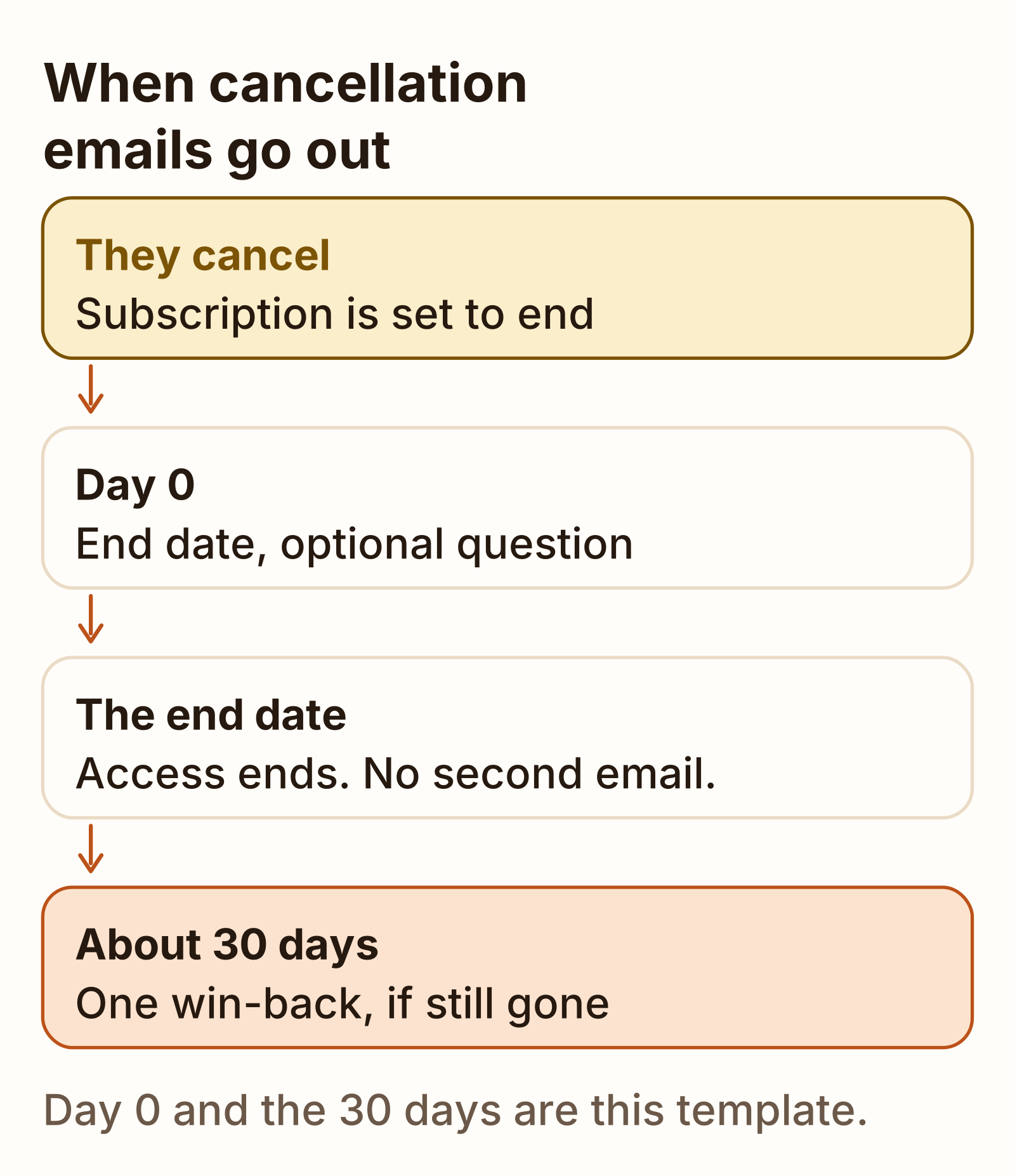
A confirmation the moment they cancel, one optional question, and a win-back about 30 days later.
On this page
The short answer
A cancellation email for a SaaS subscription goes out the moment they cancel: name the product, the date access ends, a data export link, and how to come back. An optional acknowledgment asks one reason, and one win-back goes out about 30 days later. Skip a second confirmation when Stripe’s cancellation email is already on. Lemon Squeezy’s docs describe no cancellation email on cancel, so this confirmation is the one you send.
A cancellation is the churn line on the SaaS metrics sheet: the subscription is gone, and its monthly price leaves with it. The copy below is for that moment. A failed card is a different note.
The cancellation email template
This cancellation email template is the confirmation. Send it the moment the customer cancels a subscription. It names the product, the date access ends, where they export their data, and how to come back. It says they will not be charged again.
The words are this template. Stripe’s pages and Lemon Squeezy’s pages do not print this subject or this body. Replace {first_name}, {product}, {end_date}, {export_url}, and {return_url} before you send. Both links have to work when they click. Point {export_url} and {return_url} at a page you control.
{end_date} is the day access actually ends, not the day they clicked. If the subscription runs until the end of the period they already paid, that period end is the date. If access stops immediately, the date is today.
Download the cancellation email templates (plain text)
The same file is on Templates.
Subject: {product} is canceled. Access ends {end_date}

Hi {first_name},

Your {product} subscription is canceled. You will not be charged again.

Access ends on {end_date}. Until that date, {product} works as it does today.

Export your data: {export_url}

To come back: {return_url}The acknowledgment and exit-survey template
The acknowledgment is optional. It says the cancellation is already confirmed, repeats the end date, and asks one question. It is not a second copy of email 1. Skip it when the cancellation email you already send includes a reason survey.
Subject: One question about your {product} cancellation

Hi {first_name},

Your {product} cancellation is confirmed. Access ends on {end_date}.

Why did you cancel? Reply with one number:

1. Too expensive
2. Missing a feature
3. Not using it
4. Switching to something else
5. Something else
The five answers are this template. They are not a rate, and they are not Stripe’s portal list. Stripe’s cancellation page, checked November 17, 2026, can collect a reason inside the customer portal after the customer cancels. The reasons on that page are price, missing features, an alternative, no longer needing it, customer service, ease of use, quality, and other. That collection is a form in the portal. It is not this email. If that option is on, or if Stripe’s cancellation email already includes a survey link, do not send email 2 on top.
The win-back template
One win-back, about 30 days after they canceled, and only if they have not come back. The 30 days are this template. None of the pages checked names a 30-day email.
Subject: {product} is here if you want it back

Hi {first_name},

You canceled {product} on {cancel_date}. Access ended on {end_date}.

If you want it back, start again here: {return_url}

Nothing is charged until you do.
{cancel_date} is the day they canceled. {end_date} is the day access ended, which may be the same day. {return_url} is the same page you used in the confirmation, and it still has to work.
Stripe’s cancellation page says the portal can offer a retention coupon while the customer is canceling. The page does not name an amount, and it does not describe an email 30 days later. A coupon at the moment of cancel is that portal setting. Email 3 is the later note, and only if they left.
Subject lines for cancellation emails
Each subject states the fact. The confirmation says the product is canceled and names the end date. The acknowledgment asks the one question. The win-back says the product is there if they want it back, which is an offer, not a claim that they have returned.
| Subject | |
|---|---|
| 1. Confirmation | {product} is canceled. Access ends {end_date} |
| 2. Acknowledgment | One question about your {product} cancellation |
| 3. Win-back | {product} is here if you want it back |
A subject line for a cancellation email to a customer is the first row, once {product} and {end_date} are real. Do not use that subject for a failed card. A card that did not go through is a dunning email. Do not use it for a price change either. That sequence is a price increase email template.
What Stripe and Lemon Squeezy already send
Read this table before you send email 1. If Stripe is already emailing a cancellation confirmation, a second one from you is the same fact twice. On the Lemon Squeezy pages checked November 17, 2026, no cancellation confirmation is described, so email 1 is the note you send.
Stripe’s send-email page, checked November 17, 2026, lists “Upon cancellation of subscription” among the notifications you can configure. The path is Settings, then Billing, then Subscriptions and emails. You select the notifications to send. The page does not say a new account has the cancellation notification selected, and it does not print a subject or a body. The same page says billing emails can include a link to the Stripe-hosted customer portal or to a URL you supply, and that you turn on Subscription management if those emails should carry a manage-subscription link.
Stripe’s automations page, checked the same day, is a recipe you create, not a switch the page says is already on. The trigger is “Subscription is canceled.” The action is “Send subscription cancellation email.” Stripe provides a predefined template. The email includes the subscription details and confirms the cancellation date. You can include a link to a cancellation reason survey. If that survey link is included, skip email 2.
Stripe’s customer emails page logs “Canceled subscriptions” among email types from the last 60 days. A log line is not the same as a new account sending the email. The configure list on that page names failed payments, trial endings, renewals, expiring cards, and payment confirmations. It does not add a separate “on by default” sentence for cancellation.
Stripe’s cancel guide does not describe a customer email. It does say that canceling a subscription sets auto_advance to false on that subscription’s open and draft invoices, which prevents automatic reminder emails. That is Stripe stopping invoice reminders. It is not a confirmation. The API default is an immediate cancel. Set cancel_at_period_end to true and the subscription runs through the period they already paid. You can undo that scheduled cancel until the period ends. A subscription that is already canceled is not reactivated. You create a new one. The events are customer.subscription.updated when cancel_at_period_end is set, and customer.subscription.deleted when the subscription is canceled.
Lemon Squeezy’s subscriptions page, checked November 17, 2026, says a cancelled subscription (their spelling) stays valid until the end of the current billing period, and that customers should keep access in every status except expired. The managing subscriptions guide says a mid-period cancel enters a grace period until ends_at, the customer should keep access until that date, and you can resume during the grace period by setting cancelled to false. When ends_at passes without a resume, the status becomes expired, access should end, and the subscription cannot be resumed. Neither page describes an email.
The webhook event types page says subscription_cancelled fires when the customer or the store owner cancels, the subscription stays in a grace period until the next billing date, and it can be resumed in that window. subscription_expired fires when a cancelled subscription reaches ends_at. The page sends those events to your app. It does not say Lemon Squeezy emails the customer.
The Zapier page uses “when a subscription is cancelled, send a follow-up email to the customer” as an example of a trigger plus an action you build. That follow-up is yours. The recovery page does describe emails, and they are the other job: a renewal reminder seven days before renewal, an email each time a payment fails, and dunning emails once the status is unpaid. A failed payment is not this template.
| Question | Stripe | Lemon Squeezy |
|---|---|---|
| Cancellation confirmation email | Only if you select it under Settings, Billing, Subscriptions and emails, or you create the “Subscription is canceled” automation. The automation template includes the subscription details and the cancellation date. Subject and body are not printed. The pages do not say a new account has either one on. | No cancellation email is described on the subscriptions, managing-subscriptions, webhook, or recovery pages. The Zapier example is a follow-up you send. |
| Reason survey | Optional link on the automation email. The customer portal can also collect a reason in the product. Both are settings you turn on. | Not described on the pages checked. |
| Access after a manual cancel | Immediate by default. cancel_at_period_end keeps the paid period. A scheduled cancel can be undone. An already canceled subscription is not reactivated. | Grace period until ends_at. Access should continue until then. Expired ends access, and that subscription cannot be resumed. |
| What you can listen for | customer.subscription.updated when cancel_at_period_end is set. customer.subscription.deleted when the subscription is canceled. | subscription_cancelled on the cancel. subscription_expired when ends_at is reached. |
| Win-back email | Not described. The portal can offer a retention coupon at cancel time. No amount is printed. | Not described. The Zapier follow-up is an action you add. |
| What you still write | Email 1, unless the setting or the automation is already on. Email 2, unless a survey is already included. Email 3 is not in the docs. | Email 1, because no cancellation confirmation is described. Email 2 if you want the reason. Email 3 is not in the docs. |
When to send each email
Email 1 goes out the moment the cancel is real. Email 2 goes out the same day, and only if you still need the one question. Email 3 goes out about 30 days later, and only if they have not subscribed again. Do not send email 1 again on {end_date}. The confirmation already named that date.
| When | Skip it when | |
|---|---|---|
| 1. Confirmation | The moment they cancel | Stripe’s cancellation email is already on |
| 2. Acknowledgment | The same day, if you still need the reason | A survey is already in Stripe’s email or in the portal |
| 3. Win-back | About 30 days later | They have subscribed again |
If they email you to cancel, the reply is email 1, after the subscription record matches the date you are about to type. How to respond to a cancellation email is that same note: end date, export link, and the way back. Do not promise a refund this template does not mention.
Once the subscription is gone, that monthly price is churn. The formulas are in how to calculate churn rate.
Churn rate calculator Customers lost divided by customers at the start, on a sample month you can replace. A past-due row is still a customer until it is canceled or marked unpaid. Free tool Dunning email templates, and what Stripe already sends The sequence for a failed card. A customer who clicks cancel gets the cancellation email instead. GuideWhat we tested
Checked
On November 17, 2026 I read Stripe’s send-email page, the automations page, the customer emails page, the cancel-subscriptions page, and the customer portal cancellation page. I also read Lemon Squeezy’s subscriptions page, the managing-subscriptions guide, the webhook event types page, the recovery page, and the Zapier page. The table is those pages. Where a page does not describe a cancellation email, the table says so.
The three emails are the file at /files/cancellation-email-templates.txt. The 30 days between the cancel and the win-back are the template.
I did not open a Stripe Dashboard or a Lemon Squeezy store. I did not turn a setting on, create an automation, or send the three emails. No open rate and no win-back rate appeared on those pages, so none is printed here.
FAQ
How do you respond to a cancellation email?
Confirm the subscription is canceled, name the date access ends, give the export link, and say how they can come back. If they wrote to you to cancel, check the subscription before you reply, so the date in the reply matches the billing record. Skip that confirmation when Stripe is already sending one. A failed card is a different reply: that sequence is the dunning email guide.
What should a subscription cancellation email include?
The product name, the date access ends, a link to export their data, and a link to come back. Say they will not be charged again. An optional second note asks one reason. A win-back about 30 days later is a separate email, and you send it only if they have not subscribed again. The 30 days are this template.
What is a cancellation acknowledgment email?
The optional note that says the cancellation is already confirmed and asks why they left, in one question. It is not a second copy of the confirmation. Skip it when Stripe’s cancellation email already includes a reason survey. Stripe’s customer portal can also collect a reason in the product, which is a form, not this email.
What subject line should a cancellation email use?
State the fact. This cancellation email template uses ‘{product} is canceled. Access ends {end_date}’ for the confirmation, ‘One question about your {product} cancellation’ for the acknowledgment, and ‘{product} is here if you want it back’ for the win-back. Replace the placeholders before you send.
Sources
- Send customer emails (Stripe) Checked
- Automations for Stripe Billing (Stripe) Checked
- Automate customer emails (Stripe) Checked
- Cancel subscriptions (Stripe) Checked
- Add a cancellation page to the customer portal (Stripe) Checked
- Subscriptions (Lemon Squeezy) Checked
- Managing subscriptions (Lemon Squeezy) Checked
- Webhook event types (Lemon Squeezy) Checked
- Recovery and dunning (Lemon Squeezy) Checked
- Zapier (Lemon Squeezy) Checked