
Three emails, then what Stripe and Lemon Squeezy do to the subscription you already have.
On this page
The short answer
A price increase email tells the customer the old price, the new price, the date the new price starts, and whether their current plan changes. Send a notice, a reminder, and a note on the day the price changes. Stripe leaves an existing subscription on its current price until you update that subscription. Lemon Squeezy does the same when you edit the product price.
A price change sits with the other money notes on SaaS metrics. If the change is a move off Lemon Squeezy, the fee on the next provider is a different number. Processing stops on March 31, 2027. The comparison is Lemon Squeezy vs Stripe.
The template
This price increase email template is three emails. Each one names the old price, the new price, and the date. The third email matches what you did to that subscription. Keep one of the two plan paragraphs. Delete the other before you send.
The copy is not a transcript of Stripe or Lemon Squeezy. Neither page I checked prints a subject or a body for this note.
Replace PRODUCT_NAME, OLD_PRICE, NEW_PRICE, EFFECTIVE_DATE, and BILLING_URL. BILLING_URL has to work when they click it. A Lemon Squeezy update URL from the API expires after 24 hours, so point BILLING_URL at a page you control.
Email 1. Notice. Subject: PRODUCT_NAME is NEW_PRICE from EFFECTIVE_DATE
Your PRODUCT_NAME plan is OLD_PRICE today. From EFFECTIVE_DATE the price is NEW_PRICE.
Keep one paragraph:
Your plan stays at OLD_PRICE. The new price is for subscriptions that start after EFFECTIVE_DATE.
Your plan moves to NEW_PRICE on EFFECTIVE_DATE. The next renewal bills NEW_PRICE.
Reply to this email with questions. Billing page: BILLING_URL
Email 2. Reminder. Send only if the subscription is still active. Subject: Reminder: PRODUCT_NAME changes on EFFECTIVE_DATE
PRODUCT_NAME is still OLD_PRICE today. From EFFECTIVE_DATE the price is NEW_PRICE.
Keep one paragraph:
Your plan stays at OLD_PRICE.
Your plan moves to NEW_PRICE on EFFECTIVE_DATE.
Billing page: BILLING_URL
Email 3. Day of. Send this on EFFECTIVE_DATE. Keep the paragraph that matches the subscription. Subject: PRODUCT_NAME price today
Keep one paragraph:
PRODUCT_NAME is NEW_PRICE for new subscriptions from today. Your plan is still OLD_PRICE.
PRODUCT_NAME is NEW_PRICE from today. Your plan is on that price. The next renewal bills NEW_PRICE, unless a proration on this change bills part of it sooner.
Billing page: BILLING_URL
Download the three emails (Markdown)
The same file is on Templates.
OLD_PRICE and NEW_PRICE are monthly prices if the plan bills monthly. Once NEW_PRICE is what an active subscription pays, that price is MRR.
How to calculate MRR, and what not to count The monthly price of subscriptions you still have. A higher price is a higher line of MRR once that subscription is on it. Guide MRR calculator Add the monthly prices, divide an annual price by 12, and leave out trials, tax, and one-off fees. Free tool When to send it
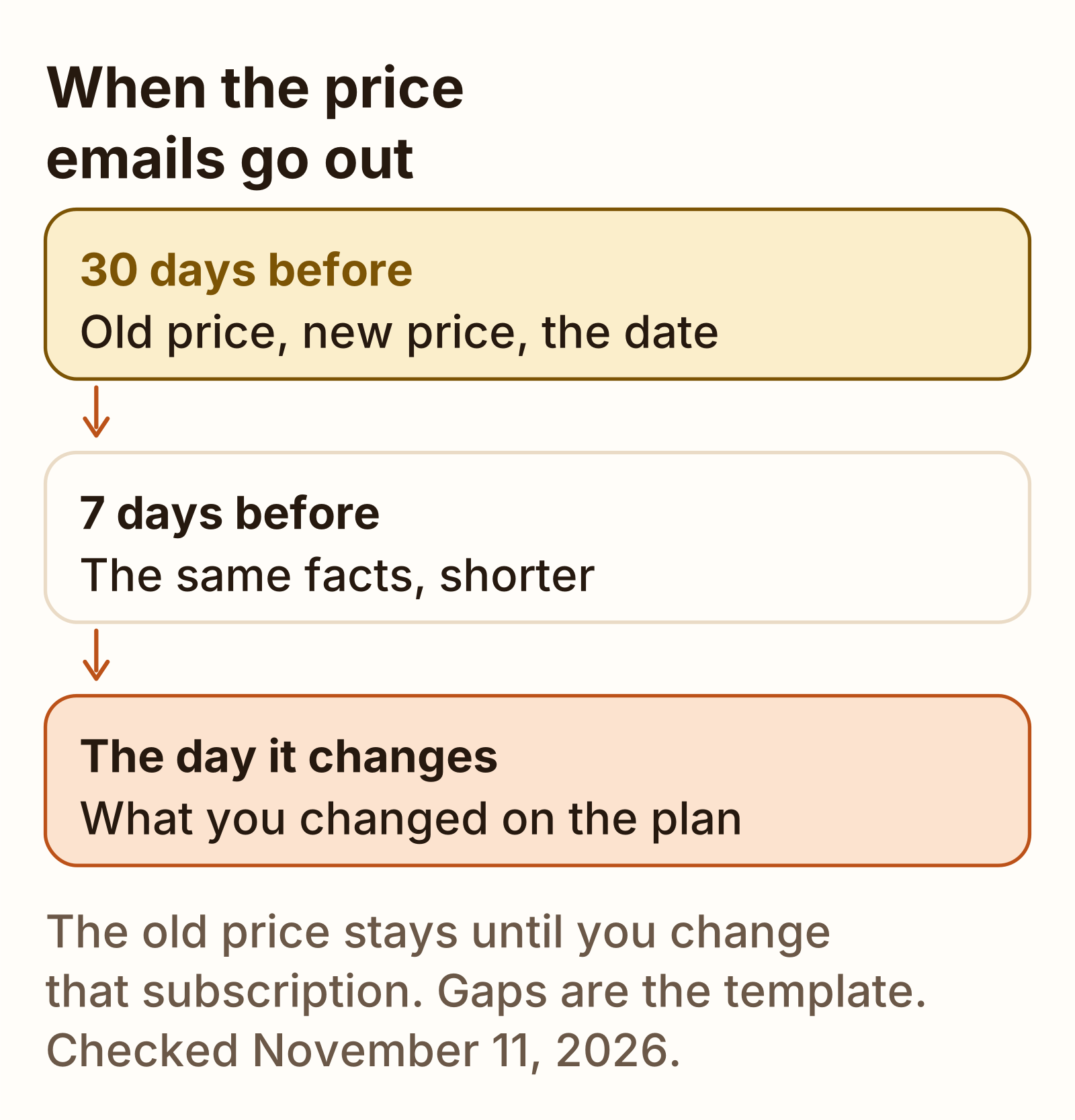
Email 1 goes out 30 days before EFFECTIVE_DATE. Email 2 goes out 7 days before, and only if that subscription is still active. Email 3 goes out on EFFECTIVE_DATE.
Those gaps are this template. This page does not cite a statute, a card-network rule, or a processor setting that picks 30 or 7. If the terms the customer already accepted name a notice period, use that period and move email 1 to match it. Do not send email 3 about a move you did not make.
| When | Job | |
|---|---|---|
| 1. Notice | 30 days before EFFECTIVE_DATE | Old price, new price, date, and whether their plan changes |
| 2. Reminder | 7 days before, if still active | The same facts, shorter |
| 3. Day of | EFFECTIVE_DATE | What you did to that subscription |
Grandfathering or not
Pick the old price if early customers should keep what they signed up for. That is the default. Both processors leave the subscription on its current price until you change that subscription. Pick the new price for everyone if one price is the point, and then change each subscription. Editing the product price, by itself, does not do that second job.
Does not happen
Edit the price and everyone moves
Stripe and Lemon Squeezy both leave the existing subscription on the price it already has.
What the docs say
New checkouts get the new price
- old subscriptions stay
- you move one at a time
A grandfathered customer gets the first paragraph in each email: their plan stays at OLD_PRICE. Everyone else gets the second paragraph. One product can have both, which is why the template does not force a single sentence.
What Stripe does to existing subscriptions
Stripe’s price docs, read November 11, 2026, say you cannot change a price’s amount in the API. The path they recommend is a new price for the new amount, then switch to that price’s id, then mark the old price inactive. Archiving a price does not cancel the subscriptions already on it. Those subscriptions stay active until they are canceled. The Dashboard edit steps on that page do not say the amount field itself can be changed.
A new price does not move anyone. Change the price of existing subscriptions says you update the subscription item and pass the new price. If you leave out the item id, the update adds the new price and both prices are active. Updating the price also sets quantity back to 1 unless you send the quantity you want to keep.
The update subscription page says the default for proration_behavior is create_prorations. Their example: a customer signs up on May 1 for 100 USD and is billed 100 USD then. On May 15 they switch to 200 USD. On June 1 they are billed 250 USD. Stripe’s breakdown is 200 USD for the renewal plus a 50 USD proration for half of the 100 USD difference. Set proration_behavior to none and the same example is 100 USD on May 1 and 200 USD on June 1, with no credit for unused time.
The same page says switching prices does not normally change the billing date or charge immediately, unless the billing interval changes, the subscription goes from free to paid, or a trial starts or ends. In those cases Stripe credits unused time on the old price, charges the new price immediately, and resets the billing date. The prorations page lists a price change among the updates that prorate by default.
| Setting | May 1 | May 15 | June 1 bill |
|---|---|---|---|
| create_prorations, the default | Billed 100 USD | Switch to 200 USD | 250 USD |
| proration_behavior none | Billed 100 USD | Switch to 200 USD | 200 USD |
The 250 USD is their sum: 200 USD plus 50 USD. I did not create that subscription.
What Lemon Squeezy does
Lemon Squeezy’s subscription docs, read November 11, 2026, say that changing the price of a subscription product or variant does not change the price of existing subscriptions. Only future subscriptions are charged the new rate. Existing subscriptions are always charged the price they were created with. To change one, you change its plan, in the API or in the Dashboard.
The update subscription page says a plan change prorates onto the next billing cycle by default. Their example: a customer buys on April 1 for $50 and is charged $50 then. On April 15 they upgrade to a $100 product. On May 1 they are charged $125. The page’s lines are $100 for the renewal, $50 for used time on the new plan, and a $25 credit for unused time on the old plan.
| Charge | Amount | Running total |
|---|---|---|
| Renewal | $100 | $100 |
| Used time on the $100 plan | $50 | $150 |
| Unused time on the $50 plan | −$25 | $125 |
invoice_immediately set to true charges that proration now. It defaults to false. disable_prorations set to true skips the proration, and the new price bills at the next renewal. It defaults to false, and it overrides invoice_immediately if you send both.
PayPal subscriptions are the exception on that page. The update endpoint does not modify them. The subscription object carries a customer portal URL, and the customer completes the change there. I did not open that portal.
The fee on whatever price does bill is a separate formula. The worked US-card subscription at $35, with no tax on the order, is $2.43 in Lemon Squeezy fees. This page does not reprice a different amount.
Handling replies
Reply with the same facts as the email: old price, new price, date, and whether that subscription moved. If they want the old price and you can spare it, do not change their subscription. That is the grandfather paragraph. If you already moved them and you agree to undo it, change the subscription back and say so. Do not promise a refund this template does not mention.
A cancellation is a lost subscription, not a billing argument. The note for that loss is a cancellation email template. What that loss does to the monthly total is how to calculate churn rate. This page does not print a share of customers who leave after a price change.
A card that fails on the new amount is a different note. The sequence for that is a dunning email. Do not send email 3 again in its place.
If they ask about a charge in the middle of the month, name the proration switch you used. Stripe’s default in the example above adds the adjustment to the June 1 bill. Lemon Squeezy’s default adds it to the next renewal. The no-proration switch on each processor is the one that waits for the next full price.
What we tested
Checked
On November 11, 2026 I read Stripe’s manage-prices page, the change-price guide, the update-subscription API reference, and the prorations page. I also read Lemon Squeezy’s subscription help page and the update-subscription API page. The sentences above are those pages: a Stripe price amount cannot be changed in the API, existing subscriptions stay on the old price until you update them, Stripe’s default proration example bills 250 USD, and Lemon Squeezy’s default upgrade example bills $125.
I did not open a Stripe Dashboard or a Lemon Squeezy store. I did not create a price, update a subscription, or send the three emails. The 30 days and the 7 days are the template. No statute was cited because none of those pages states a notice period.
FAQ
How much notice should I give?
This price increase email template sends the first email 30 days before the new price bills, a reminder 7 days before, and a note on the day. Those gaps are the template. This page does not cite a statute that sets a minimum number of days. If your terms already name a notice period, use that period instead of these 30 days.
Should I grandfather early customers?
Leave them on the old price if you want the default both processors already apply. Stripe will not change a price’s amount, and an existing subscription keeps that price until you update the subscription. Lemon Squeezy says changing the product or variant price does not change existing subscriptions. Move a subscription only if you want the new price to bill.
Sources
- Manage products and prices (Stripe) Checked
- Change the price of existing subscriptions (Stripe) Checked
- Update a subscription (Stripe API) Checked
- Prorations (Stripe) Checked
- Subscriptions (Lemon Squeezy) Checked
- Update a subscription (Lemon Squeezy API) Checked