
Documents and TypeScript functions against Postgres, SQL, and row level security. Prices from the vendor pages on November 1, 2026, plus one example month.
On this page
The short answer
Convex vs Supabase for a new app is a data-model choice first. Convex stores documents and runs TypeScript query and mutation functions, and the client can subscribe to a query. Supabase is Postgres, with SQL, row level security, and Auth in the same project. On the example usage below, Convex Free does not fit, Convex Starter is $2.20, Supabase Free is $0, and both Convex Professional for one developer and Supabase Pro are $25.
How each one stores data
Convex vs Supabase starts with what you store, and what you write to read it. It lives on the backend and stack hub. The reader is picking a backend for a new app and wants the data model, realtime, auth, the small-app price, and a way out.
Convex stores documents in tables. A schema.ts file describes each table with defineTable and the v validators. Convex adds _id and _creationTime on its own. You do not declare them. Queries and mutations are TypeScript functions in the convex/ directory. A query reads with ctx.db and returns a value. A mutation inserts, updates, or removes documents. The reading-data page says there is no query language for a join, an aggregation, or a group by. You write that logic in JavaScript, and a query’s reads share one logical timestamp.
Supabase gives every project a Postgres database. Auth, Storage, Realtime, and Edge Functions sit on that database. A query is SQL. You can join tables. Row Level Security is a policy on the table, and the policy runs inside Postgres. The same page says a table in an exposed schema without RLS is open to any role that has a grant on it.
The two snippets below are the same three fields: a title, a done flag, and an owner id stored as text. They are not a shared database. Convex will also store _id and _creationTime. The Postgres table has its own id.
import { defineSchema, defineTable } from "convex/server";
import { v } from "convex/values";

export default defineSchema({
  tasks: defineTable({
    title: v.string(),
    done: v.boolean(),
    ownerId: v.string(),
  }).index("by_owner", ["ownerId"]),
});CREATE TABLE tasks (
id bigint GENERATED ALWAYS AS IDENTITY PRIMARY KEY,
title text NOT NULL,
done boolean NOT NULL DEFAULT false,
owner_id text NOT NULL
);
CREATE INDEX tasks_by_owner ON tasks (owner_id);I type-checked that schema.ts on November 1, 2026. npm installed convex 1.49.0. TypeScript in strict mode, with emit turned off, exited 0. I did not run npx convex dev, and the snippet does not import the generated server module, so this is a schema check, not a deployed function.
The CREATE TABLE and the index ran the same day in @electric-sql/pglite 0.5.14. An insert of one row, title Ship the comparison, done false, owner user_1, returned id 1. PGlite is Postgres compiled to WebAssembly. It is not a Supabase project, and it is not a timing.
A Convex document is limited to 1 MiB, with at most 1,024 top-level fields. A query or mutation is limited to 32,000 documents scanned and 16 MiB read, and user code in that function is limited to 1 second. Those are the limits page figures. I did not time a query against either product.
If the app is still a SQL file on one machine, SQLite vs Postgres times both locally. If you want an ORM in front of the Supabase connection string, the bundle and the migration files, measured on one schema, are in Drizzle vs Prisma.
Realtime and reactivity
Convex queries are cached, consistent, and reactive. The query page says a client can subscribe and receive a new result when the underlying documents change. There is no separate message price on the pricing page. The limits page counts subscription updates as function calls, along with explicit client calls, scheduled runs, and file accesses. A chatty subscription spends the function-call allowance. I did not count how many updates a given screen would produce.
Free and Starter run on the S16 deployment class: 1,000 concurrent sessions and 16 concurrent queries. Professional runs on S256: 10,000 concurrent sessions and 256 concurrent queries. Those are documented concurrency caps. They are not a speed test. This page did not open a websocket.
Supabase Realtime is a separate service in the project: Broadcast, Presence, and Postgres Changes. The pricing page, read November 1, 2026, includes 200 concurrent peak connections and 2 million messages a month on Free, with a 256 KB max message. Pro includes 500 connections, then $10 per 1,000, and 5 million messages, then $2.50 per million, with a 3 MB max message. The example month below does not set a message count, so that meter is not in the Supabase total.
Auth
Convex checks a JWT. The auth page says deployments accept OpenID Connect ID tokens, so Clerk, WorkOS AuthKit, Auth0, or any other OpenID provider can identify the user. The Convex Auth library is a separate npm package that runs on your deployment. It is in beta. It covers React and React Native, with social sign-in, one-time email or SMS codes, or passwords. The same page says Next.js support is under active development.
Authorization is code at the start of a public function. The auth page says Convex does not use row level security. You read the user id and decide what that function may touch. The pricing page and the limits page do not publish a per-user auth price.
Supabase Auth is part of the project. It covers passwords, magic links, email one-time passwords, social sign-in, phone sign-in, and SSO. It stores users in the project’s Postgres database and issues a JWT. Row level security is how a request from the client is limited to particular rows. The pricing page includes 50,000 monthly active users on Free. Pro includes 100,000, then $0.00325 each. Phone MFA is an add-on at $75 a month for the first project. SAML on Pro includes 50 monthly active users, then $0.015. Neither add-on is in the example below. This page does not restate how Supabase counts a monthly active user, because that counting rule is a different doc from the pricing page.
Convex vs Supabase pricing
Every dollar below is from the Convex pricing page, the Convex limits page, or the Supabase pricing page, all read on November 1, 2026. Where a page does not publish a figure, the cell says so. The Convex dollar rates are the US region rates. The limits page says other regions are 1.3 times those rates. The pricing page says included amounts are shared across regions. The example is one US region.
Convex Free and Convex Starter share one column of included amounts on the pricing page. The limits page splits them. Free has hard caps. Starter is pay as you go past those amounts, and the pricing page lists that plan as $0 a month. Professional is $25 per developer a month, with higher included amounts, then a lower usage rate past those amounts. This comparison stops at Professional. Business starts at a $2,500 monthly minimum on the pricing page. That is a different purchase.
Supabase plans in this table are Free and Pro. Pro is the first paid plan. Team starts at $599 a month. A Pro organization with one project on Micro compute is $25 before usage past the included quotas. The pricing page says the $10 compute credit covers that one Micro. A second project pays its own compute. The example is one project.
| Meter | Convex Free | Convex Starter | Convex Professional | Supabase Free | Supabase Pro |
|---|---|---|---|---|---|
| Plan price | $0. Hard caps | $0 a month, then usage past the included amounts | $25 per developer a month, then usage past the higher included amounts | $0 | From $25 a month, charged up front. One Micro is covered by a $10 credit |
| Calls | 1,000,000 function calls a month, hard cap | 1,000,000 included, then $2.20 per 1,000,000 | 25,000,000 included, then $2 per 1,000,000 | Unlimited API requests. A different meter | Unlimited API requests |
| Database | 0.5 GB total. Rows and indexes. Each index is priced as another copy of the table | 0.5 GB included, then $0.22 per GB-month | 50 GB included, then $0.20 per GB-month | 500 MB database size. Shared CPU, 500 MB RAM | 8 GB disk included, then $0.125 per GB. Micro is shared compute, 1 GB RAM |
| Database I/O | 1 GB a month, hard cap | 1 GB included, then $0.22 per GB | 50 GB included, then $0.20 per GB | No database I/O gigabyte price on the pricing page | No database I/O gigabyte price. General purpose disk includes 3,000 IOPS, then $0.024 per IOPS |
| Egress | 1 GB a month, hard cap. Includes file serving and backup transfer | 1 GB included, then $0.132 per GB | 50 GB included, then $0.12 per GB | 5 GB egress and 5 GB cached egress | 250 GB, then $0.09 per GB. Cached egress is 250 GB, then $0.03 per GB |
| Files | 1 GB total | 1 GB included, then $0.033 per GB-month | 100 GB included, then $0.03 per GB-month | 1 GB. Max upload 50 MB | 100 GB, then $0.0213 per GB. Max upload 500 GB |
| Auth | No per-user price on the pricing page | No per-user price on the pricing page | No per-user price on the pricing page | 50,000 monthly active users | 100,000 monthly active users, then $0.00325 |
| Seats and projects | 1 to 6 developers. 40 deployments | 1 to 6 developers. 40 deployments | 1 to 20 developers. 300 deployments | 2 active projects. Paused projects are extra | Each project has its own compute. The credit covers one Micro |
| Past the cap | New mutations that commit more writes may fail | Usage past the included amounts is billed | Usage past the included amounts is billed | Pauses after a week of inactivity | Does not pause. Spend cap is on by default |
Query and mutation compute is free on Free, Starter, and Professional. The limits page bills that compute on dedicated deployments, which are a Business and Enterprise class. Action compute is a separate meter: 20 GB-hours on Free, as a hard cap, and 20 GB-hours included on Starter, then $0.33 per GB-hour. Professional includes 250 GB-hours, then $0.30. Supabase Edge Functions are a different product: 500,000 invocations on Free, and 2 million on Pro, then $2 per million. The example uses none of either meter.
Two Supabase words are easy to mix. Free is quoted as database size, 500 MB. Pro is quoted as disk size, 8 GB included. This page does not convert one into the other. Convex storage is rows and indexes, and each index is priced as another copy of the table. Files and backups are outside that meter.
The worked Supabase bill at 1,000, 10,000, and 50,000 users, against Firebase, is Supabase vs Firebase. The other hosted Postgres, with scale-to-zero and branching, is Neon vs Supabase.
The example usage level
This is an example usage level. I did not run these apps, and I did not open an invoice. The meters are not the same unit of work. Two million Convex function calls are not two million Supabase API requests, and they are not two million Realtime messages.
One developer. One project. Convex at US region rates. For the month:
- 2,000,000 Convex function calls. On Supabase, API requests are unlimited, so this count has no Supabase line.
- 0.4 GB on Convex’s database storage meter, the meter that already counts each index as another copy of the table.
- 400 MB of Supabase database size. That number is set under the 500 MB cap. It is not a unit conversion of the 0.4 GB.
- 1 GB of Convex database I/O, which is the included amount.
- 1 GB of data egress.
- 1 GB of file storage.
- No text search, no vector search, no action compute, no Edge Function invocations.
- No Supabase Realtime messages. That meter is left out.
- Fewer than 50,000 monthly active users, so the Supabase Free auth cap is not crossed.
- No backup generated. Convex bills backup generation as bandwidth and file storage. That cost is not in the total.
- One Convex deployment and one Supabase project.
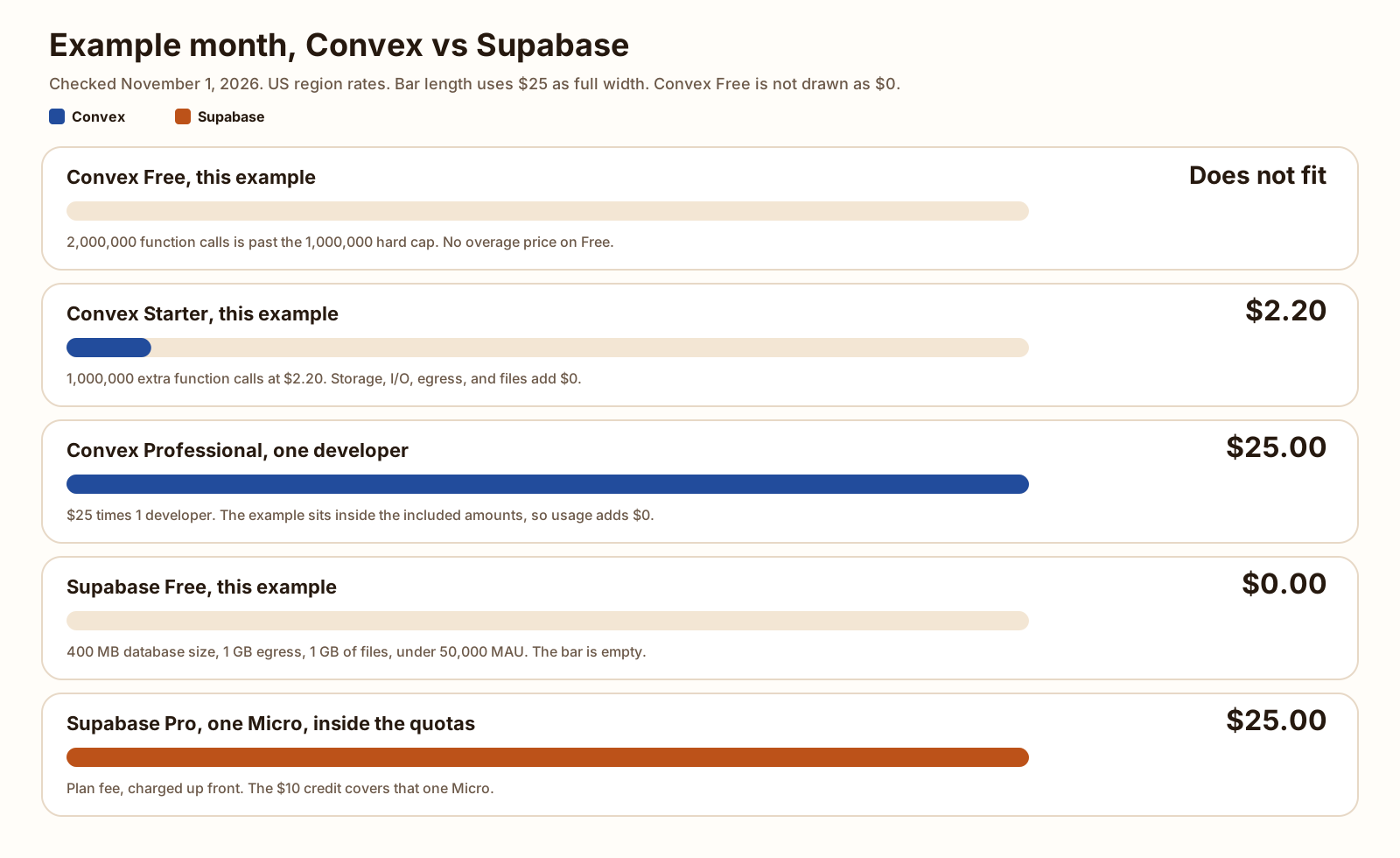
Convex Free does not fit. 2,000,000 function calls is past the 1,000,000 hard cap. Free has no overage rate. The limits page says that after a Free cap is hit, new mutations that commit more insertions or updates may fail. The other lines in this example are inside the Free caps. The function-call line is the one that excludes Free. I am not printing a dollar amount for a plan the example cannot use.
Convex Starter includes 1,000,000 function calls, then $2.20 per additional 1,000,000. The extra amount is 2,000,000 minus 1,000,000, which is 1,000,000. That is one block. One times $2.20 is $2.20. Database storage of 0.4 GB is under the 0.5 GB included, so the additional storage is zero. Database I/O, egress, and files are each at the included 1 GB, so each additional amount is zero. Action compute and search are zero. The plan fee on the pricing page is $0. The example total is $2.20.
Convex Professional is $25 per developer. One developer is $25. The example’s 2,000,000 function calls are under the 25,000,000 included, so the function-call line is $0. Storage of 0.4 GB is under 50 GB. Database I/O of 1 GB is under 50 GB. Egress of 1 GB is under 50 GB. Files of 1 GB are under 100 GB. The usage lines add $0. The example total is $25.
Supabase Free fits this example. 400 MB is under 500 MB of database size. 1 GB of egress is under 5 GB. 1 GB of files is the included 1 GB. API requests are unlimited. Monthly active users are under 50,000. The price is $0. A Free project still pauses after a week without enough database activity. This example is a month of usage, not a claim about how often the app is opened.
Supabase Pro for one Micro project, inside the included disk, egress, files, and monthly active users, is $25. The pricing page says that figure is before usage past the quotas, and that it is charged up front. Nothing in this example leaves a quota, so the spend cap does not change it. The total is $25.
-
$2.20
Convex Starter at this example, US region
-
$25.00
Convex Professional, one developer, usage inside the included amounts
-
$0.00
Supabase Free, this example, inside that plan's caps
-
$25.00
Supabase Pro, one Micro, inside the included quotas
A month that stays inside 1,000,000 Convex function calls, 0.5 GB of database storage, 1 GB of database I/O, 1 GB of egress, 1 GB of files, and 20 GB-hours of action compute is $0 on Convex Free. The $2.20 appears when function calls cross that million. Supabase Free does not have that call meter. Its first walls, on the pricing page, are 500 MB of database size, 5 GB of egress, 5 GB of cached egress, 1 GB of files, 50,000 monthly active users, and two active projects.
Self-hosting and getting your data out
Convex publishes the backend. The self-hosting page says a self-hosted deployment runs the open-source backend, the same code the cloud service uses. The license on that page is FSL Apache 2.0. You can do almost anything Apache-2.0 allows, except create a product that competes with hosted Convex Cloud. The code converts to Apache-2.0 two years after it is written. The legal text the page points at is fsl.software.
The self-hosting guide is three services: the backend, the dashboard, and your frontend. The backend stores state in a local SQLite database by default. The guide says you can point that storage at Postgres or MySQL, and that the app still talks to Convex through npx convex dev. The documented start is Docker Compose. The guide also says the Convex Auth CLI does not support self-hosted deployments yet, and points at a manual setup. I did not run Docker Compose, and I did not generate an admin key.
The way out of hosted Convex is a snapshot, not a SQL dump. Export is a zip from a backup, or npx convex export. The backup page says the zip holds documents.jsonl per table, one document per line, and file bytes only if you included storage. It does not include your functions, your schema file, environment variables, or pending scheduled functions. Those live in the repo and the dashboard. A downloaded zip can be imported into another Convex deployment. Turning the JSONL into Postgres tables is your own job. I did not run an export.
Manual backups are kept for 7 days. Free and Starter can store two backups per deployment. Periodic daily or weekly backups require a Convex Pro plan, which is the name the backup page uses. The pricing page lists daily backups on Professional and not on Free or Starter. Generating a backup reads every document, so it spends database bandwidth, and stored backup bytes are billed like file storage. The example month above does not take one.
Supabase is Postgres, so the way out is a SQL dump. The backups page says Pro keeps 7 days of daily backups, and it tells Free projects to export with the Supabase CLI db dump command. The backup does not include Storage files. The database holds metadata about those objects. Restoring a backup does not bring back a file you deleted later. Point-in-time recovery is about $100 a month per 7 days on the pricing page, and it needs at least a Small compute add-on. It is not in the $25. I did not run a dump.
The pricing FAQ says you can self-host with Docker or the CLI. The self-hosting guide is more specific. Docker is the production path. The CLI local stack is for development, and that page says it must not be exposed to the internet. Self-hosted Supabase is one project. Branching, managed backups, and point-in-time recovery are not in that install. You keep the server, the disk, and the backups. I did not start that Docker stack either.
Leaving Supabase for another Postgres is a dump and a restore. The flags, and what the dump leaves behind, are in Neon vs Supabase. Leaving Convex for Postgres is a rewrite of the functions plus a transform of the JSONL. Those are different exits.
Which to start on
- You want Postgres, SQL, and row level security, and you are inside 500 MB of database size, 5 GB of egress, 5 GB of cached egress, 1 GB of files, 50,000 monthly active users, and 2 active projects: Supabase Free. It can pause after a week with too little database activity.
- You want those Supabase products and you are past a free cap, or the project must not pause: Supabase Pro. $25, charged up front, one Micro covered by the $10 credit.
- You want TypeScript query functions and subscriptions, and you are inside 1,000,000 function calls, 0.5 GB of database storage, 1 GB of database I/O, 1 GB of egress, 1 GB of files, and 20 GB-hours of action compute: Convex Free. Past a hard cap, new mutations that write can fail.
- You will pass the function-call cap and you want to pay for the extra calls without a per-developer fee: Convex Starter. On this example, the extra 1,000,000 calls are $2.20 in a US region, and the other lines are $0.
- You want the Professional included amounts, periodic backups, or more than 1,000 concurrent sessions: Convex Professional. $25 per developer. One developer at this example is $25.
- You need Drizzle, Prisma, or a SQL dump as the exit: Supabase. Convex’s exit is a zip of JSONL, and the functions stay in your repo.
- You need the backend on your own machines: both publish a path. Convex is the open-source backend under the FSL terms, Docker Compose, SQLite by default. Supabase’s production path is Docker. I did not boot either one.
Convex or Supabase, on this page, is that list. A quieter Convex month that stays inside the hard caps is $0, the same sticker price as Supabase Free, on different walls. The $2.20 is one extra million function calls. The two $25 figures are plan prices with this example’s usage still inside the included amounts. The HTTP handler in front of either backend is not in that table. Node servers returning the same small JSON object compare Hono, Express, and Fastify. They do not call Convex or Supabase.
That hosting line is one cost. What the users pay you is another. How to calculate MRR is the monthly price of the subscriptions you still have, with trials, tax, and one-off fees left out. Set the $0, the $2.20, or the $25 next to that number before you treat the backend bill as the decision.
Supabase vs Firebase: the bill at 1k, 10k, 50k The monthly bill at 1,000, 10,000, and 50,000 users, from the Supabase and Firebase price lists. Blog Neon vs Supabase: free tier, price, and branching Free caps, the first paid month, branching, and what happens when the database goes quiet. BlogFAQ
Is Convex open source, and can I self-host it?
Yes. The self-hosting page says the backend, the client libraries, the dashboard, and the CLI are open source, and that a self-hosted deployment runs the same backend code as the cloud. The license on that page is FSL Apache 2.0. You can do almost anything Apache-2.0 allows, except build a product that competes with hosted Convex Cloud, and the code converts to Apache-2.0 two years after it is written. The guide is a Docker Compose file. By default the backend stores its state in local SQLite, and the same guide says you can point that storage at Postgres or MySQL. I did not start the container.
Is Convex a replacement for Supabase?
Only when the app fits documents and TypeScript functions. Supabase is a Postgres project with Auth, Storage, Realtime, and Edge Functions. Convex is a reactive document database with query and mutation functions, file storage, and auth you connect. A SQL dump, Drizzle, or Prisma points at Supabase. It does not point at the Convex document API. The dollar example on this page is one stated month, not a feature score.
Can I use Drizzle or Prisma with Convex?
Not against the Convex database. Those ORMs send SQL. Convex reads documents with ctx.db inside a TypeScript function, and the reading-data page says there is no query language for a join. Supabase is Postgres. Its pricing page says you can connect with Prisma, Drizzle, or any Postgres client. The install size and the bundle, measured on SQLite, are in Drizzle vs Prisma.
Which is cheaper for a small app?
On the example usage level on this page, Supabase Free is $0 and still fits. Convex Free does not fit 2,000,000 function calls. Convex Starter is $2.20 in a US region. Convex Professional for one developer is $25, and Supabase Pro is $25. A month that stays inside Convex’s hard caps is $0 on Free too. This page did not run either app, and the two products do not bill the same meters.
Does Convex use SQL?
The cloud API does not. You describe tables in schema.ts and read them with ctx.db. The reading-data page says there is no query language for a join, an aggregation, or a group by, and that you write that logic in JavaScript. Self-hosted Convex stores its own state in SQLite by default and can use Postgres or MySQL as that storage engine. Your functions are still the Convex API. The CREATE TABLE on this page ran in PGlite. It is the Postgres shape, not a Convex query.
Sources
- Convex pricing Checked
- Limits (Convex) Checked
- Schemas (Convex) Checked
- Queries (Convex) Checked
- Mutations (Convex) Checked
- Reading data (Convex) Checked
- Authentication (Convex) Checked
- Self Hosting (Convex) Checked
- Self-hosting guide (Convex backend) Checked
- Data export (Convex) Checked
- Backup and restore (Convex) Checked
- convex on npm Checked
- Supabase pricing Checked
- Database (Supabase) Checked
- Row Level Security (Supabase) Checked
- Realtime (Supabase) Checked
- Auth (Supabase) Checked
- Self-Hosting (Supabase) Checked
- Database Backups (Supabase) Checked
- @electric-sql/pglite on npm Checked