
Personal site: Vercel Hobby. A site that takes payment: Netlify Free or Vercel Pro. Next.js: Vercel. Static traffic past either free cap: Cloudflare Pages.
On this page
The short answer
For a personal site, pick Vercel Hobby: the included Fast Data Transfer is 100 GB, and Netlify Free’s 300 credits cover 15 GB of bandwidth only when every credit is spent on bandwidth. For a site that takes payment, pick Netlify Free or Vercel Pro, because Hobby is limited to non-commercial personal use. For a Next.js app, pick Vercel, and read Netlify’s adapter limits before you host that app there. For a static site past either free cap, pick Cloudflare Pages, where requests to static assets are free and unlimited.
Vercel vs Netlify is a host choice for a small site or a SaaS that deploys from Git. People also search netlify vs vercel. It lives on the backend and stack hub. The reader wants the free cap, the paid price, and a deploy of the same site.
I did not create a Vercel account or a Netlify account, and I did not deploy one Astro site to both free tiers. There is no build time from either platform on this page. The timing below is 20 new requests from one VM in Ashburn, Virginia, to each vendor’s public Astro starter. The prices are the vendor pages on November 8, 2026. Where a page does not publish a figure, the cell says so.
Pricing and free tier limits
Vercel Hobby is $0. The Hobby plan includes 100 GB of Fast Data Transfer, 10 GB of Fast Origin Transfer, 1,000,000 CDN requests, 4 CPU-hours of active CPU, 360 GB-hours of provisioned memory, and 1,000,000 function invocations. The same page says there is no billing cycle on Hobby. If you pass a usage limit, you wait until 30 days have passed before you can use that feature again. The account plans page says Hobby plans are paused when they exceed the included free tier usage. Vercel’s pages say the prices are in USD and exclude VAT and GST.
The fair use guidelines restrict Hobby to non-commercial, personal use. Commercial use needs Pro or Enterprise. The page defines commercial use as a deployment for the financial gain of anyone involved in producing the project, including a paid employee or consultant who writes the code. The examples include taking a payment, advertising a product or service, being paid to create or host the site, a site whose primary purpose is affiliate links, and ads, including AdSense. The same page says asking for donations is not commercial use.
Netlify Free is $0 with a 300 credit limit, on the pricing page. The credit-based plans page says new accounts from September 4, 2025 use credit-based plans, and Free is 300 credits a month with a hard limit and no auto recharge. The how credits work page says that when the credit balance is used up, every web project is paused and visitors get a “Site not available” page. Unused monthly credits do not roll over on Free.
How credits work prices the meters that spend those credits. A production deploy is 15 credits, and the page says build minutes are no longer calculated. Deploy previews and branch deploys are 0 credits. Bandwidth is 20 credits per GB. Web requests are 2 credits per 10,000 requests, and that meter includes page views, API calls, redirects, function requests, and asset requests. Compute is 10 credits per GB-hour. The pricing page prints the same four rates.
| Line | Vercel Hobby | Netlify Free |
|---|---|---|
| Monthly price | $0 | $0. 300 credits, hard limit |
| Commercial use | Personal use only, on the fair use page | The November 12, 2024 announcement says commercial projects can deploy. The credit pages read today do not add a personal-use-only rule |
| Transfer | 100 GB Fast Data Transfer, 10 GB Fast Origin Transfer | 20 credits per GB of bandwidth. 300 divided by 20 is 15 GB, if every credit is bandwidth |
| Requests | 1,000,000 CDN requests | 2 credits per 10,000 web requests. 300 divided by 2 is 150, times 10,000 is 1,500,000 requests, if every credit is requests |
| Functions | 1,000,000 invocations, 4 CPU-hours, 360 GB-hours of provisioned memory | 10 credits per GB-hour of compute. 300 divided by 10 is 30 GB-hours, if every credit is compute |
| What happens at the cap | The plan pauses. You wait 30 days to use the feature again | Projects pause. Visitors see “Site not available” |
| Deploys | 100 deployments a day. 1 concurrent deployment. Build step 45 minutes | Production deploy 15 credits. Previews and branch deploys 0 credits. 1 concurrent build |
| Custom domains | 50 per project, on the Hobby comparison table | Custom domains with SSL, on the pricing page. The page does not print a count |
The three Netlify “if every credit” rows are exclusive. They are not a bundle. One production deploy is 15 credits. 300 minus 15 is 285. 285 divided by 20 is 14.25 GB of bandwidth, with no requests and no compute in that arithmetic. Twenty production deploys, 300 divided by 15, spend the month and leave 0 GB. I did not run a site, so this is the rate, not a bill.
The November 12, 2024 announcement, Introducing Netlify’s Free plan, says you can deploy commercial projects, personal sites, or other work you want to share. The same post lists 100 GB of bandwidth and 300 build minutes. Those two numbers are the older meter. They are not the 300 credit plan in the table above. I am using the announcement for the commercial sentence, and the November 8 pages for the cap.
The paid plans
Vercel Pro, on the Pro plan page, is a $20 a month platform fee. The fee includes one deploying team seat and $20 of usage credit. The credit applies across managed infrastructure, expires at the end of the month, and usage past it is billed on demand. The pricing page prices an additional paid seat at $20 a month. Flat Rate CDN, on the Pro plan page, includes the lowest tier at no extra cost: 1,000,000 CDN requests and 1 TB of data transfer a month. I am not treating that 1 TB as something the $20 credit has to buy. The page lists the tier as included.
Netlify Personal, on the pricing page, is $9 a month and 1,000 credits. Netlify Pro is $20 a month, 3,000 credits, and unlimited members. Personal can buy 500 more credits for $5. Pro can buy 1,500 more credits for $10. Free cannot. At the Pro pack rate the pricing page prints, $10 for 1,500 credits, a production deploy is $0.10, bandwidth is $0.13 per GB, and compute is $0.07 per GB-hour. That dollar column is their conversion of the credit rates. It is not a second price list.
| Plan | Price | What the page includes |
|---|---|---|
| Vercel Hobby | $0 | Personal use. The allotments in the table above. Pause at the cap |
| Vercel Pro | $20 a month | The platform fee, one deploying seat, $20 of usage credit, and the lowest Flat Rate CDN tier |
| Netlify Free | $0 | 300 credits. Pause at the cap |
| Netlify Personal | $9 a month | 1,000 credits. Auto recharge is 500 credits for $5 |
| Netlify Pro | $20 a month | 3,000 credits, unlimited members. Auto recharge is 1,500 credits for $10 |
-
100 GB
Vercel Hobby Fast Data Transfer
-
15 GB
Netlify Free, if all 300 credits are bandwidth
-
$20
Vercel Pro fee and Netlify Pro price
-
$9
Netlify Personal
A small SaaS that takes a payment cannot stay on Vercel Hobby. The fair use page says so. The same app can start on Netlify Free until the 300 credits run out, or on Vercel Pro at $20. The database under that app is a different bill. Supabase vs Firebase prices one workload at 1,000, 10,000, and 50,000 users. This page does not.
Build and deploy speed
I did not time a build. The limits below are the published caps, not a stopwatch.
On Vercel, the limits page sets the build step to 45 minutes on Hobby and on Pro. A build that reaches 45 minutes fails. Hobby allows 1 concurrent deployment and 100 deployments created per day. A CLI upload of source files is capped at 100 MB on Hobby and 1 GB on Pro. The Hobby comparison table lists the build machine as 2 vCPUs, 8 GB of memory, and 32 GB of disk. The same limits page says a Hobby team cannot connect a project to a Git repository owned by a Git organization.
On Netlify, a production deploy costs 15 credits and build minutes are no longer a separate meter. Previews are free. The credit-based plans page says Free includes 1 concurrent build, so only one build runs at a time. I did not click a Git deploy on either host, so this page does not name a button I did not see and does not report a build duration.
The measurement I could run is the response time of a page that is already deployed. The Vercel Astro boilerplate names https://astro-template.vercel.app as the live example. Netlify’s own post, Make and Deploy an Astro Project in Minutes, links https://astro-quickstart.netlify.app. I opened https://astro-platform-starter.netlify.app as well. Its title was “bye”, so I did not time it.
What we tested
Checked
The clock started at 2026-11-08T09:06:28.997Z and the last request finished at 2026-11-08T09:06:32.551Z. That window includes two warmup requests per URL, which are not in the table. Then 20 measured requests, interleaved, Vercel then Netlify, one new curl process each time so the connection was not reused. curl 8.5.0, HTTP/2, with compressed responses. The User-Agent was shipmunks-ttfb/1.0. Every measured response was HTTP 200.
ipinfo.io, checked just before the run, reported Ashburn, Virginia, Amazon AS14618, address 34.199.12.19. A later check from the same VM was 3.226.203.3, the same city. Vercel’s x-vercel-id started with iad1 on every saved header. Netlify’s headers did not name a city. The Netlify addresses curl reported were 18.208.88.157 and 98.84.224.111.
TTFB is curl’s time_starttransfer. Total time is time_total. Both include DNS, TCP, and TLS, because each request was a new process. “After TLS” is time_starttransfer minus time_appconnect, and the median is the median of that difference, not the difference of the medians. For an even count, the median is the mean of the two middle sorted samples.
A probe before the timed run, one request each, with no Accept-Encoding, returned content-length 4,825 for the Vercel URL (title “Welcome to Astro.”) and 15,713 for the Netlify URL (title “Astro Quickstart”). https://astro.vercel.app returned the same etag and the same 4,825 bytes as the template URL on that probe. The timed run sent Accept-Encoding and downloaded brotli: 1,742 bytes on every Vercel sample, and 4,116 to 4,134 bytes on Netlify.
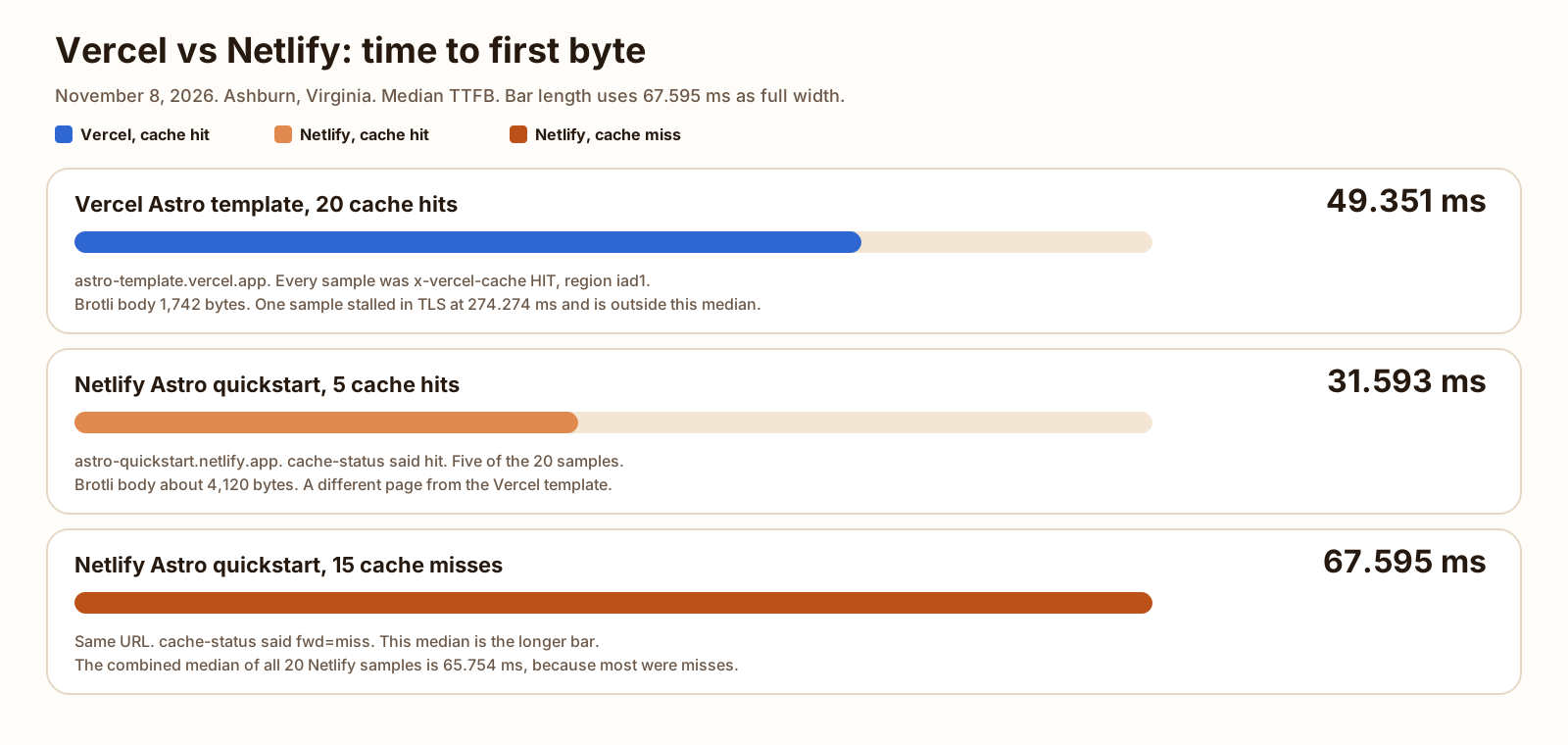
Vercel was x-vercel-cache: HIT on all 20. age was 250162 to 250164 seconds. last-modified was Thu, 05 Nov 2026 11:37:07 GMT. A unique query string on five later requests was still HIT. Netlify’s cache-status was a miss on 15 of the 20 (fwd=miss) and a hit on 5. The pages are different sizes. This is not one Astro site deployed twice, and it is not a cold origin on Vercel.
| Group | n | Median TTFB | Min | Max | Median total | Median after TLS |
|---|---|---|---|---|---|---|
| Vercel template, all hits | 20 | 49.3505 | 45.622 | 274.274 | 49.436 | 12.644 |
| Netlify quickstart, all samples | 20 | 65.754 | 30.091 | 92.895 | 65.960 | 38.341 |
| Netlify, hits only | 5 | 31.593 | 30.091 | 47.344 | 31.717 | 4.885 |
| Netlify, misses only | 15 | 67.595 | 51.113 | 92.895 | 67.733 | 39.918 |
The Vercel median is the mean of the 10th and 11th sorted samples, 49.307 ms and 49.394 ms, which is 49.3505 ms. The chart rounds that to 49.351 ms. The 274.274 ms sample is real. Its TLS time was 264.039 ms, so the stall was in the handshake. The other 19 Vercel samples were 68.352 ms or faster. Total time sat within 1 ms of TTFB on both hosts, because the brotli bodies were a few kilobytes.
The five Netlify hits were faster than the Vercel hits. The fifteen misses were slower. The combined Netlify median, 65.754 ms, sits with the misses because 15 of 20 samples were misses. I am not calling either host faster. The cache state and the page are different.
Five more requests used a unique query string. They are not in the medians above. Vercel stayed HIT, TTFB from 46.841 ms to 54.730 ms, median 50.415 ms. Netlify was four misses and one hit, TTFB from 30.029 ms to 79.198 ms, median 67.212 ms.
| Sample | Vercel TTFB | Vercel total | Netlify TTFB | Netlify total | Netlify cache |
|---|---|---|---|---|---|
| 1 | 50.852 | 50.937 | 66.492 | 66.710 | miss |
| 2 | 47.394 | 47.481 | 64.238 | 64.449 | miss |
| 3 | 49.694 | 49.779 | 67.144 | 67.411 | miss |
| 4 | 49.147 | 49.238 | 67.595 | 67.733 | miss |
| 5 | 51.081 | 51.181 | 63.338 | 63.794 | miss |
| 6 | 49.307 | 49.391 | 77.366 | 77.636 | miss |
| 7 | 68.352 | 68.436 | 51.113 | 51.242 | miss |
| 8 | 47.793 | 47.903 | 64.118 | 64.312 | miss |
| 9 | 49.241 | 49.342 | 74.738 | 75.039 | miss |
| 10 | 45.622 | 45.726 | 83.795 | 84.495 | miss |
| 11 | 46.940 | 47.033 | 30.091 | 30.220 | hit |
| 12 | 49.851 | 49.949 | 65.016 | 65.210 | miss |
| 13 | 48.517 | 48.601 | 31.866 | 31.986 | hit |
| 14 | 274.274 | 274.362 | 82.480 | 82.724 | miss |
| 15 | 47.321 | 47.420 | 87.304 | 87.490 | miss |
| 16 | 59.140 | 59.241 | 30.724 | 30.846 | hit |
| 17 | 52.827 | 52.929 | 80.067 | 80.240 | miss |
| 18 | 49.394 | 49.481 | 92.895 | 93.021 | miss |
| 19 | 50.065 | 50.152 | 31.593 | 31.717 | hit |
| 20 | 48.641 | 48.733 | 47.344 | 47.804 | hit |
Serverless and edge functions
Vercel Functions, on the limits page for Fluid compute, allow 2 GB of memory on Hobby and a maximum duration of 300 seconds, which is also the default. The uncompressed size limit is 250 MB, or 500 MB for Python. The default region is iad1, which you can change. Pro and Enterprise can set more than one region. The same page says an Edge runtime function must begin sending a response within 25 seconds, and can keep streaming for up to 300 seconds. A separate line, on the fair use page, caps middleware that uses the Edge runtime at 50 ms of CPU on average. That 50 ms is CPU time, and time spent waiting on the network does not count. It is not the 300 second duration.
Netlify Functions, on the configuration page, default to region cmh (US East, Ohio), 1024 MB of memory, and a synchronous limit of 60 seconds. Background functions can run 15 minutes. The buffered payload limit is 6 MB. Raising memory or vCPU is listed as a Credit-based Pro and Enterprise feature, from 1024 MB to 4096 MB. Free stays at the 1024 MB default.
Netlify Edge Functions, on the limits page, allow a 20 MB bundle after compression, 512 MB of memory for the set of deployed edge functions, 50 ms of CPU per request, and a 40 second response-header timeout. CPU time does not include waiting on the network. The page says the monthly invocation count depends on the team plan and points you at the usage dashboard. It does not print a free-plan number, so this post does not invent one.
The two 50 ms figures are both CPU caps, on different products. Vercel’s is the fair-use average for Edge middleware. Netlify’s is the per-request cap for Edge Functions. I did not deploy a function to either host, so there is no duration from a handler I ran.
If the thing you are choosing is the handler itself, the empty-route rates on one VM are in Hono vs Express. That page did not deploy Hono to Vercel or to Netlify. The Vercel frameworks page lists Hono under backends. Listing it is not a timing result.
Framework support
Vercel builds Next.js, and the Hobby and Pro pages treat a Git push as the deploy. The frameworks page, read November 8, 2026, also lists Astro with the frontends. The Astro boilerplate says the starter deploys with zero configuration. The live example is the URL in the test above.
Netlify’s Next.js page, last updated February 4, 2026, says the adapter supports Next.js from version 13.5, and that leaving the adapter unpinned updates it on each build. The support table marks App Router, server rendering, incremental static regeneration, static generation, React Server Components, Server Actions, and image optimization as supported. The limitations on that page are the ones that matter if you are leaving Vercel:
- Server-rendered pages that use the Edge runtime run in the functions region on the Node.js runtime, not at the edge. The page says no functionality is missing.
- A rewrite in the Next.js config cannot point at a static file in
public. - Headers and redirects are evaluated after middleware, which differs from stand-alone Next.js.
- Node.js middleware does not support C++ addons or the filesystem.
For a static Astro site, both hosts have a public starter, and both starters answered HTTP 200 from this VM. For a Next.js app, start on Vercel. Move it to Netlify only after those four limits are acceptable for the app you have. I did not port an app, so this is the docs, not a migration I finished. Sign-in on that Next.js app is a separate vendor. Clerk or Auth0 on a Next.js app is the pricing, from their pages, not from a login I ran.
When to pick Cloudflare Pages instead
Cloudflare Pages is the static host that does not spend the request on the meters above. The Pages functions pricing page, last updated September 8, 2026, says requests to static assets are free and unlimited on free and paid plans, as long as the request does not invoke Functions. Functions count toward the Workers quota. The page’s own example is 50,000 Functions requests plus 50,000 Workers requests against 100,000 a day on the Free plan, resetting at midnight UTC.
The Pages limits page lists 500 builds a month on Free, one build at a time, a 20 minute build timeout, and 20,000 files. That is a build count, not Netlify’s 15 credits and not Vercel’s 100 deployments a day. The feature split between Workers and Pages, including what a new project should use, is Cloudflare Workers vs Pages. This page did not re-run that dry run.
A long-running process with Postgres on the same host is a different product. The worked month for that shape is Railway vs Render. Once the site is on a host and the domain answers, the order for getting it into Google is how to get a new website indexed.
- The site is personal, and you want the larger free transfer number: Vercel Hobby. 100 GB of Fast Data Transfer, then the plan pauses.
- The site takes a payment, shows ads, or you are paid to build it: leave Vercel Hobby. Netlify Free allows commercial projects on the 2024 announcement, inside 300 credits. Vercel Pro is $20 a month.
- The app is Next.js and you want the framework’s defaults: Vercel. Read the four Netlify adapter limits before you host that app there.
- The site is static and the free transfer cap is the problem: Cloudflare Pages. Static asset requests are free and unlimited. Functions are a separate quota.
- The repo is owned by a Git organization and you are still on Hobby: Vercel says that connection is not supported. A Pro team, or Netlify, is the path the limits page leaves you.
- You need a process that stays on, plus Postgres on that host: Railway or Render. This page does not price that shape.
FAQ
Is Netlify cheaper than Vercel?
On the pages read November 8, 2026, both free plans are $0 until a cap. Vercel Hobby includes 100 GB of Fast Data Transfer and pauses when that included usage is passed. Netlify Free includes 300 credits, and bandwidth is 20 credits per GB, so 300 credits is 15 GB only when every credit is spent on bandwidth. A production deploy on Netlify is 15 credits. Vercel Pro is a $20 a month platform fee with $20 of usage credit and one deploying seat. Netlify Personal is $9 a month with 1,000 credits. Netlify Pro is $20 a month with 3,000 credits. The $20 plans are the same list price and different meters. These are readings of the price pages, not an invoice.
Is Vercel only for Next.js?
No. The Vercel frameworks page, read November 8, 2026, lists Astro with the frontends and Hono with the backends. The Astro boilerplate template says that starter deploys to Vercel with zero configuration, and the live example is astro-template.vercel.app. Next.js is the framework Vercel builds. Netlify’s Next.js page, last updated February 4, 2026, says their adapter supports Next.js from version 13.5. The same page says edge-runtime server rendering runs in the functions region on Node, rewrites cannot point at files in public, and middleware runs in a different order from stand-alone Next.js.
Which has the better free tier?
For a personal site, Vercel Hobby. It includes 100 GB of Fast Data Transfer and 1,000,000 CDN requests, and the fair use page restricts Hobby to non-commercial, personal use. For a site that takes payment, Netlify Free. Netlify’s Free plan announcement, dated November 12, 2024, says commercial projects can deploy on Free, and the credit-plan pages read November 8, 2026 do not add a personal-use-only rule. That announcement’s 100 GB and 300 build minutes are an older meter. The current Free plan is 300 credits. For static traffic past either cap, Cloudflare Pages: the functions pricing page says requests to static assets are free and unlimited.
Can I move between them easily?
A static site is a Git repo and a build command. I did not move a project. A Next.js app is the harder move, because Netlify runs it through the adapter and lists the limits in the previous answer. Vercel also says a Hobby team cannot connect a project to a Git repository owned by a Git organization. That line is on the limits page, read November 8, 2026.
Sources
- Vercel Hobby plan Checked
- Pricing on Vercel Checked
- Vercel Pro plan Checked
- Account plans on Vercel Checked
- Fair use guidelines (Vercel) Checked
- Limits (Vercel) Checked
- Vercel Functions limits Checked
- Frameworks (Vercel) Checked
- Astro boilerplate template (Vercel) Checked
- Netlify pricing Checked
- Credit-based pricing plans (Netlify) Checked
- How credits work (Netlify) Checked
- Configuration for functions (Netlify) Checked
- Edge Functions limits (Netlify) Checked
- Next.js on Netlify Checked
- Introducing Netlify's Free plan Checked
- Make and Deploy an Astro Project in Minutes (Netlify) Checked
- Pages limits (Cloudflare) Checked
- Pages Functions pricing (Cloudflare) Checked