
Cloudflare points a new project at Workers with static assets. Pages still builds a static site from Git. The split is which features you need.
On this page
- The short answer
- What changed: Workers static assets vs Pages
- Cloudflare Workers vs Pages, feature by feature
- Cloudflare Pages pricing and Workers pricing
- Pages Functions vs Workers
- How shipmunks.dev and ContextBolt run
- Moving a Pages site to Workers static assets
- What we tested
- Which one to pick
- FAQ
- Sources
- Related
The short answer
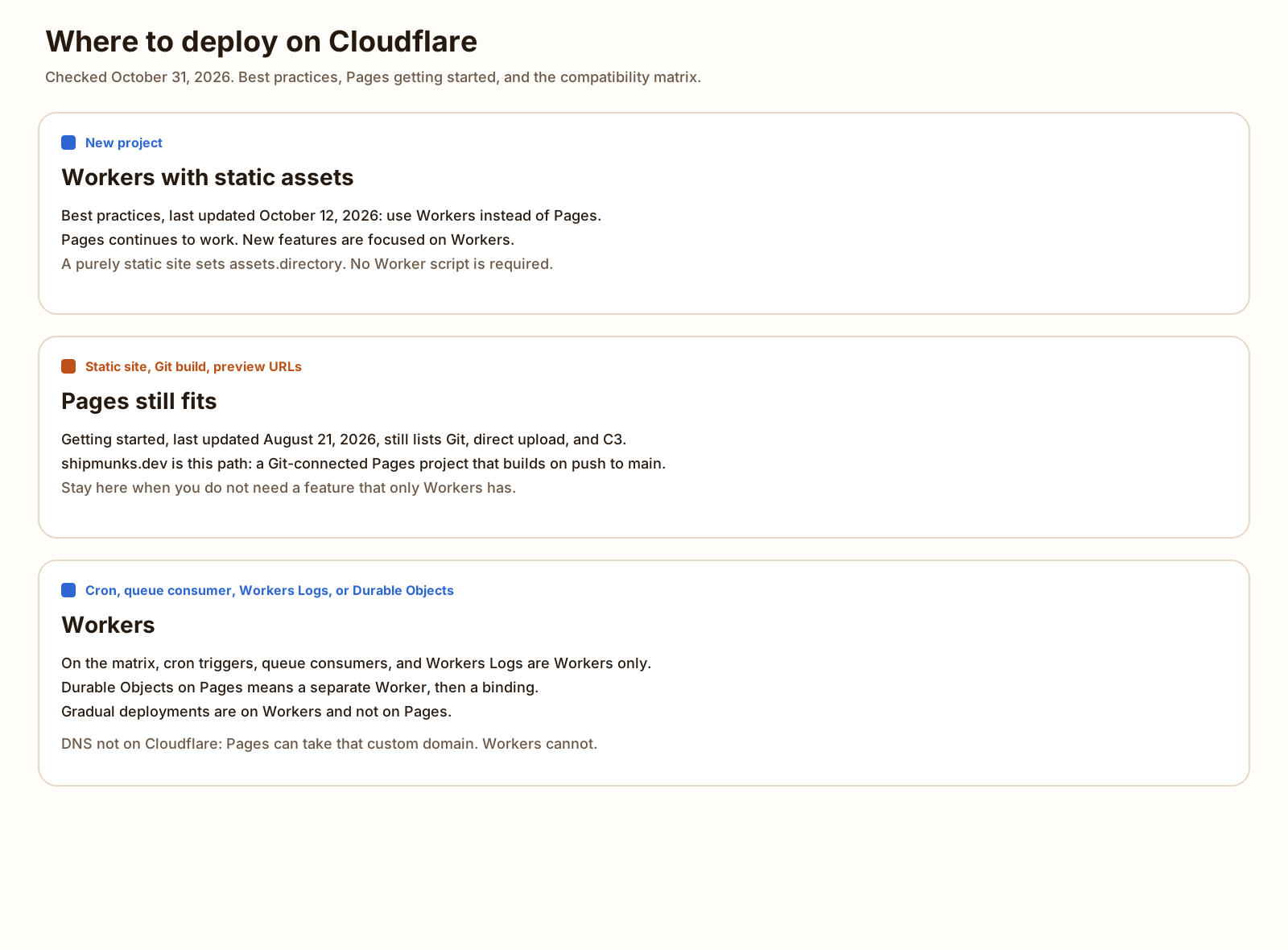
Cloudflare Workers vs Pages, for a new project, means Workers with static assets: that is what Cloudflare’s docs point you at. Pages still works, and it is the easier Git-push-and-preview path for a static site. Pick by whether you need a feature only Workers has.
What changed: Workers static assets vs Pages
People also search workers vs pages cloudflare. It lives on the backend and stack hub. The reader is deciding where to deploy a site or an app on Cloudflare in 2026.
The Workers best practices page, last updated October 12, 2026, and checked October 31, 2026, says this:
Workers Static Assets is the recommended way to deploy static sites, single-page applications, and full-stack apps on Cloudflare. If you are starting a new project, use Workers instead of Pages. Pages continues to work, but new features and optimizations are focused on Workers.
The same section says a purely static site points assets.directory at the build output, and that no Worker script is needed.
The Pages getting started page, last updated August 21, 2026, opens with “Are you sure you want to use Pages?” It says Workers is Cloudflare’s primary platform for building applications, and it says to start new projects with Workers. Under that, it still offers three Pages setup methods: the C3 CLI, direct upload, and Git integration.
I searched the Pages index, the getting started page, and the limits page for a deprecation notice. None of those pages say Pages is deprecated. The Pages index, last updated August 25, 2026, still describes the product, and its limits link says 500 deploys a month on the Free plan.
Most third-party comparisons of this choice are from 2021. They predate Workers static assets. The current Cloudflare docs are the ones above, plus the migrate from Pages guide, last updated October 12, 2026. That guide is the workers static assets vs Pages comparison Cloudflare publishes. It includes the compatibility matrix used in the next section.
Cloudflare Workers vs Pages, feature by feature
Every row is from that matrix unless the cell says otherwise. The matrix page was last updated October 12, 2026. I read it on October 31, 2026. A checkmark on the matrix is “supported.” A yellow mark is “unsupported, workaround available.”
| Feature | Workers | Pages |
|---|---|---|
| Git builds | Workers Builds. Both columns support monorepos, build watch paths, build caching, and deploy hooks. | Pages Git integration. Same four rows are supported. Branch deploy controls are fuller on Pages. Workers Builds can turn preview builds on, with less configuration. Footnote 4. |
| Preview URLs | Supported. A preview on your domain is the preview name, which defaults to the branch name, in front of your domain. Footnote 5. | Supported. The same footnote says you can point any hostname at a branch. Preview deployments are unlimited on the Pages limits page. |
| Functions and routing | One Worker script, or a framework that routes. A functions/ folder can be compiled into a Worker. Footnote 6. File-based routing is the yellow mark. | File-based routing in functions/ is supported. Pages plugins are supported. |
| KV, D1, R2 | All three bindings are supported. | All three bindings are supported. |
| Durable Objects | Supported. | Yellow. You create a separate Worker that owns the Durable Object, then bind it in production and in preview. Footnote 3. |
| Queues | Producers and consumers are supported. | Producers are supported. Consumers are not. |
| Cron triggers | Supported. | Not supported. |
| Logs | Workers Logs, Logpush, Tail Workers, real-time logs, and source maps are supported. | Real-time logs are supported. Workers Logs, Logpush, Tail Workers, and source maps are not. |
| File limits | Workers limits, last updated October 29, 2026: 20,000 files per version on Free, 100,000 on Paid, 25 MiB per file on both. | Pages limits, last updated September 5, 2026: 20,000 files on Free, 100,000 on paid plans if you set PAGES_WRANGLER_MAJOR_VERSION=4, 25 MiB per file. |
| Custom domains | Supported when Cloudflare manages the domain’s nameservers. A domain outside a Cloudflare zone is not supported. Routes can cover a path, not only the whole host. | Supported, including a custom domain whose nameservers are not Cloudflare. The migrate guide says Workers does not support that case. |
| Rollbacks | Supported. | Supported. |
Gradual deployments are another row on the same matrix: supported on Workers, not on Pages.
D1 is on both columns. What a local SQLite file costs next to a local Postgres, on one machine, is SQLite vs Postgres. That timing is not a D1 bill.
SQLite vs Postgres, timed on one machine 100,000 inserts, a dashboard query, and 1, 4, and 8 writers, measured locally. Not a D1 bill. BlogCloudflare Pages pricing and Workers pricing
Prices below are the vendor pages, checked October 31, 2026. Where a page gives no number, this section does not invent one. I did not open a Cloudflare invoice.
Static files are the part both products treat the same way. The Workers pricing page, last updated October 2, 2026, says requests to static assets are free and unlimited. The Pages Functions pricing page, last updated September 8, 2026, says the same for both free and paid plans, when the request does not invoke Functions.
Workers requests, from that Workers pricing page:
- Free: 100,000 requests a day, and 10 milliseconds of CPU time per invocation. No charge for duration.
- Paid: a $5 USD minimum a month for the account. 10 million requests included, then $0.30 per additional million. 30 million CPU milliseconds included, then $0.02 per additional million CPU milliseconds.
The Workers limits page, last updated October 29, 2026, lists the Free request cap as 100,000 a day and the Paid request row as no limit. The pricing page is the one that bills past 10 million. The limits page also lists 100 Workers on Free and 500 on Paid, and 5 cron triggers per account on Free.
A static asset request is not that Worker request. The static assets page says a URL that matches a file is served without invoking Worker code, when that is the default. The 10 millisecond CPU cap is for an invocation. This site’s config has no Worker script, so a matched file does not spend that cap. I did not measure a request against the quota.
Cloudflare Pages pricing, from the Pages limits page, last updated September 5, 2026:
- Free: 500 builds a month, 1 build at a time, a build timeout of 20 minutes.
- Pro: 5,000 builds a month, 5 concurrent builds.
- Business: 20,000 builds a month, 20 concurrent builds.
- Concurrent builds are counted per account.
- Free: 20,000 files. Paid plans: up to 100,000 files, after you set
PAGES_WRANGLER_MAJOR_VERSION=4. - One file: 25 MiB.
- Custom domains per project: 100 on Free, 250 on Pro, 500 on Business.
- Preview deployments: unlimited.
- Projects: 100 per account.
The Pages index calls the Free plan figure “500 deploys per month.” The limits table calls it “Builds per month.” I am using the table’s 500.
Workers pricing for Git is a different product. Workers Builds limits and pricing, last updated October 28, 2026:
- Free: 3,000 build minutes a month, 1 concurrent build, a 20 minute timeout.
- Paid: 6,000 build minutes a month, then $0.005 per minute, 6 concurrent builds, the same 20 minute timeout.
- Concurrent builds are the number that can run in parallel across an account.
Moving a Pages site onto Workers Builds does not keep the 500 build meter. It switches the meter to minutes. This post did not time a build, so it does not turn 3,000 minutes into a build count.
The sites on this account share the Pages plan’s 500 builds a month, so pushes are batched. That sharing is our record of the account, not a second number from the docs. The docs say the monthly build count depends on the plan, and that concurrent builds are counted per account. They do not print a sentence that says the 500 is shared. The plan limit is 500.
Pages Functions vs Workers
Cloudflare functions vs workers is this question. The product name is Pages Functions.
The Pages Functions page, last updated April 21, 2026, says Functions let you run code on the Cloudflare network with Cloudflare Workers. It says Workers runtime features are configurable on Pages Functions, including a subset of Node.js APIs and a compatibility date.
The pricing page then says requests to Functions are billed as Workers requests. On the Free plan, Functions requests and Workers requests draw on the same 100,000 a day. The page’s example is 50,000 of each. The cap resets at midnight UTC.
That is the sense in which Pages Functions are Workers. The runtime and the bill are Workers. The feature list is not. From the matrix in the section above: cron triggers, queue consumers, and Workers Logs are Workers, and they are not Pages. Durable Objects on Pages means a second Worker. File-based routing is the Pages shape. On Workers you write a script, use a framework, or compile the functions/ folder with wrangler pages functions build. The migrate guide says that compile command stays available, and it suggests a framework if you want to keep file-based routing. Hono is one framework with a Workers entry point. The same two JSON routes on Node, in Hono, Express, and Fastify, is a separate test. It was not deployed as a Worker. Choosing Bun or Node for a handler is Bun vs Node, measured on localhost. That run was not deployed either.
A full-stack app that needs those Workers-only rows should start on Workers. A static site that never invokes a Function does not pay the request quota for the HTML, on either product, per the pricing pages above.
The bundle size of an ORM is a different measurement. Drizzle vs Prisma timed one schema on this machine. That bundle was not deployed as a Worker.
Drizzle vs Prisma: bundle size and migrations, measured The minified bundle was 71,691 bytes for Drizzle and 4,679,321 bytes for Prisma. Not a Worker deploy. BlogHow shipmunks.dev and ContextBolt run
shipmunks.dev is a static Astro site. On October 31, 2026 it moved from Cloudflare Pages deployed by a GitHub Actions direct-upload workflow to a Git-connected Cloudflare Pages project named shipmunks. That project builds on every push to main. Preview deployments are off. The direct-upload workflow is disabled. GitHub Actions minutes ran out the same day. Do not turn that workflow back on.
The Pages Free plan lists 500 builds a month. The sites on this account share that budget, so pushes to this repo are batched. A failed build is a fix and a new push, not an empty commit. The README in this repo is the record of that rule.
ContextBolt’s APIs run as Cloudflare Workers. The Worker names are contextbolt-seo, contextbolt-worker, and contextbolt-analytics. contextbolt.com itself is a Pages project. This post does not link to it. There is no article there that answers this question.
The database behind an API is a separate choice from the host that serves the HTML. Neon vs Supabase is the hosted Postgres bill. This post did not open either database.
I fetched https://shipmunks.dev/ twice on October 31, 2026. Both responses were HTTP 200, content-type: text/html; charset=utf-8, cache-control: public, max-age=3600, server: cloudflare, and cf-cache-status: DYNAMIC. The response date on both was Sat, 31 Oct 2026 16:13:35 GMT. The two cf-ray values ended in IAD. I did not see a HIT.
Moving a Pages site to Workers static assets
This site’s build output is dist. Astro writes a folder of index.html files, because trailingSlash is always, and it writes 404.html for unknown paths. The static site generation page, last updated August 25, 2026, is the matching config: not_found_handling of 404-page, and html_handling of auto-trailing-slash.
404-page serves the nearest 404.html with status 404 when the path is not a file. auto-trailing-slash is the default. The same page says a folder index.html is served with a trailing slash, and a bare foo.html is served without one. That is how this site already works.
There is no Worker script. Best practices says a purely static site does not need one.
The file is not at the root of this repo. The migrate guide says to put wrangler.jsonc in the project root, and a Pages project can already carry a Wrangler file there for pages_build_output_dir. A root file is what the Pages build would pick up. This copy lives only under public/templates/cloudflare-workers-static-assets/. The live Pages project does not read it.
Download wrangler.jsonc. The notes are in the README. Both are listed on Templates.
{
  "name": "shipmunks",
  "compatibility_date": "2026-10-31",
  "assets": {
    "directory": "./dist",
    "not_found_handling": "404-page",
    "html_handling": "auto-trailing-slash"
  }
}
name matches the Pages project. The migrate guide says the Worker name can be the same as the Pages project name. A real wrangler deploy would publish a Worker of that name. I did not run one.
Copy the file to a project root only when that project is ready to leave Pages. Then build, then run a dry run from that root. The command I ran is below. It used a copy of this file in a temp directory, with dist linked at the site that npm run build had just written. The config text is the one in the download.
After a real cutover, a new URL still has to be fetched. The order is how to get a new website indexed by Google. If Search Console says the sitemap could not be read, start with Sitemap could not be read.
What we tested
Checked
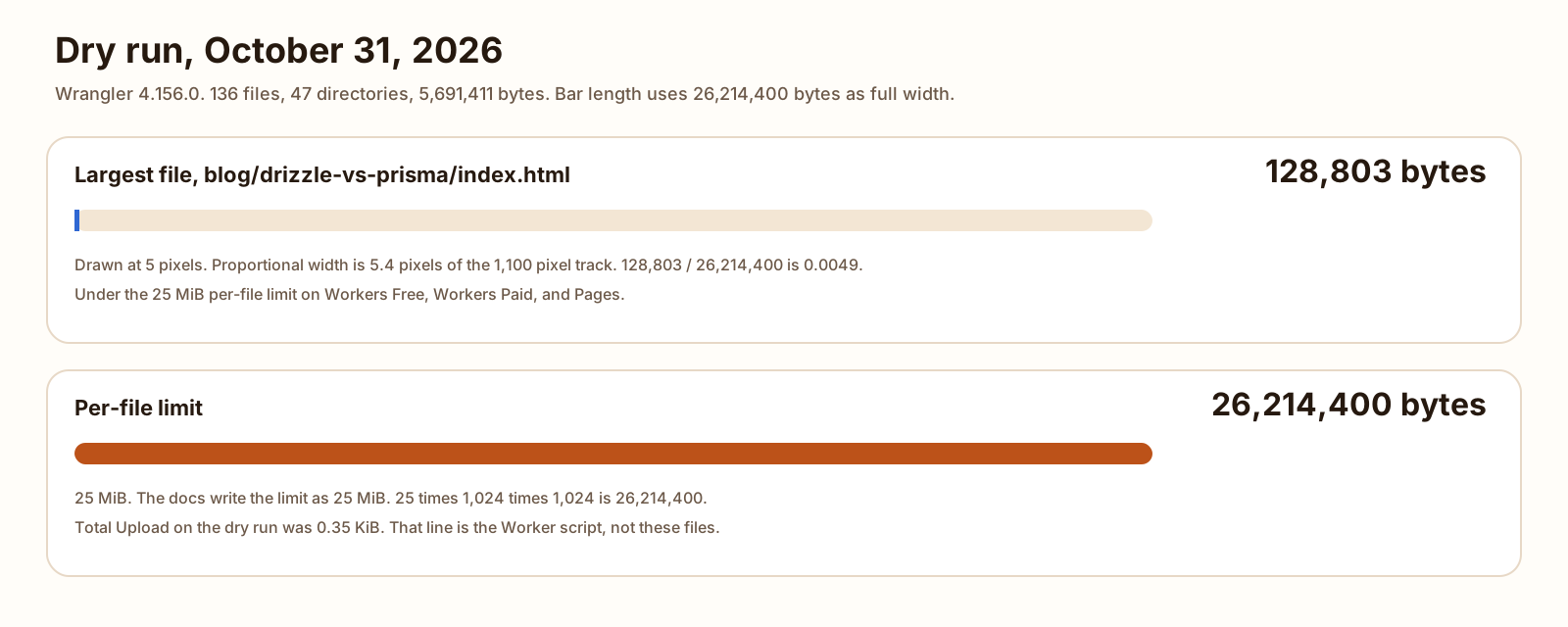
npm run build wrote dist. I counted every file under dist with Python, summing os.path.getsize. There were 136 files and 47 directories. I did not use du, because a block size would change the total. Wrangler 4.156.0 printed “Read 183 files.” A debug log of the same command listed 183 paths, and those paths are the 136 files plus the 47 directories. The dry run was npx wrangler deploy --dry-run from /tmp/shipmunks-assets-dry-run, with this wrangler.jsonc and a symlink named dist pointing at the built site. CI was set so the CLI would not open a login prompt. No Cloudflare token was set. Nothing was deployed.
| Measurement | Result |
|---|---|
| Wrangler | 4.156.0 |
| Files in dist | 136 |
| Directories in dist | 47 |
| Paths in the “Read 183 files” line | 183, the 136 files plus the 47 directories |
| Sum of file sizes | 5,691,411 bytes |
| Largest file | blog/drizzle-vs-prisma/index.html, 128,803 bytes |
| Per-file limit | 25 MiB, which is 26,214,400 bytes, on Workers Free, Workers Paid, and Pages |
| Not uploaded as files | _headers is 1,993 bytes and _redirects is 918 bytes. Wrangler printed Ignoring asset for each. |
| Total Upload | 0.35 KiB / gzip 0.25 KiB. That line is the Worker script. This config has no main script. It is not the size of the asset files. |
-
136
Files in dist
-
5,691,411
Sum of file sizes, bytes
-
128,803
Largest file, bytes
 ⛅️ wrangler 4.156.0
────────────────────
✨ Read 183 files from the assets directory /tmp/shipmunks-assets-dry-run/dist
Total Upload: 0.35 KiB / gzip: 0.25 KiB
No bindings found.
--dry-run: exiting now.
Which one to pick
- A new project: Workers with static assets. That is the sentence on the best practices page and on Pages getting started.
- A static site, Git push, preview URLs, and you do not need cron, a queue consumer, Workers Logs, or Durable Objects in this project: Pages still does that. It is what shipmunks.dev uses.
- You need cron, a queue consumer, or Workers Logs: Workers. Those rows are not on Pages.
- You need Durable Objects in the same project: Workers. On Pages the matrix says to add a separate Worker and bind it.
- The domain’s nameservers are not Cloudflare: Pages can attach that custom domain. The migrate guide says Workers cannot.
- You are near the plan’s 500 builds a month: batch the pushes. Moving to Workers Builds changes the meter to minutes, 3,000 a month on Free, which is not a larger copy of 500.
- You already have a static Pages site and it is inside the file limits: staying is fine. The config above is the move, when you want it. This site has not made that move.
FAQ
Is Cloudflare Pages being deprecated?
Not on the pages checked October 31, 2026. The Pages index, getting started, and limits pages do not say deprecated. Getting started, last updated August 21, 2026, still lists Git, direct upload, and the C3 CLI, and it tells you to start new projects on Workers. Workers best practices, last updated October 12, 2026, says Pages continues to work, and that new features are focused on Workers.
Are Pages Functions just Workers?
They run on the Workers runtime, and the Pages Functions pricing page bills them as Workers requests. On the Free plan the daily quota is shared. That page’s own example is 50,000 Functions requests plus 50,000 Workers requests against the 100,000 requests a day. The feature lists are not the same. On the compatibility matrix, cron triggers, queue consumers, and Workers Logs are on Workers and not on Pages.
Is Cloudflare Pages free?
The Free plan lists 500 builds a month, one build at a time, a 20 minute timeout, 20,000 files, and a 25 MiB cap on one file. Requests to static assets are free and unlimited when they do not invoke Functions. Functions requests count toward the Workers Free quota of 100,000 requests a day, which resets at midnight UTC.
Can a Worker host a static site?
Yes. Workers best practices says that for a purely static site you point assets.directory at the build output, and that no Worker script is needed. The dry run in this post is that config for shipmunks.dev. It was not deployed.
Cloudflare Workers vs Pages pricing?
Static asset requests are free and unlimited on both, on the pages checked October 31, 2026. Pages Free lists 500 builds a month. Workers Free lists 100,000 requests a day, and a static asset request is not one of those. Workers Paid has a $5 minimum a month. Git builds on Workers are a different meter: Workers Builds lists 3,000 build minutes a month on Free, not 500 builds.
Cloudflare Workers vs Vercel?
This post does not compare them. Vercel is a different host, with its own build product and its own price page. The decision here is which Cloudflare product deploys the site.
Sources
- Workers Best Practices (Cloudflare) Checked
- Pages getting started (Cloudflare) Checked
- Pages product page (Cloudflare) Checked
- Migrate from Pages to Workers (Cloudflare) Checked
- Workers static assets (Cloudflare) Checked
- Static site generation routing (Cloudflare) Checked
- Workers pricing (Cloudflare) Checked
- Workers limits (Cloudflare) Checked
- Pages limits (Cloudflare) Checked
- Pages Functions (Cloudflare) Checked
- Pages Functions pricing (Cloudflare) Checked
- Workers Builds limits and pricing (Cloudflare) Checked