
Node v26.13.0 and Bun 1.4.4, one JSON route, one cloud VM, November 3, 2026. Throughput on the empty handler is close. Install time and peak RSS are not.
On this page
The short answer
Bun vs Node on this VM is not a reason to switch an empty HTTP handler. Bun.serve’s median was 115,877.82 requests a second and node:http on Node was 115,697.46, and the three-run ranges overlap. bun vs node memory usage did separate them: peak RSS was 39,316 kB for Bun.serve and 110,272 kB for node:http. Use Bun as the package manager when install time is the pain, and stay on Node for the server until a route you actually ship says otherwise.
This is the bun vs node 2026 test: November 3, 2026, from 16:17:46 UTC to 16:21:35 UTC, on one cloud VM. It lives on the backend and stack hub. The reader is deciding whether to move a Node project onto Bun, or to keep Node and use Bun only to install packages.
bun vs node performance, on the empty GET /json handler, is a tie for any decision I would make. The medians differ by 180.36 requests a second. The ranges overlap. bun vs npm is not a tie. On a copy of this site’s lockfile, with the cache cleared before every run, bun install’s median was 319.039 ms and npm install’s was 3,062.396 ms.
The earlier framework test on this class of machine is Hono vs Express. That run was Node v22.23.4 only. It did not time Bun. The numbers below do not replace it. They answer a different question: the runtime, not the framework.
Benchmark setup
The machine, from /proc/cpuinfo, /proc/meminfo, and lscpu: model name Intel(R) Xeon(R) Processor, 4 processors, kernel 6.12.94+, MemTotal 16,387,280 kB. lscpu reported hypervisor vendor KVM. Nothing pinned the cores. Another guest on the same host can take time. The servers did not run at once. A rerun will not match these medians.
Node was v26.13.0. process.release.lts was Lithium. npm was 11.20.0. The Node.js releases page, read November 3, 2026, lists v26 Lithium as LTS, last updated October 28, 2026. The same table still lists v22 and v24 as LTS. The v26.13.0 release notes say that version is the LTS transition, codename Lithium, with updates through the end of April 2029, and that Linux binaries since Node 25 link against libatomic. This VM already had libatomic1, and the binary started. This VM’s older node binary is v22.23.4. The benchmark did not use it. I installed v26.13.0 from nodejs.org/dist and pointed the script at that binary.
Bun was 1.4.4, revision 1.4.4+38afee6c8, from the official install script. The Bun v1.4.4 post is dated October 22, 2026. npm view and npm ls agreed on express 5.3.0 and autocannon 8.0.0. Express’s engines.node, from npm view, is >= 18.
The handler is one route. GET /json returns {"message":"hello","ok":true}, 29 bytes. Five servers, one after another:
http.mjsunder Node,node:httpbun-serve.mjsunder Bun,Bun.serveexpress.mjsunder Node- the same
express.mjsunder Bun - the same
http.mjsunder Bun
The load generator was autocannon inside the Node v26.13.0 process, for every server, including the Bun ones. One warmup of 10 seconds at 100 connections, then three measured runs with the same settings. Pipelining is 1. The timeout is 10 seconds. The median is the middle of the three measured requests.average values. p99 is the middle of the three latency.p99 values. The warmup is in the CSV and is not in the median. Every run, warmup included, had 0 errors, 0 timeouts, and 0 non-2xx responses.
autocannon’s own duration on these runs was 10, 10.01, 11, or 11.01 seconds, even though the setting was 10. The req/s column is requests.average. I did not divide the total by 10.
The probe before each series required status 200 and that JSON, parsed. The raw body was 29 bytes on all five. The headers did not all match, because I left Express’s defaults on. node:http and Bun.serve sent content-type: application/json; charset=utf-8 and content-length: 29, and nothing else that the probe recorded. Both Express processes sent those two plus etag: W/"1d-EUKbljZfjWuxwQ/VsJGEB4SSsUg" and x-powered-by: Express. The etag string was the same on Node and on Bun. I did not turn the etag off.
Peak RSS is VmHWM from /proc/<pid>/status after that server’s warmup and three measured runs. Idle RSS is VmRSS after listen, before the warmup. Both are kilobytes, as the file prints them.
The script is scripts/benchmarks/bun-vs-node/bench.mjs. Work files go to /tmp/bun-vs-node-bench unless BENCH_WORK is set. The rows from this run are the benchmark CSV. Notes on the files are in the README. The same files are on Templates.
HTTP throughput results
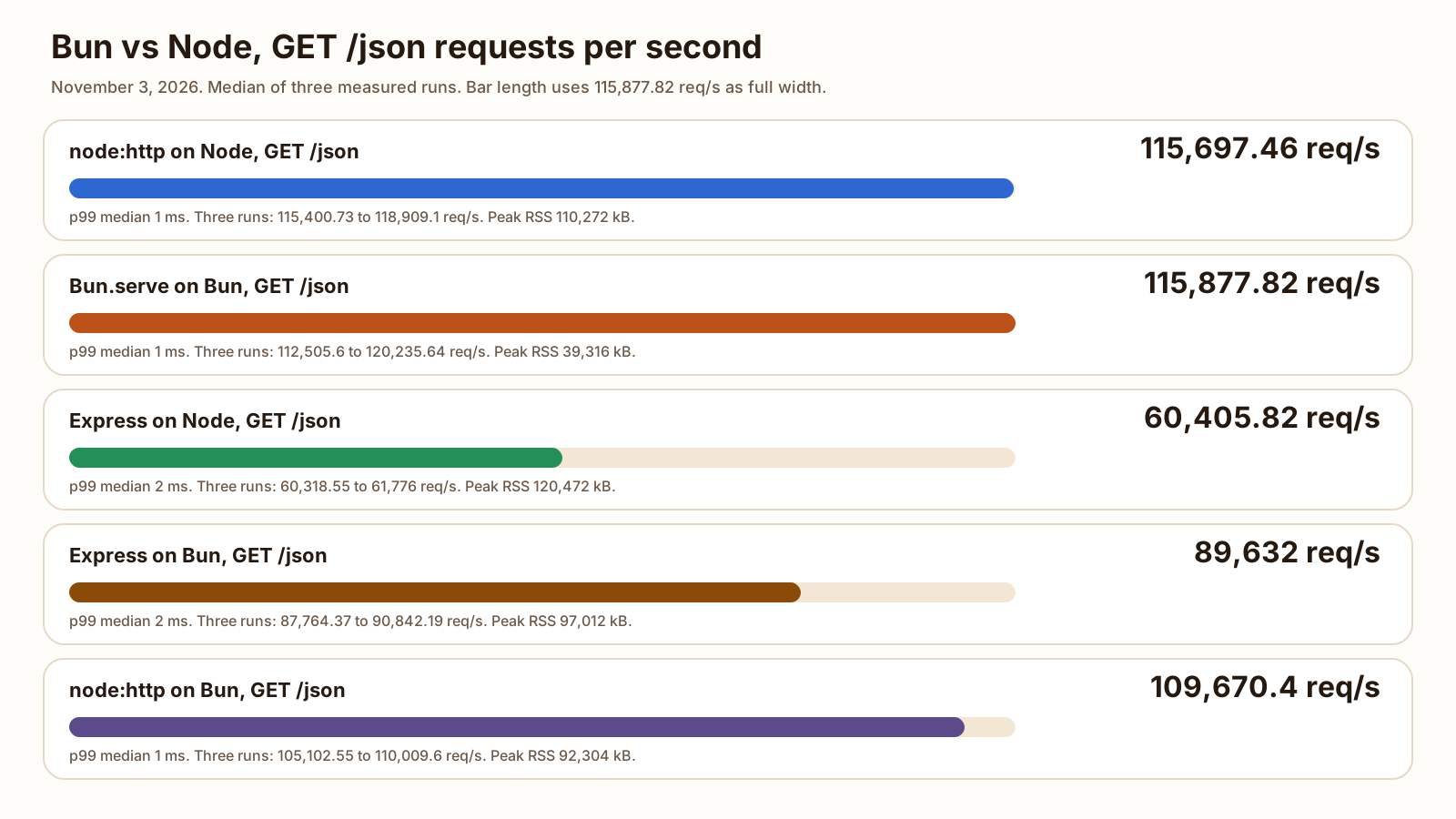
bun vs node performance, in the table, is the median of three measured runs. bun vs node memory usage is the VmHWM column, same process, after the warmup and the three runs.
| Server | Median req/s | Run range | Median p99 | Peak RSS |
|---|---|---|---|---|
| node:http on Node v26.13.0 | 115,697.46 | 115,400.73 to 118,909.1 | 1 ms | 110,272 kB |
| Bun.serve on Bun 1.4.4 | 115,877.82 | 112,505.6 to 120,235.64 | 1 ms | 39,316 kB |
| Express 5.3.0 on Node | 60,405.82 | 60,318.55 to 61,776 | 2 ms | 120,472 kB |
| Express 5.3.0 on Bun | 89,632 | 87,764.37 to 90,842.19 | 2 ms | 97,012 kB |
| node:http file on Bun | 109,670.4 | 105,102.55 to 110,009.6 | 1 ms | 92,304 kB |
-
115,697.46
node:http on Node, median req/s
-
115,877.82
Bun.serve, median req/s
-
39,316 kB
Bun.serve peak RSS, VmHWM
-
110,272 kB
node:http on Node, peak RSS, VmHWM
115,877.82 divided by 115,697.46 is 1.002, to three decimal places. Bun.serve’s three runs sat between 112,505.6 and 120,235.64. node:http on Node sat between 115,400.73 and 118,909.1. Those intervals overlap. The median says Bun.serve, by 180.36 requests a second. The spread says this VM does not know.
The same http.mjs file is a different result. On Bun its median was 109,670.4, between 105,102.55 and 110,009.6. Node’s lowest run of that file was 115,400.73. The ranges do not overlap. 115,697.46 divided by 109,670.4 is 1.055, to three decimal places. Pointing Bun at the Node HTTP file did not make it faster here.
Express is the gap inside one runtime, and again across runtimes. 115,697.46 divided by 60,405.82 is 1.915, to three decimal places. Express on Node never cleared 61,776. node:http on Node never fell to 115,400. 89,632 divided by 60,405.82 is 1.484. Express on Bun stayed between 87,764.37 and 90,842.19. Express on Node stayed between 60,318.55 and 61,776. Those ranges do not overlap. Express on Bun still sat under the node:http-on-Bun range, which started at 105,102.55.
p50 was 0 ms on every node:http run and every Bun.serve run, and 1 ms on every Express run. p99 was 1 ms on the raw handlers and 2 ms on both Express servers, and every measured run landed on that integer. autocannon’s 0 ms bucket means under 1 ms. It does not mean the latency was zero.
Idle RSS, before the warmup, was 62,680 kB for node:http on Node, 19,640 kB for Bun.serve, 68,852 kB for Express on Node, 45,100 kB for Express on Bun, and 26,024 kB for the node:http file on Bun. The low peak belongs to Bun.serve, not to every process Bun starts. The same HTTP file on Bun peaked at 92,304 kB. 110,272 divided by 39,316 is 2.80, to two decimal places. That is Bun.serve against node:http on Node, on this VM, with autocannon in another process. It is not a production heap profile.
This handler does no I/O. If the time is an ORM and a local database, that measurement is Drizzle vs Prisma. If the time is the database itself, that measurement is SQLite vs Postgres. Neither of those posts ran Bun.
These are the three files the HTTP section ran. Download http.mjs. Download bun-serve.mjs. Download express.mjs. The ports differ because the script started them one after another. A real app picks one port.
import { createServer } from 'node:http';
import { writeSync } from 'node:fs';

const port = Number(process.env.PORT || 3111);
const body = JSON.stringify({ message: 'hello', ok: true });

const server = createServer((req, res) => {
  if (req.method === 'GET' && req.url === '/json') {
    res.writeHead(200, {
      'content-type': 'application/json; charset=utf-8',
      'content-length': Buffer.byteLength(body),
    });
    res.end(body);
    return;
  }
  res.writeHead(404);
  res.end();
});

server.listen(port, '127.0.0.1', () => {
  writeSync(1, `listening ${port}\n`);
});import { writeSync } from 'node:fs';
const port = Number(process.env.PORT || 3112);
const body = JSON.stringify({ message: 'hello', ok: true });
const server = Bun.serve({
hostname: '127.0.0.1',
port,
fetch(req) {
const url = new URL(req.url);
if (req.method === 'GET' && url.pathname === '/json') {
return new Response(body, {
headers: {
'content-type': 'application/json; charset=utf-8',
'content-length': String(Buffer.byteLength(body)),
},
});
}
return new Response(null, { status: 404 });
},
});
writeSync(1, `listening ${server.port}\n`);The Bun.serve page, read the same day, also shows a routes object. This file uses fetch. I did not time routes.
import { writeSync } from 'node:fs';
import express from 'express';

const port = Number(process.env.PORT || 3113);
const app = express();

app.get('/json', (_req, res) => {
  res.json({ message: 'hello', ok: true });
});

const server = app.listen(port, '127.0.0.1', () => {
  writeSync(1, `listening ${port}\n`);
});
The signal handlers that shut the processes down are in the downloadable files. They are not part of the timed route.
Install and test speed (bun vs npm)
bun vs npm, in this section, is a cold install of one real project: a copy of this repo’s package.json and package-lock.json. The script hashed the lockfile before the runs. Each run used a fresh directory. Before every npm run the script executed npm cache clean --force. Before every bun run it executed bun pm cache rm. The command was npm install or bun install, with no extra flags. The clock is hrtime around the process. Three runs each, alternating, so a slow stretch of network would hit both. The median is the middle wall time.
I did not capture packets, so I am not claiming every byte came off the public network. I am claiming the caches were cleared and the directories started empty.
| Command | Median | Run range | node_modules |
|---|---|---|---|
| npm install | 3,062.396 ms | 3,024.204 to 3,111.148 ms | 149,751,958 bytes |
| bun install | 319.039 ms | 310.090 to 379.964 ms | 149,585,244 bytes |
The table rounds the stored floats to 0.001 ms. The CSV has the full values. 3,062.395934 divided by 319.038572 is 9.60, to two decimal places.
Both tools reported 350 packages. The nine direct versions matched on every run: @astrojs/mdx 5.0.6, @astrojs/rss 4.0.19, @astrojs/sitemap 3.7.4, astro 6.4.8, satori 0.26.0, satori-html 0.3.2, sharp 0.34.5, js-yaml 4.3.2, tsx 4.23.15. du -sb was 149,751,958 bytes after every npm run and 149,585,244 bytes after every bun run. The difference is 166,714 bytes. I did not diff the trees file by file.
package-lock.json did not change. Bun wrote bun.lock at 118,367 bytes on every run, and its log said it migrated the lockfile from package-lock.json (1.70 ms, 1.75 ms, and 1.80 ms on the three runs). That line is the migration, not the install. bun vs yarn was not timed. This repo has no yarn.lock. The Bun 1.4.4 notes say bun install can convert a Yarn 2+ lockfile. That path did not run here. pnpm vs npm on install time and disk use is the later run, with Yarn classic and pnpm on this same package.json.
npm’s own summary said “added 350 packages, and audited 351 packages in 3s” on each run. The wall clock is the number in the table, not that rounded “3s”. The same output said “5 vulnerabilities (1 low, 2 moderate, 1 high, 1 critical)”. I did not open the audit. npm also warned that install scripts for [email protected], [email protected], and [email protected] were not covered by allowScripts. The exit code was still 0. Both trees contained @img/sharp-linux-x64. I did not start the site from either tree, and I did not approve the scripts and time a second install.
The test clock is a small suite written for this comparison, suite.test.mjs. It is not this site’s build. One test checks that the JSON body is 29 bytes. Thirty-two tests hash a 64 KiB buffer twice and compare the digests. 33 tests. The commands were node --test and bun test on that file. One warmup, then three measured runs. Wall time is GNU time’s elapsed line, from /usr/bin/time -v, which prints a hundredth of a second. The runner’s own timer is Node’s duration_ms and the last [...ms] line Bun prints.
| Command | GNU time, every measured run | Runner timer, median | Runner timer range | Max RSS, median |
|---|---|---|---|---|
| node --test | 0.08 s | 58.970 ms | 57.928 to 62.425 ms | 63,896 kB |
| bun test | 0.01 s | 18 ms | 17 to 18 ms | 28,824 kB |
Node’s three duration_ms values were 57.928117, 58.969832, and 62.425485. The median is 58.969832, shown above to 0.001 ms. Bun’s three summary times were 18 ms, 17 ms, and 18 ms. GNU time printed 0:00.08 for every measured Node run and 0:00.01 for every measured Bun run. A hundredth of a second cannot separate 17 ms from 10 ms, so I am not turning 0.08 and 0.01 into an 8x claim. The warmup printed 0:00.09 for Node and 0:00.02 for Bun. On the runners’ own timers, 58.969832 divided by 18 is 3.28, to two decimal places. Both finish in well under a tenth of a second. I would not switch a project for this suite.
GNU time’s “Maximum resident set size” was 64,420 kB, 63,860 kB, and 63,896 kB for the measured Node runs, median 63,896 kB. Bun’s were 28,824 kB, 28,696 kB, and 28,824 kB, median 28,824 kB. That is the test command, not the HTTP server. Node’s runner may spawn a child. The figure is whatever GNU time reported for the command I passed it.
Compatibility: what still breaks
The Bun docs, read November 3, 2026, call Bun a drop-in replacement for Node.js and say Node.js compatibility is an ongoing effort. The compatibility page says it reflects Bun’s compatibility with Node.js v26, and that Express is one of the frameworks that work. The Express guide says Express should work without changes, because Bun implements node:http.
The Express file above is the check I actually ran. It listened, it returned the same body and the same etag, and autocannon recorded no errors. That is one route. It is not a middleware port. Hono vs Express is the framework comparison on Node, including what does not paste across.
Two checks failed on Bun in the way that page describes.
import('node:sea') on Node v26.13.0 exited 0 and printed default,getAsset,getAssetAsBlob,getAssetKeys,getRawAsset,isSea. The same import on Bun exited 1 and printed ERR_UNKNOWN_BUILTIN_MODULE No such built-in module: node:sea. The compatibility page marks node:sea as not implemented and points at bun build --compile instead. I did not run that build.
http.Server.prototype instanceof net.Server was true on Node, with process.version of v26.13.0. It was false on Bun. Bun’s process.version was v26.3.0, and process.versions.bun was 1.4.4. The compatibility page says http.Server does not extend net.Server. Code that assumes the Node prototype chain will not see it on Bun. I did not search an app for that assumption. I only ran the check.
This was localhost. Where a process would be deployed, Workers or Pages, is a separate choice. I did not deploy either server.
When to switch and when to stay on Node
Switch the install, not the server, when the pain is install time and the app already runs on Node. That is the result this page separates cleanly: about 3,062 ms against about 319 ms, same direct versions, 350 packages, on this lockfile.
- The app is already Node, and installs are the slow part: use
bun install, and leave the server on Node. This run did that split. Read the install-script warning above before you trust a native module you have not started. - The server is
node:httporBun.servereturning a tiny JSON body, and you want more requests a second: stay. The ranges overlap. If the process RSS is the constraint, Bun.serve was the small one here, 39,316 kB peak against 110,272 kB, idle 19,640 kB against 62,680 kB. - You plan to change nothing but the binary, and keep
http.mjs: on this VM that file was slower on Bun, and the ranges did not overlap. Measure your file. Do not assume Bun.serve’s number transfers to it. - The server is Express and the handler is this empty route: Express on Bun was faster here, 89,632 against 60,405.82, and its peak RSS was 97,012 kB against 120,472 kB. A stack of Express middleware was not in the test.
- You import
node:sea, or you needhttp.Serverto be anet.Server: stay on Node. Both checks failed on Bun 1.4.4. - The time goes to a database or an ORM: stay until you have measured that path. The empty JSON body is not that path.
- The host is Cloudflare Workers or Pages: this page did not deploy. The host choice is the other post.
FAQ
Is Bun faster than Node?
Not on the empty handler. Bun.serve’s median was 115,877.82 requests a second and node:http on Node was 115,697.46. The three-run ranges overlap, so this VM does not pick a winner there. Express on Bun was faster than Express on Node, 89,632 against 60,405.82, and those ranges do not overlap. The same node:http file was slower on Bun than on Node, 109,670.4 against 115,697.46, and those ranges do not overlap either. bun install was faster than npm install. Faster depends on which clock you mean.
Can Bun run Express?
This file, yes. express.mjs on Bun 1.4.4 returned the same 29-byte JSON as Express on Node v26.13.0, with the same etag and the same X-Powered-By header. Every autocannon run, warmup included, had 0 errors, 0 timeouts, and 0 non-2xx responses. The Express guide on Bun’s site, read November 3, 2026, says Express should work without changes. I did not mount middleware, and I did not port an existing app.
Is Bun production ready?
I did not run a production app, so this page is not a sign-off. The Node.js compatibility page, read November 3, 2026, says compatibility is ongoing and that the page tracks Node.js v26. Two checks matched that page. import of node:sea succeeded on Node and failed on Bun with ERR_UNKNOWN_BUILTIN_MODULE. http.Server extends net.Server was true on Node and false on Bun. Bun’s process.version string was v26.3.0 while bun --version was 1.4.4. The one Express route did run.
Bun vs npm: can I use Bun just as a package manager?
Yes. That is the split this run actually supports. bun install’s median wall time was 319.039 ms and npm install’s was 3,062.396 ms, three cold runs each, on a copy of this site’s package.json and package-lock.json. The nine direct dependency versions matched. The HTTP servers stayed on whichever runtime the table names. You do not have to move the server to get the install result. npm 11.20.0 printed that three install scripts were not approved, and the command still exited 0.
Sources
- Node.js Releases Checked
- Node.js 26.13.0 (LTS) Checked
- HTTP (Node.js) Checked
- Bun docs Checked
- Node.js compatibility (Bun) Checked
- Bun.serve (Bun) Checked
- Build an HTTP server using Express and Bun Checked
- Bun v1.4.4 Checked
- autocannon on npm Checked
- express on npm Checked