
Node v22.23.4, pnpm 12.16.1, npm 10.9.9, Yarn classic 1.22.22, and Bun 1.4.4. One package.json, November 5, 2026. Cold install time and the on-disk total do not rank the tools the same way.
On this page
The short answer
pnpm vs npm on this VM favors pnpm for a new JavaScript project. The cold median was 882.225 ms for pnpm install and 3,532.106 ms for npm install, and the combined apparent disk was 129,579,126 bytes against 204,116,353. Use pnpm when you want the strict node_modules, where a package the app did not declare does not resolve. Bun install was faster, at 301.230 ms cold, and Yarn classic was slower, with the large cache.
This test ran on November 5, 2026, from 16:13:03 UTC to 16:14:34 UTC, on one cloud VM. pnpm vs yarn is the same run, using Yarn classic 1.22.22, and bun install is in it too. The project is a copy of this site’s package.json, nine direct dependencies, no lockfile copied in. It lives on the backend and stack hub. This is one VM and one project. Results vary.
The nine resolved versions matched on all four tools: @astrojs/mdx 5.0.6, @astrojs/rss 4.0.19, @astrojs/sitemap 3.7.4, astro 6.4.8, satori 0.26.0, satori-html 0.3.2, sharp 0.34.5, js-yaml 4.3.2, tsx 4.23.15. npm said it added 349 packages and audited 350. pnpm and bun each said 346. I did not reconcile that gap of three.
Install speed
The machine, from /proc/cpuinfo, /proc/meminfo, and lscpu: model name Intel(R) Xeon(R) Processor, 4 processors, kernel 6.12.94+, MemTotal 16,387,280 kB, hypervisor vendor KVM. Nothing pinned the cores. Another guest on the same host can take time. The four installs in a round did not run at once. A rerun will not match these medians.
Node was v22.23.4. npm was 10.9.9. pnpm was 12.16.1, activated with corepack. Yarn was 1.22.22, Yarn classic, also from corepack. Bun was 1.4.4, revision 1.4.4+38afee6c8. The package.json sha256 was df89fa2137a88401d7f672d1e36d950cec1554c41668684aeabe14d8681fc6ba.
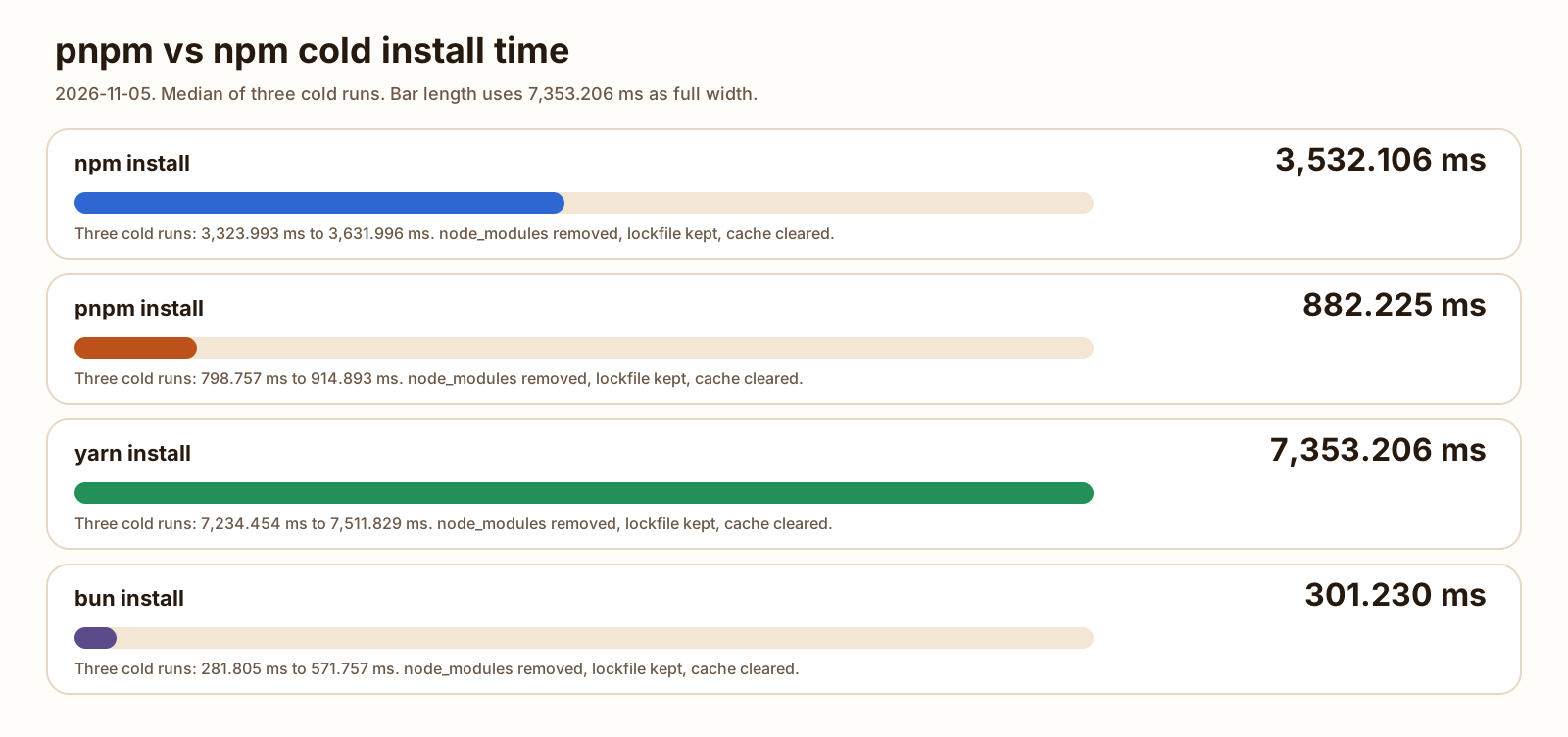
Each tool got its own copy of that package.json and wrote its own lockfile once, before the clock started. Timed runs kept the lockfile. Cold runs deleted that tool’s store or cache, then deleted node_modules. Warm runs left the store or cache in place and deleted node_modules again. Three cold runs, then three warm runs, round-robin: npm, pnpm, yarn, bun. The median is the middle wall time. The clock is hrtime around the child process, so it includes npm’s audit and any lifecycle script the command actually ran.
The commands were:
npm install --cache <work>/npm/cache
pnpm install --allow-build esbuild --allow-build sharp --store-dir <work>/pnpm/store --state-dir <work>/pnpm/state
yarn install --cache-folder <work>/yarn/cache --non-interactive
BUN_INSTALL_CACHE_DIR=<work>/bun/cache bun install
pnpm 12.16.1 exits 1 after it links packages when a build script is not approved. A separate one-run pnpm install, same lockfile, fresh store, no allow-build flag, exited 1 with ERR_PNPM_IGNORED_BUILDS for [email protected], [email protected], and [email protected]. Wall time on that single run was 767.155 ms. require('sharp') from that project still returned a function, and require('esbuild') from the [email protected] folder inside node_modules/.pnpm still printed 0.27.7. The timed pnpm command names those two packages so the exit code is 0, which is what npm, Yarn classic, and bun did with no extra flag. The script is scripts/benchmarks/pnpm-vs-npm/bench.mjs. Work files go to /tmp/pnpm-vs-npm-bench unless BENCH_WORK is set. Every row is the benchmark CSV. Notes are in the README.
| Command | Cold median | Cold range | Warm median | Warm range |
|---|---|---|---|---|
| npm install | 3,532.106 ms | 3,323.993 to 3,631.996 ms | 2,402.260 ms | 2,388.420 to 2,445.913 ms |
| pnpm install | 882.225 ms | 798.757 to 914.893 ms | 313.034 ms | 309.973 to 349.538 ms |
| yarn install | 7,353.206 ms | 7,234.454 to 7,511.829 ms | 1,365.702 ms | 1,360.491 to 1,596.918 ms |
| bun install | 301.230 ms | 281.805 to 571.757 ms | 43.659 ms | 43.065 to 47.020 ms |
-
882.225 ms
pnpm cold median, hrtime
-
3,532.106 ms
npm cold median, hrtime
-
301.230 ms
bun cold median, hrtime
-
7,353.206 ms
Yarn classic cold median, hrtime
3,532.106 divided by 882.225 is 4.004, to three decimal places. 882.225 divided by 301.230 is 2.929. 7,353.206 divided by 882.225 is 8.335. On the warm clock, 2,402.260 divided by 313.034 is 7.674, and 313.034 divided by 43.659 is 7.170. The four cold ranges do not overlap. The four warm ranges do not overlap. The order on this VM is bun, then pnpm, then npm, then Yarn classic, on both clocks.
Bun’s own line on the cold median run said 346 packages installed [295.00ms]. pnpm’s own line on its cold median run said Done in 755ms. Yarn’s own line on its cold median run said Done in 7.18s. npm’s own line said in 3s. The table is hrtime, not those rounded lines.
npm printed 5 vulnerabilities (1 low, 2 moderate, 1 high, 1 critical) on every cold run. I did not open the audit. The Yarn classic install page, read the same day, says Yarn runs an audit when you pass --audit, and that npm runs one on every install. Yarn did not print an audit. It did print two warnings on every run, cold and warm: The engine "pnpm" appears to be invalid on [email protected], and Workspaces can only be enabled in private projects. I left both as printed.
The HTTP framework in front of a project like this is a different clock. Hono vs Express timed two JSON routes on Node. This page did not.
Disk use and node_modules layout
du -sb is apparent size. du -B1 is allocated size, rounded up to blocks. A hard link is one inode. du counts that inode once inside a single command, and counts it again if you run du twice and add the results. The combined column is one du -sb -c of node_modules and that tool’s store or cache, so a hard link is counted once. The bytes below are the cold median run. The CSV has every run.
| Tool | node_modules | Store or cache | Combined | Symlinks |
|---|---|---|---|---|
| npm 10.9.9 | 148,147,981 | 55,968,372 | 204,116,353 | 19 |
| pnpm 12.16.1 | 125,628,260 | 128,286,373 | 129,579,126 | 1,160 |
| Yarn classic 1.22.22 | 150,763,525 | 1,347,120,463 | 1,497,883,988 | 46 |
| Bun 1.4.4 | 128,496,509 | 128,516,189 | 128,516,684 | 19 |
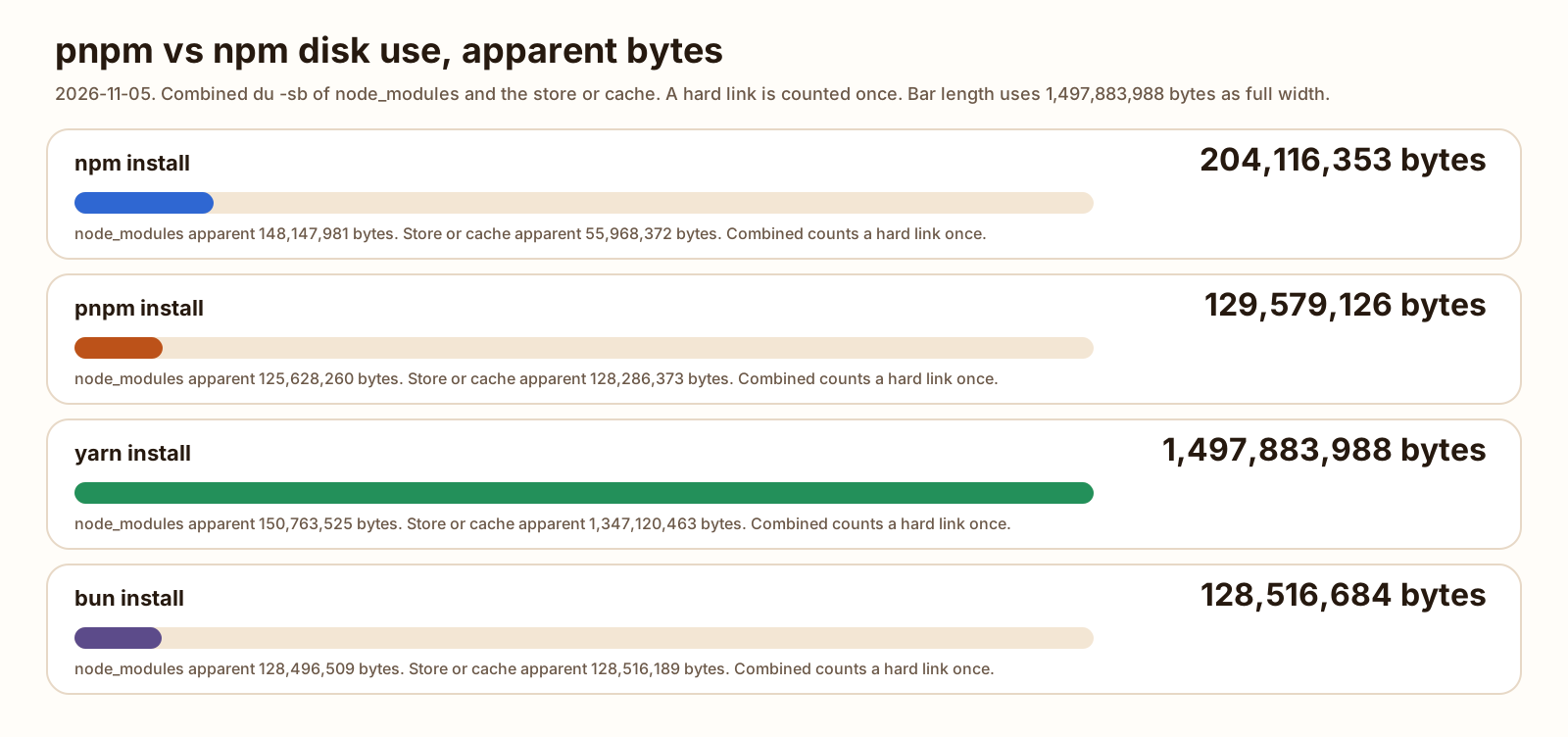
148,147,981 plus 55,968,372 is 204,116,353. That is npm’s combined number, so the cache and node_modules did not share inodes. node_modules/astro/package.json had nlink 1, and find -samefile in the npm cache found nothing. Yarn is the same shape: 150,763,525 plus 1,347,120,463 is 1,497,883,988, and nlink on that same file was 1.
pnpm is the other shape. 125,628,260 plus 128,286,373 is 253,914,633. The combined figure is 129,579,126. Adding the two columns would count 124,335,507 bytes twice. node_modules/astro was a symlink to .pnpm/[email protected]_@[email protected][email protected][email protected]/node_modules/astro. The real package.json had nlink 2, and find -samefile printed a path under store/v11/files. The walk counted 1,160 symlinks, 11,440 files, and 2,190 directories, without following links.
The motivation page, read November 5, 2026, says the store is content-addressable and that installs hard-link or clone files from it, copying only when the filesystem supports neither. The symlinked node_modules page says the files inside node_modules/.pnpm are hard links to that store, and that direct dependencies are then symlinked into the root node_modules. The same page says pnpm hoists dependencies into node_modules/.pnpm/node_modules by default, and that the root still only exposes what the project declared. The symlink and the nlink of 2 are what that description looks like on this tree.
Bun hard-linked too. Combined apparent size was 128,516,684, which is 495 bytes over the cache alone. nlink on astro/package.json was 2, and find -samefile printed cache/[email protected]@@@1/package.json. The root astro entry was a real directory, not a symlink. 19 symlinks, the same count as npm.
npm’s node_modules was 148,147,981 bytes on all six runs. The three cold caches were 55,968,335, 55,968,365, and 55,968,372 bytes. The table uses the median run, which is the third cold run. pnpm’s store was 128,286,373 bytes on all six runs. Cold node_modules was 125,628,209 on the first run and 125,628,260 on the other two. The median run is one of the 125,628,260 runs. Warm pnpm node_modules was 125,627,016 on all three, 1,244 bytes under that cold figure. I did not diff the trees. Yarn and bun reported the same apparent sizes on all six runs.
Combined allocated bytes on the cold median runs, from du -B1, were 249,417,728 for npm, 169,631,744 for pnpm, 1,584,205,824 for Yarn, and 174,354,432 for bun. Those are the block-rounded sizes. The table is the apparent size.
The install size of one ORM on this class of VM is Drizzle vs Prisma. That page measured npm only.
Lockfiles and strictness
The lockfiles, written once and then unchanged on all 24 timed runs:
| Tool | File | Bytes |
|---|---|---|
| npm | package-lock.json | 233,510 |
| pnpm | pnpm-lock.yaml | 133,305 |
| Yarn classic | yarn.lock | 159,994 |
| bun | bun.lock | 112,452 |
pnpm import is the path from an npm lockfile. I copied the npm project’s package.json and package-lock.json into an empty directory and ran pnpm import -y. It exited 0 in 196.761 ms and wrote a pnpm-lock.yaml of 133,305 bytes. The sha256 matched the lockfile from pnpm install --lockfile-only on package.json alone: 8882539ce115d8ab08c813740a0df17ddffd3abf0997399622da435b32ce0cb2. The import page says the versions in the source lockfile are preferred and the result can differ where that lockfile does not satisfy the manifests. On this pair of files, the bytes matched. A following pnpm install in that directory, without allow-build, exited 1 with the same ignored-builds error. astro was on disk. That install’s wall time was 5,555.945 ms, one run, its own empty store. It is not in the median table.
Strictness is a require from the project root. Astro 6.4.8 depends on @astrojs/compiler at ^4.0.0. The root package.json does not. node -e calling require.resolve('@astrojs/compiler') from each finished tree:
- npm exited 0 and resolved
node_modules/@astrojs/compiler/dist/node/index.cjs - Yarn classic exited 0 and resolved the same path shape
- bun exited 0 and resolved the same path shape
- pnpm exited 1 with
MODULE_NOT_FOUND
That is the phantom dependency the symlinked layout is for. npm, Yarn classic, and this bun install hoisted it. pnpm did not. I did not pass --linker isolated to bun. The bun install page, read November 5, 2026, says a new single-package project uses the hoisted linker, and a new workspace uses isolated. This package.json is one package. The root astro folder was not a symlink, which matches hoisted. An isolated bun install is a different command, and I did not run it.
sharp’s linux-x64 .node file was present after every timed install. On pnpm it lived under node_modules/.pnpm/@[email protected]/. On the other three it lived at node_modules/@img/sharp-linux-x64/lib/sharp-linux-x64.node. require('sharp') from the timed pnpm tree and from the npm tree both returned a function.
Workspaces and monorepos
The timed project is not a workspace. There is no pnpm-workspace.yaml and no workspaces field in the package.json I copied. The speed table says nothing about a monorepo.
I did run one separate pnpm install, two local packages, not published. The root had a pnpm-workspace.yaml whose packages list was packages/*. packages/app depended on @bench/lib at workspace:*. pnpm install exited 0 in 114.183 ms. packages/app/node_modules/@bench/lib was a symlink to ../../../lib. node -e requiring @bench/lib from packages/app printed {"ok":true}.
The workspaces page, read November 5, 2026, says a workspace needs that yaml file, and that the workspace: protocol will not resolve to the registry. The same page says that since pnpm 12.7.0, a root workspaces field and no yaml file makes pnpm install write the yaml. I wrote the yaml myself. I did not test that conversion. Yarn’s warning about workspaces, quoted above, was printed while installing the single package.json. I did not give Yarn a workspace fixture.
pnpm vs yarn, and where bun install fits
pnpm vs npm vs yarn vs bun, on time, is the table above. pnpm vs yarn on this page is pnpm 12.16.1 against Yarn classic 1.22.22. Cold, Yarn took 8.335 times as long. Warm, 1,365.702 divided by 313.034 is 4.363. The disk gap is the cache, not the node_modules folder. Yarn’s node_modules was 150,763,525 bytes. npm’s was 148,147,981. The @img folder inside each was 34,426,392 bytes, the same number.
Yarn’s cache was 449 directories and 1,347,120,463 apparent bytes. I split those directories by name. Names containing sharp or @img: 26 directories, 339,220,033 bytes. Names containing esbuild: 54 directories, 816,918,423 bytes. The other 369 directories: 190,982,007 bytes. The three buckets add to 1,347,120,463. Each cache entry I opened was an unpacked package under cache/v6/.../node_modules, including libvips builds for platforms this VM does not run. That is why the cache is about nine times the node_modules tree. The Yarn classic install docs describe installing into node_modules from yarn.lock. They do not say the cache stays small.
I did not install Yarn 4. The yarn binary on this VM was 1.22.22, and the timed command was yarn install. A Yarn Berry install, with or without Plug’n’Play, is not in the CSV.
bun install is the fast end of the same table. Cold median 301.230 ms, with one run at 571.757 ms that still sat under pnpm’s fastest cold run, 798.757 ms. Warm median 43.659 ms, range 43.065 to 47.020. Combined disk 128,516,684 bytes, 0.992 times pnpm’s 129,579,126, to three decimal places. The layout was hoisted, and the phantom require succeeded. Use bun install when the clock is the point and you already accept a flat node_modules. Use pnpm when the require that failed here is the point.
The runtime under a server, measured on this class of VM, is Bun vs Node. That page timed bun install against npm on an earlier copy of this package.json and did not install pnpm or Yarn. The numbers there are not this table.
This install did not deploy the site. The host choice for a finished build is Cloudflare Workers vs Pages.
How to switch from npm to pnpm
The switch I actually ran is the import above, plus the allow-build flag the timed installs used. Corepack on this VM was corepack prepare [email protected] --activate. The installation page also documents the standalone script and npm install -g pnpm@latest.
-
Install pnpm.
The timed binary was pnpm 12.16.1 from corepack. After it is on your PATH,
pnpm -vshould print that version, or whichever current release you prepared. I did not uninstall corepack’s pnpm at the end of the run. -
Import the npm lockfile.
From the project that holds
package-lock.json, runpnpm import. On this package.json it wrote apnpm-lock.yamlwhose sha256 matched a lockfile pnpm generated on its own. Keeppackage-lock.jsonuntil you are ready to stop using npm. The timed runs did not delete it. They used separate directories. -
Approve builds, then install.
pnpm installon this tree exited 1 until esbuild and sharp were allowed to run scripts. The command that exited 0 waspnpm install --allow-build esbuild --allow-build sharp.pnpm approve-buildsis the interactive form of the same gate. I used the flag because the benchmark is not interactive. After that install,require('sharp')from the project root returned a function.
Removing pnpm is the FAQ below. Removing node_modules and installing again is the warm row in the table: lockfile kept, store kept, directory deleted.
FAQ
Is pnpm faster than npm?
On this VM, for this package.json, yes. The cold median was 882.225 ms for pnpm install and 3,532.106 ms for npm install. The warm median, with the store or cache left in place and node_modules removed, was 313.034 ms and 2,402.260 ms. The three cold runs did not overlap, and the three warm runs did not overlap. pnpm 12.16.1 needed --allow-build esbuild --allow-build sharp or the command exited 1. One cloud VM, one project. A rerun will not match these medians.
Is pnpm better than yarn?
Against Yarn classic 1.22.22 on this run, pnpm was faster and used less disk. Cold medians were 882.225 ms and 7,353.206 ms. Combined apparent bytes were 129,579,126 and 1,497,883,988. The Yarn number is node_modules plus an unpacked cache, and most of that cache is esbuild and sharp packages for other platforms. I did not install Yarn 4, and I did not turn on Plug’n’Play. Better than that Yarn is a different test.
How do I uninstall pnpm?
To uninstall pnpm that npm installed, run npm rm -g pnpm. I did that for pnpm 12.16.1 in a prefix directory, and the pnpm binary in that prefix was gone afterward. The uninstall page, read November 5, 2026, also says to delete PNPM_HOME after the standalone install script, and to delete the store with rm -rf on the path from pnpm store path. I did not run those two. The pnpm used for the timed installs came from corepack, and I left that one in place.
How do I install a package globally with pnpm?
pnpm install global, as a search, is pnpm add -g. I ran pnpm add -g [email protected]. It exited 0. which cowsay printed a path ending in pnpm/bin/cowsay, and pnpm ls -g listed [email protected]. That bin directory was not on PATH until I prepended it. pnpm root -g had failed before that with ERR_PNPM_GLOBAL_BIN_DIR_NOT_IN_PATH. pnpm rm -g cowsay then exited 0, and which cowsay exited 1. I did not run pnpm setup.
Can I use pnpm with an npm lockfile?
Yes. pnpm import reads package-lock.json and writes pnpm-lock.yaml. On a copy of this project, pnpm import -y exited 0, and the new file’s sha256 matched the pnpm-lock.yaml from pnpm install --lockfile-only on the same package.json. The import docs, read November 5, 2026, say the import prefers the versions in the source lockfile and is not a one-to-one conversion. A following pnpm install, without --allow-build, exited 1 because esbuild and sharp scripts were ignored. astro was still on disk.
Sources
- Symlinked node_modules structure (pnpm) Checked
- Motivation (pnpm) Checked
- pnpm install Checked
- Workspace (pnpm) Checked
- pnpm import Checked
- pnpm add Checked
- Installation (pnpm) Checked
- Uninstalling pnpm Checked
- npm install Checked
- package-lock.json (npm) Checked
- yarn install (Yarn classic) Checked
- bun install Checked