
Built-in commands from the official table, the skills merge, and three files checked with claude plugin validate.
On this page
The short answer
Claude Code slash commands are names you type at the start of a message, such as /compact or a /name you add yourself. Built-in commands are coded into the CLI. A custom command is a markdown file, and custom commands are skills now: .claude/commands/deploy.md and .claude/skills/deploy/SKILL.md both create /deploy. If both exist, the skill is the one that runs.
What Claude Code slash commands are
A slash command is recognized only at the start of your message. Text after the name is its arguments. The commands page, checked October 31, 2026, says you can chain up to six skills in one message at the terminal prompt. Type / to see what this session can run.
Three kinds show up in that table.
- Built-in command. The behavior is coded into the CLI.
/helpand/compactare this kind. - Bundled skill. A prompt handed to Claude, the same shape as a skill you write. The page marks these rows Skill.
/debugand/code-revieware this kind. - Your own file. A
SKILL.mdyou save, or an older file in.claude/commands/. You type/namefor either one.
The skills page says custom commands have been merged into skills. The old URL https://code.claude.com/docs/en/slash-commands now serves that same page. I downloaded both markdown URLs on October 31, 2026. sha256sum printed one hash, and wc -c printed 118,879 bytes for each. The title on the file is “Extend Claude with skills”.
d2a5d07c0d1cef1d1edcf30f38f6b2712ff70ac050e3d50601cd3dadb42f9097  skills.md
d2a5d07c0d1cef1d1edcf30f38f6b2712ff70ac050e3d50601cd3dadb42f9097  slash-commands.md
Your old .claude/commands/ files keep working. Skills add a folder for supporting files, frontmatter for who invokes them, and the option for Claude to load them when the description matches. The same page says to prefer a skill for new work.
Built-in commands stay a separate list. A skill you name usage replaces /usage in a local terminal, and the alias /cost still runs the built-in. I did not try that replacement.
Claude Code commands cheat sheet
On October 31, 2026 I counted every data row in the All commands table. The file was https://code.claude.com/docs/en/commands.md, 57,789 bytes, sha256 dbeb2b14ca26b6684ea381cd841253b11b299b48eb1eb6a4869a0f8d8ec86831.
The table has 121 rows. 20 rows open with the Skill mark. 1 row, /deep-research, opens with the Workflow mark. The other 100 rows open with neither mark. Three of those 100 say Removed: /pr-comments, /ultraplan, and /vim. I left those three out of the list below. /review is its own row, and the text calls it an alias of /code-review, which is marked Skill. /plugin-authoring does not open with the Skill mark. The same cell says it is a skill from a built-in plugin.
The 21 rows below are built-in commands from that table. The one-line purpose is shortened from the page. This is not a third-party list. The downloadable copy is the Claude Code cheat sheet.
| Command | What it does |
|---|---|
| /help | Help, and the commands available in this session. |
| /init | Draft a starter CLAUDE.md for the repo. |
| /memory | Edit CLAUDE.md files and auto memory. |
| /skills | List skills. Filter, and change whether Claude can see one. |
| /reload-skills | Re-scan skill and command folders without restarting. |
| /config | Open settings, or set one key. Alias /settings. |
| /status | Version, model, account, and connectivity. |
| /model | Switch the model. With no argument, opens a picker. |
| /effort | Set how much reasoning the session applies. |
| /context | Show what is filling the context window. |
| /compact | Summarize the conversation so far and free space. |
| /clear | Start a new conversation. Aliases /reset and /new. |
| /plan | Enter plan mode. An optional description starts the task. |
| /diff | Show the working tree, including edits made so far. |
| /permissions | Allow, ask, and deny rules. Alias /allowed-tools. |
| /mcp | Manage MCP server connections and sign-in. |
| /agents | On this page, a reminder to edit the agent folders. Older builds opened a wizard. |
| /tasks | Background work in this session, including finished subagents. |
| /btw | A side question that is not added to the conversation. |
| /rewind | Roll the conversation, the code, or both back to a checkpoint. |
| /resume | Open an earlier conversation. Alias /continue. |
The skills page names six bundled skills in one sentence: /doctor, /code-review, /batch, /debug, /loop, and /claude-api. Each of those is marked Skill in the commands table. /checkup is an alias of /doctor. /review is an alias of /code-review. They are prompts. They are not the fixed logic behind /help.
/mcp manages servers you have already added. Add an MCP server to Claude Code is the command that writes the config, and the three scopes it lands in.
The page says the menu does not show every command to every user. /desktop is one example: macOS or x64 Windows, and a Claude subscription. I did not open a session, so the 121 rows are the document, not a menu I saw.
How to make Claude Code custom commands
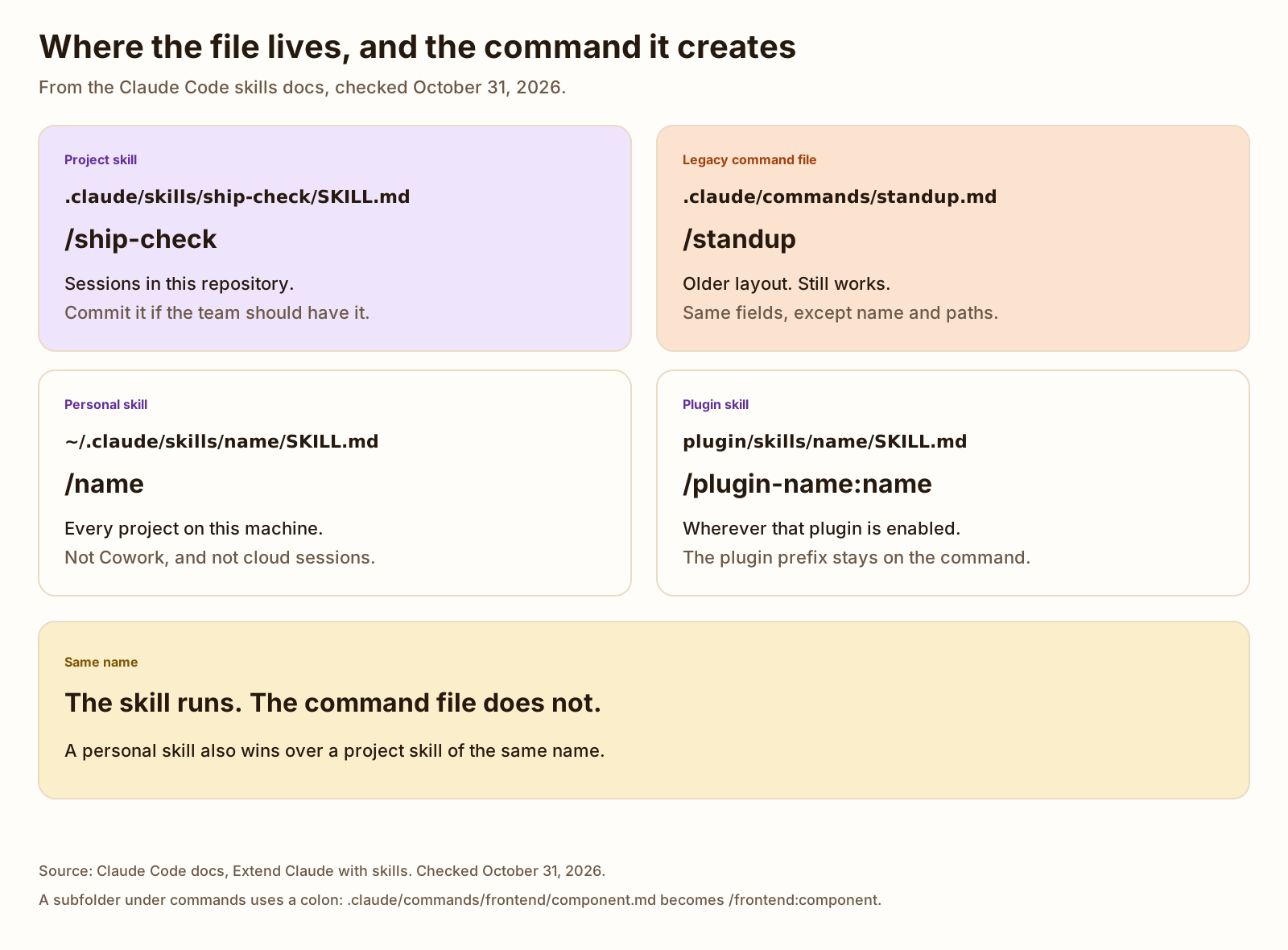
Save a new command as a skill. The folder name is the command you type, unless you set name.
| Where you save it | Command | Who gets it |
|---|---|---|
.claude/skills/name/SKILL.md | /name | This repository. Commit it for the team. |
~/.claude/skills/name/SKILL.md | /name | Every project on this machine. Not Cowork, and not cloud sessions. |
.claude/commands/name.md | /name | Older layout. Still loaded. |
.claude/commands/frontend/component.md | /frontend:component | The slash in the folder becomes a colon. |
A plugin’s skills/name/SKILL.md | /plugin-name:name | Wherever that plugin is enabled. |
When two definitions share a name, the skills page ranks them. Enterprise wins over personal. Personal wins over project. A skill wins over a file in .claude/commands/. A plugin skill does not replace those, because it keeps the plugin prefix. A nested skill under a subfolder stays out of the launch set until Claude reads a file there. You can also type /apps/web:deploy for a skill at apps/web/.claude/skills/deploy/SKILL.md.
-
Put the file in .claude/skills/.
Create
.claude/skills/ship-check/SKILL.mdfor one project. Create~/.claude/skills/ship-check/SKILL.mdif you want it in every project on this machine. The filename for a skill isSKILL.md. The folder name is the command, unlessnamesays otherwise.The older file is
.claude/commands/standup.md. That still creates/standup. It accepts the same frontmatter exceptnameandpaths. -
Set description and disable-model-invocation.
descriptionis when Claude should load the skill. If you omit it, the first non-empty line of the body is used. The listing truncates the combined description at 1,536 characters.Set
disable-model-invocation: truewhen you want to type the command yourself. The page’s examples are deploy, commit, and sending a message. Claude then cannot run it on its own.user-invocable: falseis the other direction: Claude can load it, and/namedoes not run it.All fields are optional. A field name has to match the table. The page says Claude Code ignores a field it does not recognize, and it does not report an error. Boolean fields also accept
yes,no,on,off,1, and0.The frontmatter is read only when the opening
---is the first line. If the YAML does not parse, the skill still loads with no fields set./namecan still work, because the name can come from the folder. Claude cannot match your description.Other fields on that table, if you need them:
argument-hint,arguments,allowed-tools,disallowed-tools,model,effort,contextset tofork,agent,paths,shell,hooks,metadata,license, andcompatibility.context: forkruns the skill in a subagent.agentpicks which subagent type, and only matters withcontext: fork.pathslimits automatic loading to files that match, inside the working directory. -
Add arguments or a shell line.
Put
$ARGUMENTSin the body for the whole string after the command, or$0and$1for the first and second arguments. A shell line, written as an exclamation mark and a command in backticks at the start of a line, is replaced with that command’s output before Claude sees the file. The next section is the exact substitution rules. -
Run claude plugin validate.
The skills page says to run
claude plugin validateon the skills directory to findSKILL.mdfiles whose frontmatter does not parse. It names Claude Code v2.1.233 or later. The run on 2.1.316 is in the examples section. I did not start a chat, so I did not watch/standupappear in a menu.
/reload-skills re-scans skill and command directories during a session. I did not run it inside a session.
Arguments, shell output, and allowed tools
$ARGUMENTS is everything after the command name. $0 is the first argument. $1 is the second. $ARGUMENTS[0] is the same as $0. Wrap a multi-word value in quotes if it should stay one argument. The skills page’s example is /my-skill "hello world" second, which sets $0 to hello world and $1 to second.
An indexed placeholder with no argument stays in the text as you wrote it. It does not become an empty string. That is why /write-test tells Claude to stop if $0 or $1 is still in the instructions it receives. A named placeholder from the arguments field is different: a missing one expands to empty. These three files do not set arguments.
argument-hint is the autocomplete hint, such as [file] [behavior]. It is not the parser. The page says Claude Code ignores a frontmatter field it does not recognize, and does not report an error. The validator run below matched that for a field named colour.
A line that starts with ! and a command in backticks runs in the shell first. Claude receives the output, not the command. The page calls this dynamic context injection. The command is not scanned a second time, so the output cannot smuggle another shell line. The ! has to be at the start of the line or right after whitespace. Set disableSkillShellExecution to true and each of those lines becomes a fixed notice instead of running. I did not run the git lines in the starter files. The validator does not run them either.
allowed-tools pre-approves the listed tools for the turn that invokes the skill. The grant ends when you send the next message. It does not remove other tools. The page says a project skill’s grant applies even in a folder you have not trusted, so read allowed-tools on skills you clone before you run Claude Code there. /standup names Bash(git log *) and Bash(git status *). /ship-check adds Bash(git diff *), Read, and Grep. /write-test names Read, Grep, and Glob, and no shell. I did not watch a permission prompt.
Claude Code slash commands examples
Three files for a web project. One is the older command layout. Two are skills. Download the Claude Code cheat sheet, then the three files: standup.md, ship-check/SKILL.md, and write-test/SKILL.md. The same files are on Templates.
/standup summarizes commits since yesterday. The shell line is git log --since=yesterday. /ship-check is manual only, takes one argument string, and names the tools it wants pre-approved. /write-test takes a file and a behavior as $0 and $1.
---
description: Summarize commits since yesterday into a short standup note. Use when you want status from git, not a code change.
argument-hint: "[optional focus]"
disable-model-invocation: true
allowed-tools: Bash(git log *) Bash(git status *)
---

Write a standup note from the git output below. Do not change files. Do not commit.

If the user passed a focus, keep the note on that: $ARGUMENTS

Group the commits into shipped, still open, and blocked. If the log is empty, say there were no commits since yesterday.

Recent commits:
!`git log --since=yesterday --pretty=format:%h %ad %s --date=short`

Working tree:
!`git status --short`---
name: ship-check
description: Check a web project before a deploy. Use when the user runs /ship-check. Does not deploy and does not commit.
argument-hint: "[what changed]"
disable-model-invocation: true
allowed-tools: Bash(git status *) Bash(git diff *) Read Grep
---
Check whether this project is ready to ship. Do not deploy. Do not commit. Do not push.
What the user said changed: $ARGUMENTS
1. Read the status and the diff stat below.
2. Name problems you can see in that diff: a behavior change with no test, a secret, or a broken path in a file you can read.
3. If you cannot see a problem, say what you checked and that you found nothing.
Status:
!`git status --short`
Diff stat:
!`git diff --stat`---
name: write-test
description: Write one test for a named file and a named behavior. Use when the user runs /write-test with a path and the behavior to cover.
argument-hint: "[file] [behavior]"
disable-model-invocation: true
allowed-tools: Read Grep Glob
---
Write one test. Do not change production code. Do not invent a test runner.
File: $0
Behavior to cover: $1
1. Read $0.
2. Find the test file that already covers that module. If none exists, say so and name the path you would add. Do not create a new runner.
3. Add one test for the behavior in $1. Match the runner and the file layout the repo already uses.
4. If the instructions you receive still contain the characters $0 or $1, that argument was not passed. Stop and say which one is missing.Copy the .claude folder into the project. Then run the validator. Do not treat a passing validator as a session. These files were not executed by the model.
What we tested
Checked
npm i -g @anthropic-ai/claude-code failed. The global prefix was /, and npm tried to create /usr/lib/node_modules. The error was EACCES. The install that worked used the Node 22 prefix already on PATH:
npm i -g @anthropic-ai/claude-code --prefix /home/ubuntu/.nvm/versions/node/v22.23.42.1.316 (Claude Code)No API key was set. No Claude session was started. The shell lines inside the three files were not run. claude plugin validate checks files. It does not invoke the model.
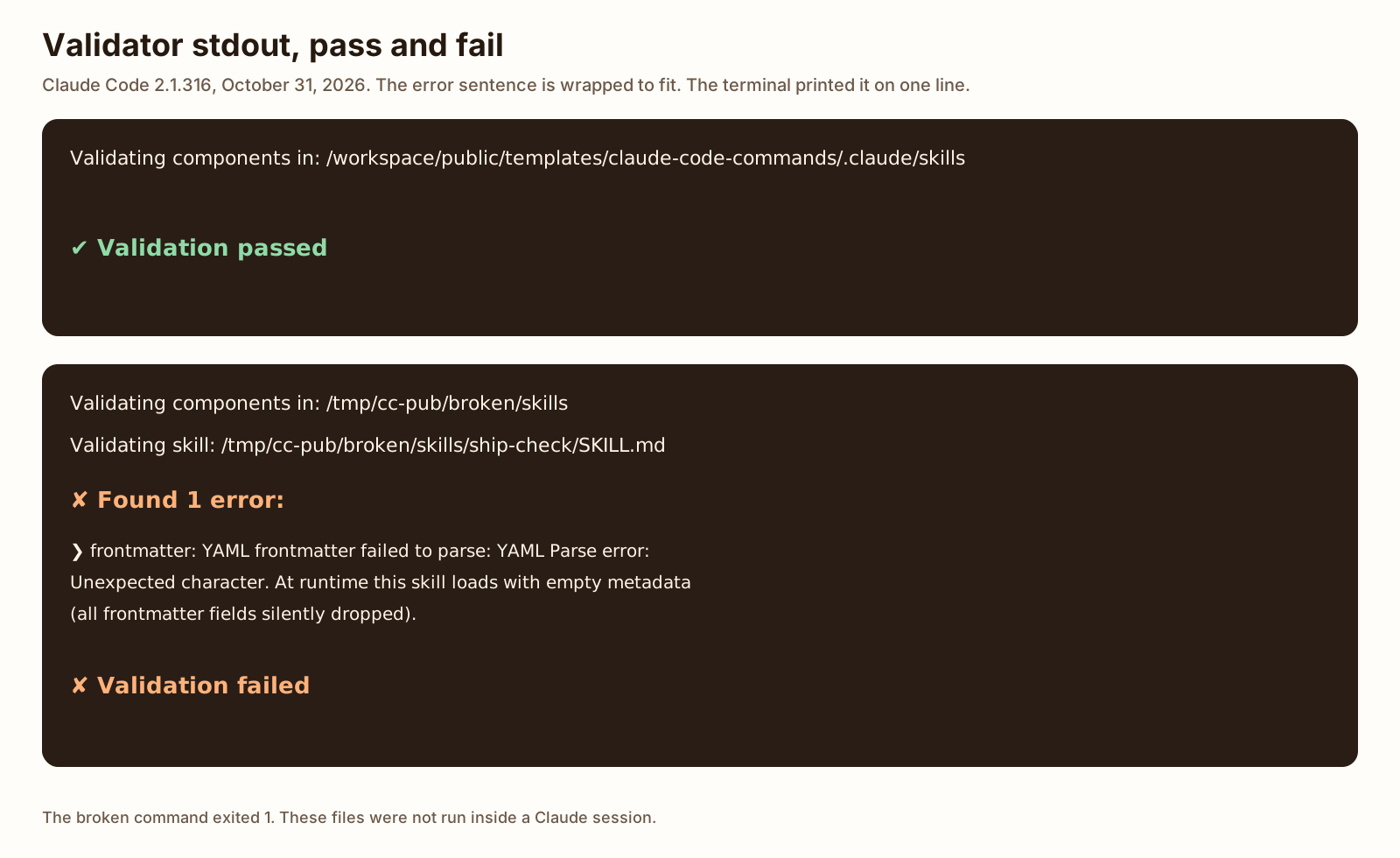
On the skills directory, both the plain command and --strict exited 0. --json set success to true and contents to an empty array. The commands directory did the same. The pack root, public/templates/claude-code-commands, and the .claude directory inside it, also printed Validation passed. --strict on the pack root exited 0.
Validating components in: /workspace/public/templates/claude-code-commands/.claude/skills

✔ Validation passed{
"success": true,
"strict": false,
"target": "/workspace/public/templates/claude-code-commands/.claude/skills",
"manifest": null,
"contents": [],
"advice": [],
"directory": null
}Validating components in: /workspace/public/templates/claude-code-commands/.claude/commands
✔ Validation passedI then made copies that were not published. An unknown field did not fail. The file was the ship-check skill plus one line, colour: blue. Plain and --strict both exited 0:
Validating components in: /tmp/cc-pub/unknown/skills

✔ Validation passed
A file whose name line was name: [broken, with no closing bracket, also printed Validation passed and exited 0, including with --strict. The parser in 2.1.316 did not treat that as bad YAML.
The copy that failed was the ship-check skill with the name line changed to name: "ship-check and no closing quote. Plain and --strict printed the same error and exited 1.
Validating components in: /tmp/cc-pub/broken/skills

Validating skill: /tmp/cc-pub/broken/skills/ship-check/SKILL.md

✘ Found 1 error:

  ❯ frontmatter: YAML frontmatter failed to parse: YAML Parse error: Unexpected character. At runtime this skill loads with empty metadata (all frontmatter fields silently dropped).

✘ Validation failed{
"success": false,
"strict": false,
"target": "/tmp/cc-pub/broken/skills",
"manifest": null,
"contents": [
{
"file": "/tmp/cc-pub/broken/skills/ship-check/SKILL.md",
"type": "skill",
"errors": [
{
"path": "frontmatter",
"message": "YAML frontmatter failed to parse: YAML Parse error: Unexpected character. At runtime this skill loads with empty metadata (all frontmatter fields silently dropped).",
"code": null
}
],
"warnings": [],
"notes": [],
"gatingHooks": []
}
],
"advice": [],
"directory": null
}Not tested: a Claude session, the / menu, argument substitution, the shell lines, whether allowed-tools skipped a prompt, or which file wins when two names clash on disk.
Slash command, skill, subagent, or CLAUDE.md
Use the file that matches the job. The skills page, the subagent page, and the memory page are the sources. Checked dates are on those posts and in Sources below.
| The job | Use | What the docs say |
|---|---|---|
| A rule for every session | CLAUDE.md | Loaded every session. Keep it short. A procedure that grew out of it belongs in a skill. |
| A command you type, or a procedure you keep pasting | A skill, which is a slash command | The body loads when it is used. .claude/commands/name.md and .claude/skills/name/SKILL.md both create /name. |
| Logs or file dumps you will not read again | A subagent | Own context window. The summary comes back. context: fork on a skill is the other way to get a separate window. |
| A server the session can call | MCP | Add it with claude mcp add. Inside a session, /mcp manages servers that are already configured. |
How to write a Claude MD file is the standing file: where it loads, and a template. Claude Code subagents is the worker with its own window. A slash command does not replace either one. A skill can set context: fork when that one command should run in a subagent. The three files here do not set context.
Claude Code slash commands best practices
A few limits from the skills page, not a scored list.
- Put a new command in
.claude/skills/name/SKILL.md. Leave old.claude/commands/files where they are. They still run. - Set
disable-model-invocation: trueon anything with a side effect. Deploy and commit are the page’s examples./ship-checkin this pack follows that. - Write
descriptionas the case you want matched. Put the key use case first. The listing caps that text at 1,536 characters. - Keep
SKILL.mdunder 500 lines. The page says to move long reference into a neighboring file. - Read
allowed-toolsbefore you run a skill you did not write. The grant applies even in a folder you have not trusted, on the page’s own warning. - Run
claude plugin validateandclaude plugin validate --stricton.claude/skills. On 2.1.316 an unknown field was silent, and an unclosed bracket was silent. An unclosed quote was not.
More on this topic lives under AI agents and tools.
FAQ
How do I see all slash commands in Claude Code?
Type / at the start of a message. The menu lists what this session can run, and letters after the slash filter it. /help shows help and available commands. /skills lists skills. The commands page, checked October 31, 2026, says not every command appears for every user. Its All commands table had 121 rows that day. I did not open a session, so I did not see the menu.
Where do custom slash commands go?
A new one belongs in .claude/skills/name/SKILL.md for the project, or ~/.claude/skills/name/SKILL.md for every project on your machine. The older path .claude/commands/name.md still creates /name. A plugin skill is /plugin-name:name. Copy the three files from this post into a project’s .claude folder if you want a standup note, a ship check, and a test writer to edit.
Are slash commands the same as skills now?
Custom ones are. The skills page, checked October 31, 2026, says custom commands have been merged into skills. .claude/commands/deploy.md and .claude/skills/deploy/SKILL.md both create /deploy, and your old command files keep working. If a skill and a command file share a name, the skill runs. Built-in commands such as /help are a different list. The commands table marks 20 rows as Skill and 1 row, /deep-research, as Workflow.
Can a slash command take arguments?
Yes. Text after the name is the arguments. $ARGUMENTS is the whole string. $0 is the first argument and $1 is the second. argument-hint is the hint in autocomplete. I did not start a session, so I did not watch a placeholder get replaced. The write-test file in this post uses $0 and $1. The ship-check file uses $ARGUMENTS.
Why is my custom slash command not showing up?
The skills page lists several causes. The name can contain a character Claude Code refuses, such as < or a leading space. user-invocable: false hides it from the menu. If the opening --- is not the first line, the fields are not read. A new folder may need /reload-skills. If a skill and a command file share the name, the skill is the one that runs. On Claude Code 2.1.316, claude plugin validate caught an unclosed quote in the name field and did not flag an unknown field named colour.