
Own context window, own tools, own model. Plus when CLAUDE.md, a skill, or the chat you already have is the better place.
On this page
The short answer
A Claude Code subagent is a markdown file in .claude/agents/ or ~/.claude/agents/. It runs in its own context window, with the tools and model you set in the frontmatter, and it sends a summary back to the main chat. Use one when the work would fill the chat with logs or file contents you will not read again. A rule for every session still belongs in CLAUDE.md.
What a Claude Code subagent is
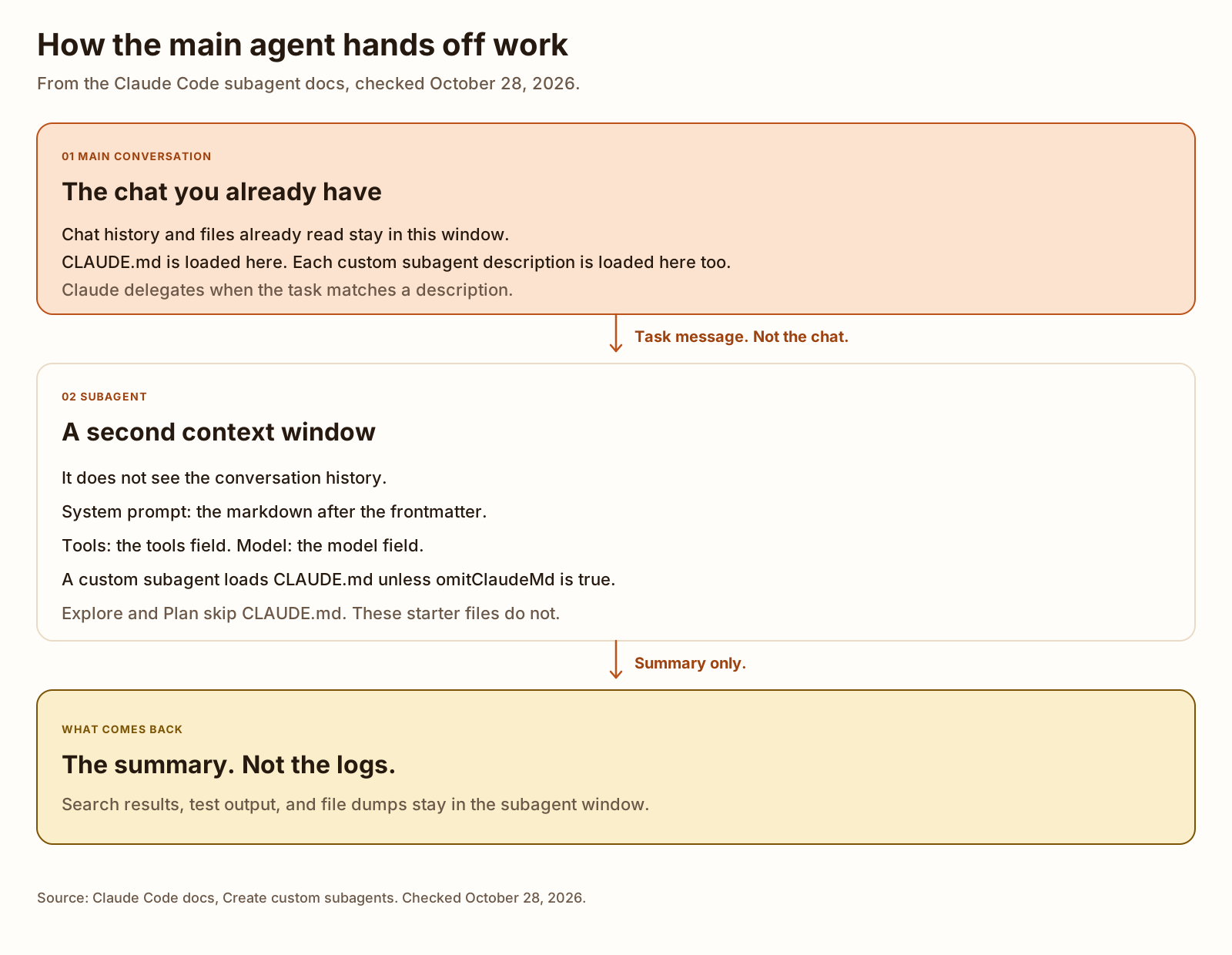
A subagent is a worker Claude can hand a task to. The subagent docs, checked October 28, 2026, say it runs in its own context window, with its own system prompt, its own tool access, and its own permissions. The main chat gets the summary. The search hits, the test log, and the file dumps stay in the subagent.
Claude picks a subagent by the description field. Write that sentence so it says when to delegate. Descriptions sit in the main context, so the page says to keep them short. If the custom descriptions together pass 15,000 tokens, Claude Code warns at startup. Detail goes in the markdown body, which loads only when that subagent runs.
The file is YAML frontmatter, then the system prompt in markdown. Only name and description are required. The body is not the Claude Code system prompt. The subagent gets its own prompt, plus a few environment details such as the working directory.
A subagent works inside one session. It is not a second chat you drive yourself, and it is not an agent team. The same page points those at other docs.
Create the file
You can ask Claude to write the file, or you can save it yourself. The three files further down are the write-it-yourself version.
-
Put the file in .claude/agents/.
.claude/agents/is the project copy. Commit it when the teammate who clones the repo should have the same worker.~/.claude/agents/is yours, on every project. The docs also load agents from managed settings, from a plugin, and from a JSON blob you pass with--agentsfor one launch.If two definitions share a
name, the page ranks them in this order: managed settings, then the--agentsflag, then.claude/agents/, then~/.claude/agents/, then a plugin. The filename does not have to matchname. These downloads use a longer filename so they do not collide with anything else on this site. After you copy one, you can rename it.Claude Code scans those folders recursively. Identity still comes from
name, not from the folder path. Two files in the same tree with the same name are a problem: the page says Claude Code loads only one of them, by filesystem read order, and/doctorreports the clash.A new
agentsdirectory is not picked up by a session that already started, because the watcher only covers directories that existed at launch. Restart once. After that, an edit to a file that is already in a watched folder is picked up in a few seconds. I did not run a session, so I did not time that. -
Write name and description.
nameis a unique id of at most 256 characters. The examples on the page arecode-reviewerandreviewer-v2. A name cannot contain:, and it cannot start with-. A file with nonameis treated as notes sitting next to the agents. A file with anameand nodescriptionis skipped. YAML that does not parse is skipped. An opening---that is not the first line is treated as no frontmatter at all.descriptionis when Claude should delegate. The three descriptions in the starter files are one sentence each, plus a short “use when” clause. The character counts are in the check below. I did not count tokens, so I am not claiming they sit under the 15,000 token warning. Three short sentences are what I wrote. The warning is about every custom subagent on the machine together, not about one file. -
Set the tools and the model.
toolsis an allowlist. The page accepts a comma-separated string,Read, Grep, Glob, or a YAML list. Leave it out and the subagent inherits the tools available to subagents.modelissonnet,opus,haiku,fable, a full id such asclaude-opus-5-5, orinherit. Leave it out and Claude Code walks the model order on that page.The next section is what those two fields actually change, including the cases where a parent setting wins.
-
Ask for the subagent by name.
In the chat, say which subagent and what the task is. The page’s example is “Use the code-improver agent to suggest improvements in this project.” Naming it is a request. An @-mention is the form that makes that subagent run.
Running
/agentsdoes not open a wizard on the page checked October 28, 2026. It prints a reminder to ask Claude or to edit the agent folders. On v2.1.197 and earlier, the same command opened the wizard. I did not run/agents.You can also start a whole session as that subagent with
claude --agent code-reviewer. The subagent prompt replaces the default system prompt. CLAUDE.md still loads through the normal message flow. I did not start a session that way.
Tools, model, and what it loads
Background is the default. The subagent page says a subagent Claude spawns from the main conversation already starts in the background, and the background tool filter is the one that applies. Fork mode is on by default from Claude Code v2.1.302, and in an interactive terminal from v2.1.232. While it is on, Claude cannot wait for a subagent in an interactive terminal, in VS Code, or in the desktop app on your machine. The summary shows up when the subagent finishes. I did not watch that happen.
A background subagent keeps every MCP tool, and only a listed set of built-in tools. That list includes Read, Grep, Glob, Bash, and WebFetch. It also includes Edit and Write. The page removes every other built-in tool from a background subagent, even if tools names it, and it reports no error unless the list resolves to nothing.
A shorter list is removed from every subagent, foreground or background, even when you list it: AskUserQuestion, EndConversation, EnterPlanMode, ScheduleWakeup, WaitForMcpServers, and Workflow. ExitPlanMode stays only when permissionMode is plan. Agent is withheld at the nesting limit.
The starter files use only names from the background list. The check fails a file that names something else.
The model on the file is not always the model that runs. When Claude invokes the subagent, the page resolves the model in this order:
- A model Claude passes for that one invocation.
- The
modelfield.inheritmeans the main conversation’s model. CLAUDE_CODE_SUBAGENT_MODEL, if you set it to an alias or a model id.- The main conversation’s model.
Set CLAUDE_CODE_SUBAGENT_MODEL_FORCE to 1 as well, and the page says the field is ignored. That needs Claude Code v2.1.257 or later. I did not set either variable.
permissionMode is unset on these files, so the subagent inherits the session mode. The page lists the exceptions. If the parent is bypassPermissions or acceptEdits, that parent mode wins and the field cannot override it. If the parent is auto mode, the field is ignored. On Pro, Max, and Team plans the session starts in auto mode unless settings say otherwise. A tools allowlist is the restriction these files actually set.
What a non-fork subagent starts with, from the same page:
- Its own system prompt, not the Claude Code system prompt.
- The task message Claude writes. Not your chat history.
- CLAUDE.md at every level the main conversation loaded, including
~/.claude/CLAUDE.md, project rules,CLAUDE.local.md, and managed policy. SetomitClaudeMd: trueand the user, project, and local files stay out. Managed policy files still load, except for a subagent that itself comes from managed settings. That field needs Claude Code v2.1.271 or later, and it is ignored when you launch the file as the main session with--agent. - A git status snapshot. Only the built-in Explore and Plan subagents skip it.
omitClaudeMddoes not turn the snapshot off. - Skills named in
skills, in full. These files name none. - Not the main conversation’s auto memory, and not your output style.
The context window is sized by the subagent’s own model, not by the parent. I did not measure a window.
Add an MCP server to Claude Code is how a server gets into the session. A subagent file can also name a server in mcpServers, including an inline definition the parent chat never loads. These three files leave mcpServers unset. They use whatever the session already has, and the tools allowlist still drops MCP tools, because none of the allowlists is open-ended.
Subagent, CLAUDE.md, skill, or one long session
The choice is on two pages, both checked October 28, 2026. Extend Claude Code says what each extension is for. The subagent page says when to stay in the chat.
| The job | Use | What the docs say |
|---|---|---|
| A rule for every session | CLAUDE.md | Loaded every session, in full, on every request. Keep it under 200 lines. Move reference material into a skill. |
| A procedure you keep pasting, or a /name command | A skill | The body loads when it is used. Custom commands are skills now. .claude/commands/deploy.md and .claude/skills/deploy/SKILL.md both create /deploy. |
| Logs or file dumps you will not read again | A subagent | Own context window. The summary comes back. Use it for a tool limit too. |
| Back and forth on one change | The chat you are in | Stay when the task needs iteration, when phases share context, when the edit is small, or when waiting on a fresh worker would cost you. |
A slash command you invent is a skill. The skills page says that in one sentence: custom commands have been merged into skills, and your old .claude/commands/ files keep working. Built-in commands such as /help are a different list. /agents is one of those, and it does not create the file for you. Claude Code slash commands is the built-in list, the file that creates /name, and a validator run on three starter files.
A skill can also run inside a subagent. context: fork on a skill sends that skill into its own worker. skills on a subagent preloads skill text into the worker. The starter files do neither. If the procedure should run in the main chat, the subagent page says to use a skill instead.
CLAUDE.md is the standing file. How to write a Claude MD file is the length and the headings from 100 public copies, plus a blank template. A subagent still reads that file unless you set omitClaudeMd. Do not paste the whole project manual into the subagent body and also into CLAUDE.md. Put the rule in CLAUDE.md. Put the one-off job in the subagent.
One long session is the right call when you are still steering. The subagent page’s own list is frequent back and forth, phases that share context, a quick edit, and latency. A subagent that is not a fork starts fresh. It has to gather context again. That is the cost of keeping the logs out of the chat.
Copy these three files
Each file is a starter. Edit the prompt. The description is the routing sentence, so change it if the job is different. The character bounds in the docs checker are the ones this site’s build enforces. Change the numbers if your site uses different bounds.
The reviewer uses the same three tools as the code-reviewer example on the docs page, Read, Grep, and Glob, and the same model: sonnet. It has no Bash, so it has no shell. The test runner adds Bash and sets haiku, because the page points at Haiku for a faster, lower-cost model and names running tests as the kind of log you should get out of the main chat. I did not measure speed or cost. The docs checker adds WebFetch, which is on the background tool list, and stays on sonnet.
The test runner’s prompt says not to edit the project with Bash. That is an instruction. It is not a hook. The docs say an allowlist of Read, Grep, Glob, and Bash cannot use the Edit tool, the Write tool, or MCP tools. I did not run a shell redirect to see whether Bash can still write a file.
Code reviewer. Test runner. Docs checker.
---
name: code-reviewer
description: Reviews a diff for bugs, security issues, and missing tests. Use after a code change, before you commit.
tools: Read, Grep, Glob
model: sonnet
---

You review code. You do not edit files.

When you are invoked:

1. Read the diff or the files named in the task. If no files are named, say so and stop.
2. Report only issues you can point at. Name the file, what is wrong, and why.
3. Group the report into bugs, security, and missing tests. If a group is empty, say that it is empty.
4. Do not rewrite the code. Skip style nits unless the task asks for them.---
name: test-runner
description: Runs the project test command and returns the failures. Use when test logs would flood the main conversation.
tools: Read, Grep, Glob, Bash
model: haiku
---
You run tests and report failures. You do not change source files to make a test pass.
1. Read the task for the test command. If it names none, read CLAUDE.md for one. If that names none, look for a test script in package.json and say which command you chose.
2. Run that command once.
3. Return the command, the exit code, and each failing test with its error. Give passing tests as a count.
4. If you cannot find a command, say so. Do not invent one.
The Bash tool can still write to disk. Do not use it to edit the project. Run the test command only.---
name: docs-checker
description: Checks a markdown file for title length, a description, headings, and internal links. Use before publishing a doc or a post.
tools: Read, Grep, Glob, WebFetch
model: sonnet
---
You check a markdown file in this repository. You do not edit files.
1. Read the file named in the task.
2. Report the title, the description if the file has one, the H1, and the H2s.
3. Count the characters in the title and in the description. Flag a title over 60 characters, a description under 120, or a description over 155. Those bounds are the ones shipmunks.dev enforces in its build. Say the counts either way.
4. List internal links whose path has no matching file in the repo. Do not guess that a route exists.
5. If the task includes a URL, fetch it and compare the response title to the file. If the fetch fails, report the failure and stop that check.
Do not invent rankings, traffic, or scores.Copy a file to .claude/agents/ and restart if that directory is new. Then name the subagent in the task.
| Field | Docs rule | code-reviewer | test-runner | docs-checker |
|---|---|---|---|---|
| name | Required. At most 256 characters. No colon. Must not start with a hyphen. | code-reviewer | test-runner | docs-checker |
| description | Required. When Claude should delegate. | 104 characters | 109 characters | 124 characters |
| tools | Optional allowlist. Each name here is on the documented background built-in list. | Read, Grep, Glob | Read, Grep, Glob, Bash | Read, Grep, Glob, WebFetch |
| model | Optional. sonnet, opus, haiku, fable, a full id, or inherit. | sonnet | haiku | sonnet |
The docs table also lists disallowedTools, permissionMode, maxTurns, autoCompactWindow, skills, mcpServers, hooks, memory, background, omitClaudeMd, effort, isolation, color, initialPrompt, and experimental. These three files set none of them. The check fails if a file adds a field name that is not in that table.
What we tested
Checked
Two downloads of the subagent page, saved as markdown, on October 28, 2026. https://code.claude.com/docs/en/sub-agents.md and https://code.claude.com/docs/en/subagents.md. sha256sum printed the same hash for both, and wc -c printed 116051 bytes for both:
c7f693e6394ee8ca9e4096629ac34d95de92d2a2322e89bef375bac512aab61a  sub-agents.md
c7f693e6394ee8ca9e4096629ac34d95de92d2a2322e89bef375bac512aab61a  subagents.md
The field rules in the script are copied from that file. The script does not download the page again on later runs. The skills page and the extend-Claude-Code page were downloaded the same day. The decision table is taken from those three pages. I did not run a tokenizer, so the 15,000 token description warning is not a number I measured.
Claude Code 2.1.312 was installed from npm in a temp directory. claude was not on the PATH before that. The only commands run were --version and plugin validate. No chat was started, and no API key was passed.
2.1.312 (Claude Code)claude plugin validate --json on a .claude/agents/ directory holding the three starter files exited 0. The JSON contents array was empty. The same command, on a directory whose only file was YAML that does not parse (name: [broken), also exited 0, with contents still empty. A directory that was not named agents failed earlier, looking for a plugin manifest. I do not count that exit 0 as a field check. The docs say this command finds frontmatter that does not parse. In this run, on 2.1.312, it did not flag the broken file.
The check that did run field by field is node scripts/research/claude-code-subagents/validate-frontmatter.mjs. It parses each starter file with js-yaml and compares every frontmatter key to the rules from the page above. It also feeds ten broken samples through the same function. Output from the run on October 28, 2026:
claude-code-subagents frontmatter check
docs: https://code.claude.com/docs/en/sub-agents.md
alias: https://code.claude.com/docs/en/subagents.md
fetched: 2026-10-28
docs sha256: c7f693e6394ee8ca9e4096629ac34d95de92d2a2322e89bef375bac512aab61a
claude plugin validate: not invoked by this script

public/files/code-reviewer-subagent.md
  name: code-reviewer (13 characters)
  description: 104 characters
  tools: Read, Grep, Glob
  model: sonnet
  body: 409 characters
  result: pass

public/files/test-runner-subagent.md
  name: test-runner (11 characters)
  description: 109 characters
  tools: Read, Grep, Glob, Bash
  model: haiku
  body: 555 characters
  result: pass

public/files/docs-checker-subagent.md
  name: docs-checker (12 characters)
  description: 124 characters
  tools: Read, Grep, Glob, WebFetch
  model: sonnet
  body: 711 characters
  result: pass

files: 3
field failures: 0

self-test:
  valid sample: ok (got pass, errors 0)
  missing description: ok (got fail, errors 1)
  name contains a colon: ok (got fail, errors 1)
  name starts with a hyphen: ok (got fail, errors 1)
  unknown field: ok (got fail, errors 1)
  model not in the docs list: ok (got fail, errors 1)
  tool the docs strip from every subagent: ok (got fail, errors 1)
  YAML does not parse: ok (got fail, errors 1)
  opening --- is not the first line: ok (got fail, errors 1)
  empty system prompt: ok (got fail, errors 1)
self-test: pass (10 cases)
The same script runs inside npm run build. Exit code of that run was 0.
Not tested: a Claude Code session, delegation, /agents, tool stripping at runtime, which model actually answered, whether CLAUDE.md was injected, whether Bash can write a file, and any token count.
More on this topic lives under AI agents and tools.
FAQ
What is a Claude Code subagent?
A markdown file with YAML frontmatter and a system prompt in the body. It runs in its own context window, with the tools and model in that file, and it returns a summary to the main chat. Claude delegates when the task matches the description. That is the definition on the subagent docs, checked October 28, 2026.
How do you create a Claude Code subagent?
Save the file in .claude/agents/ for one project, or in ~/.claude/agents/ for every project on your machine. name and description are the only required fields. You can write the file yourself or ask Claude to write it. Copy the three starter files from this post if you want a reviewer, a test runner, and a docs checker to edit.
What does the /agents command do?
On the subagent page checked October 28, 2026, running /agents prints a reminder to ask Claude or to edit .claude/agents/ and ~/.claude/agents/ directly. On Claude Code v2.1.197 and earlier, the same command opened a wizard. I did not run /agents.
When should I use a subagent instead of CLAUDE.md?
Put a rule Claude should follow every session in CLAUDE.md. Use a subagent when the work would dump logs or file contents into the chat, or when you want a tool limit on that worker. If you keep pasting the same procedure, the skills docs say to make a skill. How to write a Claude MD file is the CLAUDE.md side of that choice.
Does a subagent read CLAUDE.md?
A custom subagent loads the same CLAUDE.md hierarchy as the main conversation, unless the file sets omitClaudeMd: true. Explore and Plan skip CLAUDE.md. The three files here leave omitClaudeMd unset. I did not start a session, so I did not watch a file load.
Can each subagent use a different model?
Yes. The model field accepts sonnet, opus, haiku, fable, a full model id such as claude-opus-5-5, or inherit. The test runner file sets haiku. The other two set sonnet. A per-invocation parameter and CLAUDE_CODE_SUBAGENT_MODEL can override the field. I did not run any of the models.