
One prompt, then the process exits. Flags from Claude Code 2.1.316, JSON you can parse, and a workflow that was checked and not run.
On this page
The short answer
Claude Code headless mode is a non-interactive run: claude -p (the long form is --print) takes one prompt, prints a result, and exits. There is no chat. For a script, add --output-format json and read the result field. Permission prompts do not get a person unless you give them one, so set a permission mode on purpose.
What Claude Code headless mode is
Claude Code non-interactive mode is the phrase the CLI uses. On November 1, 2026, claude --help for version 2.1.316 opened with this: the program starts an interactive session by default, and -p / --print is for non-interactive output. The docs page is Run Claude Code programmatically. Its URL path is /headless. The help text does not contain the word headless. The flag is the same thing.
claude -p "What does the auth module do?"That line is the docs’ example. I did not run it. No API key was set on this machine, so there is no model answer, no timing, and no cost in this post.
The help text for --print says the workspace trust dialog is skipped, and that you should only use the flag in directories you trust. Settings files that fail validation are ignored, with no error dialog. Piped stdin works. The same docs page says the pipe is capped at 10MB, and that a success exits 0. I did not fill the pipe, and I did not see a success exit from the model.
Two commands that fail before a prompt did run. claude -p --not-a-real-flag exited 1 and printed error: unknown option '--not-a-real-flag'. claude -p --bg "hello" also exited 1. The first sentence of that error says --bg and --print conflict, because --print never starts the session that claude agents would attach to. The CLI reference says the same conflict. Stdout was empty both times.
A slash command you type at the start of a chat is a different interface. The headless page says a skill name inside the prompt string still expands, and that built-ins which only exist in the terminal, such as /login, do not. Claude Code slash commands is the file that creates /name, and the validator run on three starter files.
-
Install the CLI and check the version.
Install the npm package
@anthropic-ai/claude-code. Then runclaude --version. The install that printed a version on this machine is in What we tested, below.--versionand--helpdo not need an API key. A prompt does. -
Pass one prompt with claude -p.
Put the prompt in the argument, or pipe it. The process prints and exits. The docs’ own one-liner is the
auth modulequestion above. Swap in a file you actually have. I did not run a prompt. -
Print JSON and read the result field.
Add
--output-format json. The text comes back inresult. The docs’ read isjq -r '.result'. The later section shows the other fields they name, and a sample file that is the shape, not a run. -
Set dontAsk before you leave the run alone.
--permission-mode dontAskdenies a call that would have asked a person.--allowedToolsnames what may run anyway. Leave--dangerously-skip-permissionsoff unless the process is in a sandbox with no internet. That limit is the help text, and the permission-mode page says why.
The flags that matter
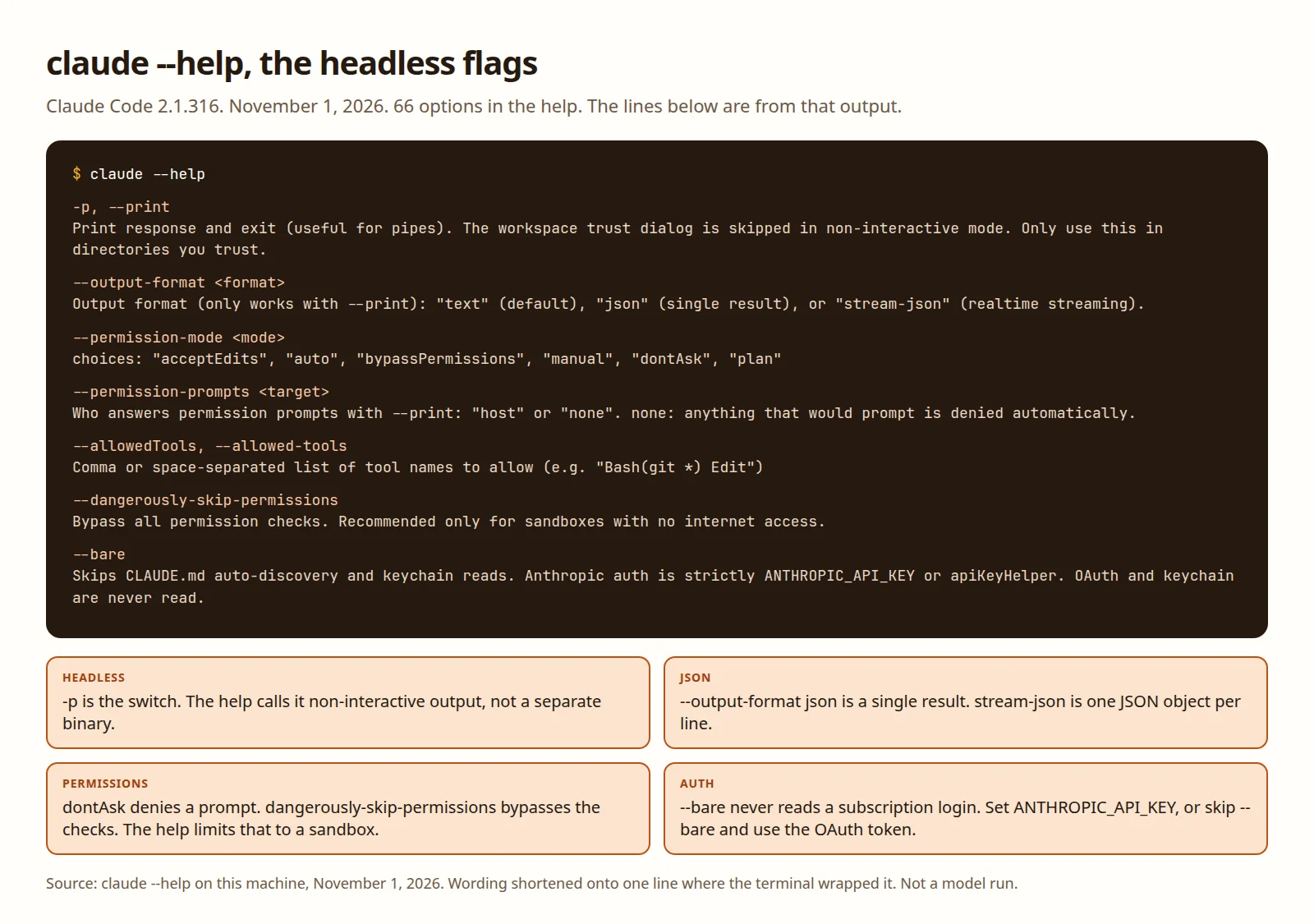
claude --help on 2.1.316 printed 313 lines and 66 options. The table is 24 of those 66. Each row is a flag the help text actually prints. The other 42 are interactive, desktop, cloud, debug, and the rest. Descriptions are shortened from that help text. The date is November 1, 2026.
| Flag | What the help says |
|---|---|
-p, --print | Print the response and exit. The workspace trust dialog is skipped. Only use it in a directory you trust. Invalid settings are ignored. |
--output-format | With --print: text (default), json (one result), or stream-json (streaming). |
--input-format | With --print: text (default) or stream-json. |
--json-schema | JSON Schema for structured output. Only with --print. |
--include-partial-messages | Partial chunks as they arrive. Only with --print and stream-json. |
--verbose | Override the verbose setting from config. |
--allowedTools, --allowed-tools | Tool names to allow. The help example is Bash(git *) and Edit. |
--disallowedTools, --disallowed-tools | Tool names to deny. Same example shape as the allow list. |
--permission-mode | acceptEdits, auto, bypassPermissions, manual, dontAsk, or plan. |
--permission-prompts | With --print: host (default) or none. none denies anything that would prompt. |
--dangerously-skip-permissions | Bypass all permission checks. Recommended only for sandboxes with no internet access. |
--allow-dangerously-skip-permissions | Offer that bypass as a choice, without starting in it. Same sandbox note. |
--bare | Skips CLAUDE.md auto-discovery, keychain reads, and hooks from settings and plugins. Auth is ANTHROPIC_API_KEY or apiKeyHelper. OAuth is never read. Skills still resolve via /skill-name. |
--max-budget-usd | Maximum dollars for API calls. Only with --print. |
--append-system-prompt | Append instructions to the default system prompt. |
--system-prompt | Replace the system prompt for the session. |
-c, --continue | Continue the most recent conversation in the current directory. |
-r, --resume | Resume a conversation by session ID or name. |
--mcp-config | Load MCP servers from JSON files or strings. |
--strict-mcp-config | Use only the servers from --mcp-config. |
--agents | Custom agents as JSON, or, with --print, a path to a file that holds them. |
--no-session-persistence | Do not save the session. Only with --print. |
--tools | Which built-in tools exist. An empty string disables all. default is the default set. |
--forward-subagent-text | Forward subagent text in the stream. Only with --print and stream-json. |
The headless page describes --bare more broadly than that help line. It says bare mode skips auto-discovery of hooks, skills, custom commands, subagents, plugins, MCP servers, auto memory, and CLAUDE.md. The 2.1.316 help line lists hooks from settings and plugins, LSP, plugin sync, attribution, auto-memory, background prefetches, keychain reads, and CLAUDE.md auto-discovery. It also says skills still resolve when you type /skill-name, and that you pass context yourself with --agents, --mcp-config, --settings, and --plugin-dir. I did not run --bare, so this is the text, not a directory listing I watched.
How to write a Claude MD file is the file --bare skips. Claude Code subagents is the worker you would otherwise put in .claude/agents/. The --agents flag is the help text’s way to pass one on the command line.
Claude Code output format JSON
The help choices are text, json, and stream-json. text is the default. json is one object. stream-json is one JSON object per line while the run is going.
The headless page says the text sits in result, and that the object also carries total_cost_usd plus a per-model breakdown. Their read is:
claude -p "Summarize this project" --output-format json | jq -r '.result'A second example on that page stores session_id with jq -r '.session_id', then passes it to --resume. I did not run either command.
The per-model object is named on the cost-tracking page that the headless page links for this. The result message has type result, total_cost_usd, usage, and modelUsage. usage counts tokens as input_tokens and output_tokens. modelUsage maps a model name to costUSD, inputTokens, and outputTokens. The page says total_cost_usd is a client-side estimate, not the bill. How to check Claude Code usage is the separate walkthrough for the subscription meter a headless run draws on when you authenticate with the OAuth token.
The bar under an interactive prompt reads a different object. A statusline script for session cost uses cost.total_cost_usd from the JSON Claude Code pipes to the status line command.
--json-schema puts structured output in structured_output. The headless page says a run can finish with that field missing, so check before you read it. --output-format stream-json needs --verbose on the docs’ streaming example, and --include-partial-messages if you want the token chunks. The last line of that stream is a result message.
The file documented-result.json is those field names and nothing else. Every number is 0. The result string says it is a placeholder. It is not a model answer. The script reads it with the same jq the docs use:
jq -e 'has("result") and (.result | type == "string")' documented-result.json
jq -r '.result' documented-result.json
jq 1.7 printed the placeholder sentence and exited 0. A copy with no result field exited 1. That test is in What we tested.
Permissions without a confirmation prompt
Running Claude Code without confirmation is a permission mode, not a second product. The Claude Code don’t ask mode is --permission-mode dontAsk.
The permission modes page says dontAsk denies every call that would have prompted. Reads in the working directory, and tools you already allowed, still run. --allowedTools "Read" is the narrow allow. The help example of a wider one is Bash(git *). The space before * matters on the headless page: Bash(git diff *) matches git diff, and Bash(git diff*) also matches git diff-index.
--permission-prompts none is the other switch in the help text. The choice none denies anything that would prompt. The headless page says the flag needs Claude Code v2.1.259 or later. 2.1.316 prints it. I did not pass it to a live run.
--dangerously-skip-permissions is the one to refuse by default. The help line says it bypasses all permission checks, and recommends it only for sandboxes with no internet access. The permission-mode page says the same flag is --permission-mode bypassPermissions, that tool calls then run immediately, including writes to paths the other modes protect, and that the mode offers no protection against prompt injection. A sentence in a file you cloned can ask for a shell command. This mode does not stop to ask you. On Linux and macOS the CLI refuses the mode when you are root. The template does not pass the flag. A GitHub Actions runner that holds your repo and a token is not a sandbox with the network off.
The headless page also says a -p run shows no workspace trust dialog and no per-server approval prompt. Without --bare, it connects the MCP servers in .mcp.json even in a folder you have not trusted. Add an MCP server to Claude Code is the command that writes that file, and the approval an interactive session still asks for.
Auth for a headless run
Two environment variables, from the authentication docs. Checked the same day.
ANTHROPIC_API_KEYis a key from the Claude Console. In-pmode the docs say the key is used when it is present. You do not get the interactive approve-this-key prompt.CLAUDE_CODE_OAUTH_TOKENis a long-lived token fromclaude setup-token. The command needs a Claude subscription: Pro, Max, Ultra, Team, or Enterprise. The token prints once. The docs say to put it in the environment. It is not saved for you.
--bare changes the second one. The help text says Anthropic auth is then strictly ANTHROPIC_API_KEY or apiKeyHelper via --settings, and that OAuth and the keychain are never read. The authentication page says the same thing in one sentence: bare mode does not read CLAUDE_CODE_OAUTH_TOKEN. If the script passes --bare, use the API key. If you only have the subscription token, do not pass --bare. The script in the template follows that split. If both variables are set, it takes the API key path, which matches the precedence on that page.
I did not run claude setup-token. I did not set either variable. A prompt was not sent.
Claude Code GitHub Actions
The GitHub Actions page shows anthropics/claude-code-action@v1. You pass anthropic_api_key or claude_code_oauth_token. The examples there use actions/checkout@v6. Quick setup stores the API key as ANTHROPIC_API_KEY and the subscription token as CLAUDE_CODE_OAUTH_TOKEN. I did not install the GitHub App, and I did not run that action.
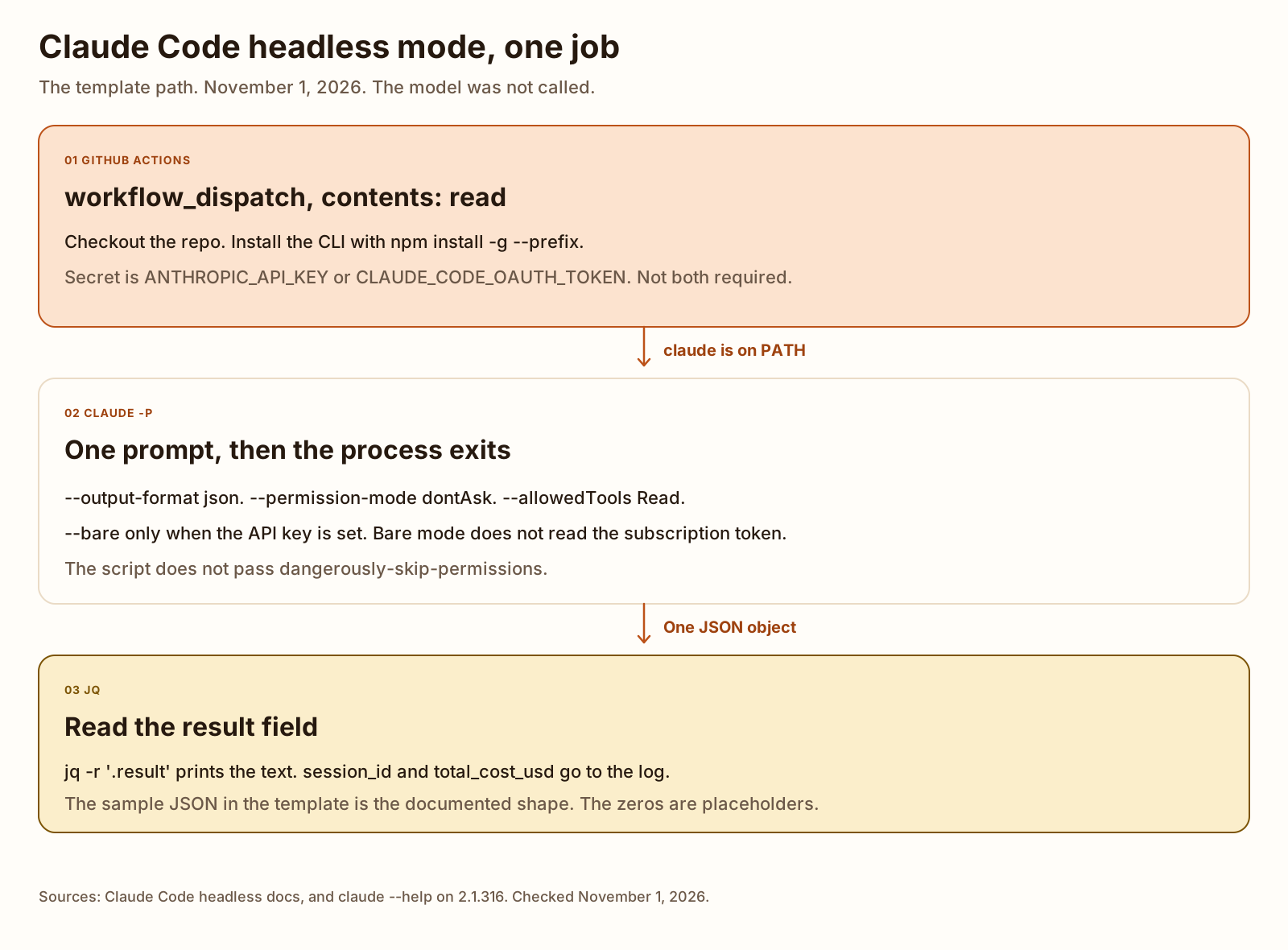
The template here is the CLI form of the same job, because the command on the headless page is claude -p. Copy claude-headless.yml to .github/workflows/claude-headless.yml in a repository of your own, and claude-headless.sh to scripts/claude-headless.sh. The same files are listed on Templates. Do not commit a key.
name: Claude Code headless

on:
  workflow_dispatch:
    inputs:
      prompt:
        description: Prompt passed to claude -p
        required: true
        default: Summarize README.md
        type: string

jobs:
  headless:
    runs-on: ubuntu-latest
    permissions:
      contents: read
    steps:
      - name: Check out the repository
        uses: actions/checkout@v6
        with:
          fetch-depth: 1

      - name: Install the Claude Code CLI
        run: npm install -g --prefix "${{ runner.temp }}/claude-code" @anthropic-ai/claude-code

      - name: Run claude -p and print the result field
        env:
          PATH: ${{ runner.temp }}/claude-code/bin:${{ env.PATH }}
          PROMPT: ${{ inputs.prompt }}
          ANTHROPIC_API_KEY: ${{ secrets.ANTHROPIC_API_KEY }}
          CLAUDE_CODE_OAUTH_TOKEN: ${{ secrets.CLAUDE_CODE_OAUTH_TOKEN }}
        run: bash scripts/claude-headless.sh "$PROMPT"
workflow_dispatch is the only trigger, so a pull request does not start the job. The prompt goes in through the environment, then into a quoted argument. The install line is the prefix install that produced a claude binary on this machine. A GitHub-hosted runner was not used. contents: read is the only permission. The script asks for Read and dontAsk, and it passes --bare only when ANTHROPIC_API_KEY is set.
The script’s live path is the call below. --from-json is the test switch. It does not call claude.
claude --bare -p "${prompt}" \
  --output-format json \
  --permission-mode dontAsk \
  --allowedTools 'Read'
That block runs only when the API key is set. The subscription-token branch is the same command without --bare. Notes on both files are in the template README.
What we tested
Checked
The CLI install that worked:
npm i -g @anthropic-ai/claude-code --prefix /home/ubuntu/.nvm/versions/node/v22.23.42.1.316 (Claude Code)The same version came from a second prefix install, npm install -g --prefix /tmp/cc-prefix2 @anthropic-ai/claude-code. The binary was /tmp/cc-prefix2/bin/claude. That is the install shape in the workflow. No API key was set. No prompt was sent to the model.
claude --help wrote 313 lines. 66 lines in the Options section start a flag. The table above is 24 of them.
error: unknown option '--not-a-real-flag'That command exited 1. Stdout was empty.
claude -p --bg "hello" also exited 1, with an empty stdout. The first sentence of stderr:
--bg and --print conflict: --print never starts the interactive session that `claude agents` attaches to, so the job would be unattachable.The rest of that line tells you to drop --print and run claude --bg with the task instead.
The template files were checked the same day. bash -n on claude-headless.sh exited 0. shellcheck 0.9.0 exited 0 with no findings. actionlint 1.7.7 on claude-headless.yml exited 0 with no findings. Python’s YAML parser loaded the workflow, and yq reported 3 steps.
claude-headless.sh --from-json documented-result.json exited 0. jq 1.7 printed the placeholder sentence on stdout. Stderr was session_id 00000000-0000-4000-8000-000000000000 and total_cost_usd 0. Those zeros are the placeholders in the file, not a measured bill. A JSON object with no result field exited 1. With no key and no --from-json, the script exited 2 and printed Set ANTHROPIC_API_KEY or CLAUDE_CODE_OAUTH_TOKEN. This script does not log in. It did not start claude.
Not tested: a model call, a token from claude setup-token, a subscription login, a GitHub-hosted runner, timings, or a real cost.
More on this topic lives under AI agents and tools.
FAQ
Is there a headless mode in Claude Code?
Yes. The docs page for it is Run Claude Code programmatically, and the URL path is /headless. Checked November 1, 2026. On Claude Code 2.1.316, claude --help does not print the word headless. It says the CLI starts an interactive session by default, and -p or --print is for non-interactive output. That flag is the mode.
Can I run Claude Code without confirmation prompts?
Yes, if you set a permission mode on purpose. --permission-mode dontAsk denies a call that would have prompted, and --allowedTools names tools that may run without asking. --permission-prompts none does the denial when nobody is there to answer. --dangerously-skip-permissions bypasses the checks. The help text says to use that only in a sandbox with no internet access. I did not watch a prompt.
Does headless mode work with a Claude subscription or only an API key?
Both, with one limit on bare mode. An API key is ANTHROPIC_API_KEY. In -p mode the authentication docs say that key is used when it is set. A Claude Code headless subscription login is the token from claude setup-token, on a Pro, Max, Ultra, Team, or Enterprise plan, stored as CLAUDE_CODE_OAUTH_TOKEN. --bare does not read that token or the keychain. Bare mode wants the API key or an apiKeyHelper. I did not log in, and I did not mint a token.
How do I get JSON output from claude -p?
Add --output-format json. The headless docs say the text is in the result field, and their jq example is jq -r ‘.result’. session_id is the field they use to resume. total_cost_usd is on the same object. The JSON file in this post’s template uses those names with placeholder zeros. It is the documented shape, not a payload I captured. I did not run a prompt.
Can Claude Code run in GitHub Actions?
Yes. The GitHub Actions docs, checked November 1, 2026, show the Claude Code GitHub Action, anthropics/claude-code-action@v1, with an API key or a subscription token. The workflow in this post is the other shape: it installs the CLI and runs claude -p. actionlint 1.7.7 accepted the YAML. The job was not executed on GitHub.