
Claude Code status line examples for the model, the git branch, the session cost, and context use. Piped the documented JSON. Not a live session.
On this page
The short answer
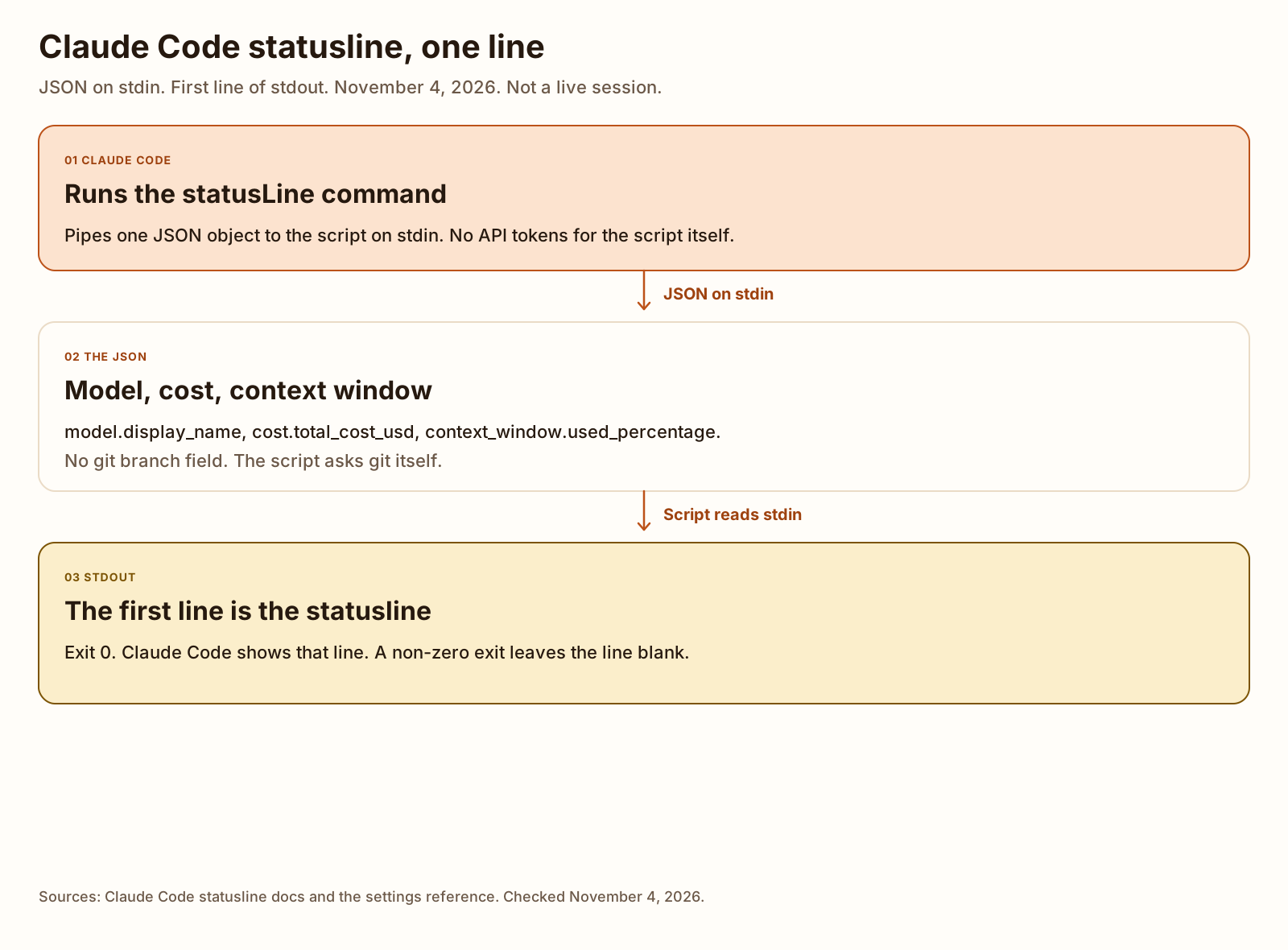
A Claude Code statusline is a shell command Claude Code runs at the bottom of the session. It receives session JSON on stdin, and the lines it prints become the bar. Type /statusline and describe the line, or set statusLine in ~/.claude/settings.json to a script. These scripts were checked by piping the documented sample JSON on November 4, 2026, not by a live session.
This is the settings file to save. The copy passed to claude --settings on this machine was identical except that command pointed at statusline.sh in this repo checkout. Save the script as ~/.claude/statusline.sh and chmod +x it.
{
  "statusLine": {
    "type": "command",
    "command": "~/.claude/statusline.sh"
  }
}
What the Claude Code statusline shows
The statusline page, checked November 4, 2026, calls it a customizable bar at the bottom of Claude Code. Your script runs locally. The page says the script does not consume API tokens. The bar sits in its own row above the built-in footer badges, and it does not replace those badges. With a custom line configured, Claude Code stops showing most of the footer’s keyboard hints, including esc to interrupt.
The page lists why people turn it on: context window usage, session cost, telling one session from another, and git branch and status. The git branch is not a field in the JSON. The docs’ git example runs git branch --show-current from the script. That is what the scripts below do.
Claude Code runs the script once when a session starts, including a resume. After that the page says it runs again when a new assistant message arrives, when /compact finishes, when the permission mode changes, when vim mode toggles, when you change the command, when a refreshInterval timer elapses, when a rate-limit window in the last payload reaches resets_at, and when a warm prompt cache reaches expires_at. Updates are debounced at 300ms. A change to command itself skips that wait. I did not watch any of those triggers. There was no session.
The script can print more than one line. Each printed line is a row. ANSI colors work when the terminal supports them. The line stays blank if the script exits non-zero, prints nothing, or the folder is not trusted. claude --debug logs stderr on every run and the exit code on the first run in a session, according to that page. I did not pass --debug.
Set it up with /statusline
/statusline takes a sentence. The docs’ example is /statusline show model name and context percentage with a progress bar. Claude Code writes a script under ~/.claude/ and updates your settings. Approve the file edits if it asks. To turn the line off, the page says to run /statusline and ask it to delete, clear, or remove the line, or delete the statusLine key yourself.
I did not run /statusline. Claude Code 2.1.318 on this machine stopped at login before any session existed. The command is still a slash command you type at the start of a message. A custom command you save as a file is a different mechanism.
-
Type /statusline, or save the script yourself.
Use
/statuslinewhen you want Claude Code to write the script. Savestatusline.shyourself when you want the line in this post. The downloads are on Templates.chmod +xthe shell script. The page says to do that so the shell can run it. -
Add statusLine to settings.json.
Put the object in user settings or project settings.
typeiscommand.commandis the script, or an inline shell command. The next section is the file locations and the optional keys. The block above the first heading is the file to save. The copy passed toclaude --settingson this machine was identical except thatcommandpointed at statusline.sh in this repo checkout. -
Pipe the sample JSON through the script.
The page’s tip is to echo a small JSON object into the script before you trust it. I used the longer example object from that same page, saved as documented-status.json. The output is in the examples and in What we tested. A live session was not part of the test.
Configure it in settings.json
The settings page, checked the same day, says Claude Code reads four scopes. User settings are ~/.claude/settings.json, for you, on every project on this machine. Shared project settings are .claude/settings.json, committed so teammates get them. Project local is .claude/settings.local.json, for you in one project. Managed settings are what an organization deploys. On Windows, ~/.claude means %USERPROFILE%\.claude.
The settings reference lists statusLine under interface settings. Scope is any file. The default is unset, so there is no custom status line. The object needs type set to command and a command string. Optional fields:
paddingis extra horizontal space, in characters. The default is 0. It is on top of the interface’s own spacing.refreshIntervalre-runs the command every N seconds, minimum 1, in addition to the event updates. Leave it unset to run only on events. The page says to set it for a clock, or when background work changes git state while the main session is idle.hideVimModeIndicatorset totruehides the built-in-- INSERT --text when your script printsvim.modeitself.
The file I used does not set padding, refreshInterval, or hideVimModeIndicator. It is only type and command.
The reference’s own example is an inline jq command with padding 2. I ran that jq filter on the documented sample. It printed [Opus] 8% context and exited 0. I did not put that one-liner in the settings file I passed to Claude Code.
jq -r '"[\(.model.display_name)] \(.context_window.used_percentage // 0)% context"'Two gates can swallow a line you did set. The statusline page says the line stays blank until you accept the workspace trust dialog, because the command runs under the same trust rule as hooks. claude --debug then logs Status line command skipped: workspace trust not accepted. The settings reference says disableAllHooks in managed settings turns the status line off entirely, and disableAllHooks outside managed settings, or allowManagedHooksOnly, narrows it to a managed value. With no managed value, your line is skipped with no warning. I did not hit either gate. There was no session to accept trust in.
subagentStatusLine is a different key. It rewrites the row for each subagent in the task list. The command receives a tasks array, not the session object the scripts below read. I did not write a script for that key. When a worker should have its own window is the subagent file. This key only changes the row text.
The JSON Claude Code sends to your script
Claude Code writes one JSON object to the script’s stdin. The statusline page’s “Available data” table is the field list. The full example object on that page is documented-status.json. Every number in it is the docs’ example. The version string in the file is 2.1.90. The CLI I installed is 2.1.318. Those are not the same fact.
The scripts read four values. Three come from the JSON. The branch does not.
| Field | Docs example | What the page says |
|---|---|---|
model.display_name | Opus | Display name of the current model. model.id in the same object is claude-opus-5-5. |
model.id | claude-opus-5-5 | Current model identifier. The scripts print the display name, not the id. |
cost.total_cost_usd | 0.01234 | Estimated session cost in USD, computed client-side at list price unless a modelPricing table is in effect. It may differ from the bill. It resets when /clear starts a new session. |
context_window.used_percentage | 8 | Pre-calculated percentage of the context window used. It counts input tokens only, including cache reads and writes. It does not include output tokens. It may be null early in the session. |
context_window.context_window_size | 200000 | Maximum context window in tokens. 200000 by default, or 1000000 for a model with extended context. The scripts do not print this field. |
context_window.total_input_tokens | 15500 | Input tokens in the window from the most recent API response, including cache creation and cache reads. Both totals are 0 before the first response. The scripts do not print this field. |
context_window.current_usage | an object | The same counts split into input_tokens, output_tokens, cache_creation_input_tokens, and cache_read_input_tokens. Null before the first API call, and again after /compact until the next call. |
workspace.current_dir | /current/working/directory | Current working directory. cwd holds the same value. The page says to prefer workspace.current_dir. |
There is no git branch key. worktree.branch in the sample is worktree-my-feature, and the page says worktree is present only during a worktree session. workspace.git_worktree in the sample is feature-xyz, which the page describes as the linked worktree name, not the branch. The script still printed this checkout’s branch, cursor/claude-code-statusline-5b2b, because it asked git. It did not read either of those strings.
Other keys in the sample are real documented fields, and the scripts ignore them: session_id, cost.total_duration_ms, rate_limits, prompt_cache, vim.mode, pr, and the rest of the example. The page says several of those can be absent. rate_limits shows up for claude.ai Pro, Max, and Ultra subscribers, or behind a gateway spend limit, and only after the first API response. vim shows up only when vim mode is on. Handle a missing key, and use a fallback when a value is null. The null test below set used_percentage and total_cost_usd to null and printed zeros.
This object is session data for a script. It is not standing instructions for the model. What to put in a Claude MD file is that other file.
Example Claude Code statusline scripts
These Claude Code status line examples are the three scripts I ran. Two are bash and use jq. One is PowerShell. Download statusline.sh, statusline-context.sh, and statusline.ps1.
statusline.sh prints the model, the branch, the cost, and the context percentage on one line. // in the jq filters is the fallback the docs use when a value is null. An empty branch, or git failing, prints no-branch.
#!/usr/bin/env bash
# Read Claude Code's statusline JSON on stdin. Print one line:
# model display name, git branch, session cost, context used_percentage.
# The branch is not a JSON field. This asks git, in this process's working directory.
set -euo pipefail

input=$(cat)
model=$(printf '%s' "$input" | jq -r '.model.display_name // "unknown"')
pct=$(printf '%s' "$input" | jq -r '.context_window.used_percentage // 0')
cost=$(printf '%s' "$input" | jq -r '.cost.total_cost_usd // 0')
branch=$(git branch --show-current 2>/dev/null || true)
if [ -z "$branch" ]; then
  branch="no-branch"
fi

printf '%s | %s | $%s | context %s%%\n' "$model" "$branch" "$cost" "$pct"
Piped the documented sample from this repo. jq 1.7. Exit 0.
Opus | cursor/claude-code-statusline-5b2b | $0.01234 | context 8%0.01234 and 8 are the sample. The branch is whatever git branch --show-current printed in this checkout. Your checkout prints your branch.
statusline-context.sh is the short line: model and context percentage.
#!/usr/bin/env bash
# Model display name and context used_percentage. One line. JSON on stdin.
set -euo pipefail

input=$(cat)
model=$(printf '%s' "$input" | jq -r '.model.display_name // "unknown"')
pct=$(printf '%s' "$input" | jq -r '.context_window.used_percentage // 0')

printf '%s | context %s%%\n' "$model" "$pct"Opus | context 8%statusline.ps1 prints the same four slots as statusline.sh. It reads stdin with [Console]::In.ReadToEnd(), which worked both as a redirect into pwsh -File and as a pipe. I also ran the PowerShell example from the statusline page. That one uses $input, and on pwsh 7.6.9 it printed directory [Opus] ctx: 8%. directory is the last segment of the sample’s cwd, /current/working/directory. It is not a folder I created.
# Read Claude Code's statusline JSON on stdin. Print one line:
# model display name, git branch, session cost, context used_percentage.
# The branch is not a JSON field. This asks git, in this process's working directory.
# Tested with pwsh 7.6.9 on Linux. Not tested on Windows PowerShell.
$raw = [Console]::In.ReadToEnd()
if ([string]::IsNullOrWhiteSpace($raw)) {
  Write-Error 'no JSON on stdin'
  exit 1
}

$data = $raw | ConvertFrom-Json
$model = 'unknown'
if ($null -ne $data.model -and -not [string]::IsNullOrWhiteSpace([string]$data.model.display_name)) {
  $model = [string]$data.model.display_name
}

$pct = 0
if ($null -ne $data.context_window -and $null -ne $data.context_window.used_percentage) {
  $pct = $data.context_window.used_percentage
}

$cost = 0
if ($null -ne $data.cost -and $null -ne $data.cost.total_cost_usd) {
  $cost = $data.cost.total_cost_usd
}

$branch = 'no-branch'
try {
  $got = git branch --show-current 2>$null
  if ($LASTEXITCODE -eq 0 -and -not [string]::IsNullOrWhiteSpace($got)) {
    $branch = $got.Trim()
  }
} catch {
  $branch = 'no-branch'
}

Write-Output "$model | $branch | `$$cost | context $pct%"Opus | cursor/claude-code-statusline-5b2b | $0.01234 | context 8%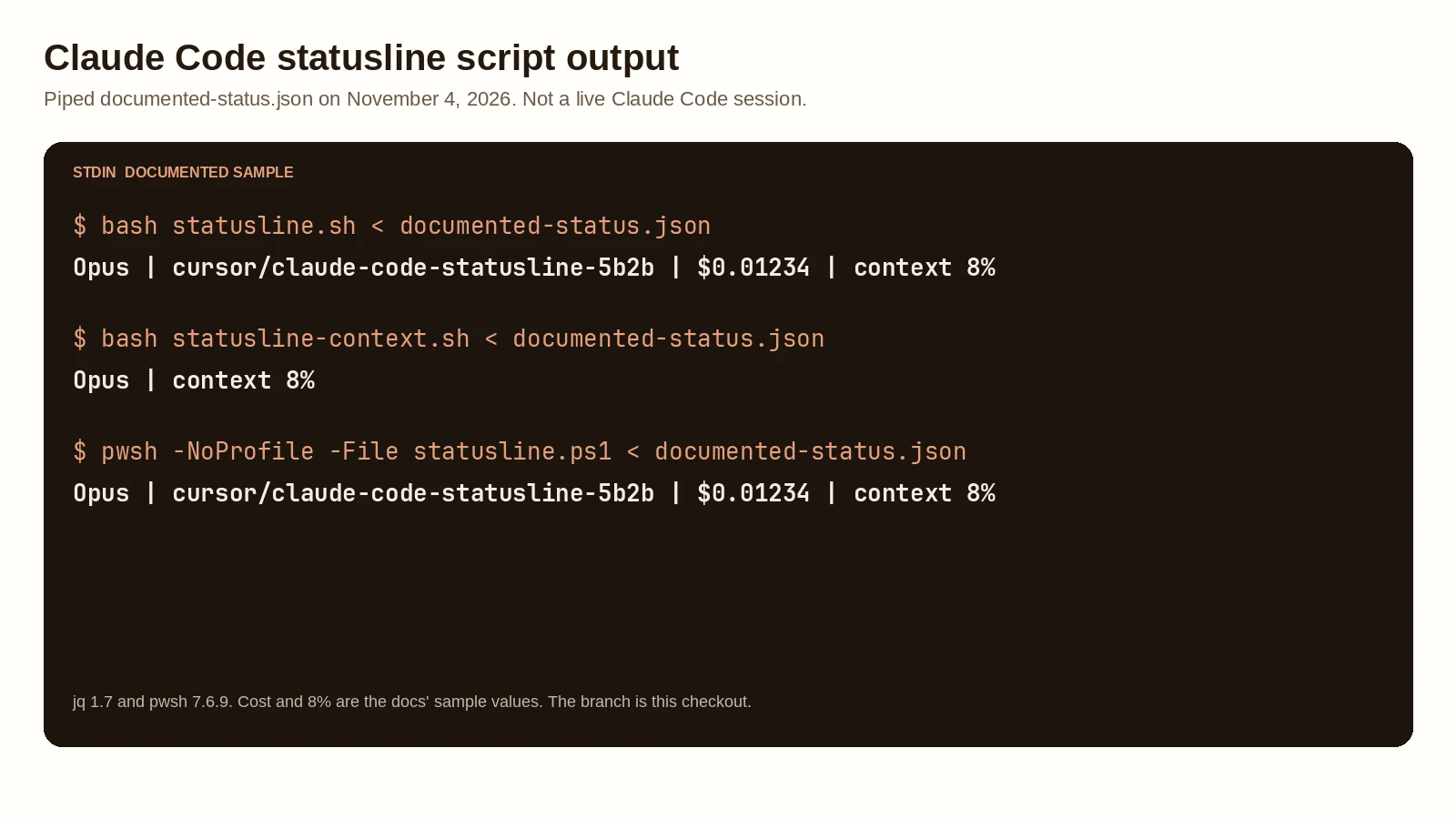
The cost on this line is the session estimate in the JSON. It is not the subscription meter. How to check Claude Code usage is the separate walkthrough for /usage, the claude.ai settings page, and the five-hour and weekly limits. I opened that page on November 4, 2026. I did not run /usage.
A one-shot claude -p prints a different JSON object and then exits. The status line is the interactive bar. That other mode’s cost field is total_cost_usd on the result object. The statusline field is cost.total_cost_usd. Same idea, different object. I did not run a prompt in either mode.
The wording of Claude’s replies is a separate setting. An output style changes the reply. This script prints the bar.
Claude Code headless mode claude -p, the flags from Claude Code 2.1.316, JSON you can parse, and a workflow that was checked and not run. GuideStatusline plugins worth trying
A script is enough if you want the four slots above. A Claude Code statusline plugin is the prebuilt option. The statusline page names two community projects, ccstatusline and starship-claude. I also opened claude-hud, because its README describes a status line plugin. These are the Claude Code statusline GitHub repositories I opened on November 4, 2026. Star counts are stargazers_count from the GitHub API that day. I did not install any of the three, and I did not run their setup commands.
ccstatusline had 13,519 stars. The latest commit on main is 66e9a08f86b1b4a8c7684cb35401e3ad3e3e4e8d, committed October 31, 2026, message docs: fix broken package size badge. package.json on that commit says version 2.2.33. The license file is MIT. The README’s install is npx -y ccstatusline@latest, which opens a terminal UI. When you install from that UI, it writes a statusLine command. The README’s example is npx -y ccstatusline@latest, with padding 0 and refreshInterval 10. It says refreshInterval is written only when Claude Code is at least 2.1.97. The file tree of main has no path containing plugin. This one is an npm package that edits settings. It is not a marketplace plugin in that tree.
claude-hud had 29,101 stars. The latest commit on the default branch is dd8c0bebeeef81f94a9361af317492f626d3890d, committed November 3, 2026, message Release v0.15.1. The license is MIT. The README’s install, inside Claude Code, is /plugin marketplace add jarrodwatts/claude-hud, then /plugin install claude-hud, then /reload-plugins, then /hud. It says /hud points the status line at the HUD after asking you. It requires Claude Code v2.1.260 or later and Node.js 22.18 or later. This machine has Node v22.23.4 and Claude Code 2.1.318. I still did not install the plugin. If you searched for a Claude Code status bar plugin, this README and the starship-claude README are the two marketplace installs I checked.
starship-claude had 151 stars. The latest commit is 2029d40f084858103cc3062e307ca52a52e5d9f8, committed April 30, 2026, message reloading plugins is required to run a newly installed plugin (#11). The license is MIT. The README’s install is /plugin marketplace add martinemde/starship-claude, then /plugin install starship-claude@starship-claude, then /reload-plugins, then /starship. The README says it needs Starship to render the line. The manual path downloads a script to ~/.local/bin/starship-claude and sets statusLine.command to that path. I did not install Starship.
Claude Code statusline on Windows
A Claude Code status line on Windows follows the statusline page’s Windows section. Claude Code runs the command through Git Bash when Git Bash is installed, and through PowerShell when Git Bash is absent. Git Bash treats an unquoted backslash as an escape, so a path like C:\Users\username\script.mjs can lose its separators and fail with no visible error. Write the path with forward slashes. ~ also works and expands to the Windows home directory.
The page’s PowerShell command is:
{
  "statusLine": {
    "type": "command",
    "command": "powershell -NoProfile -File C:/Users/username/.claude/statusline.ps1"
  }
}
I did not run powershell. I ran pwsh 7.6.9 on Linux, which is PowerShell 7, not Windows PowerShell 5.1, and not a Windows machine. pwsh -NoProfile -File statusline.ps1 with the documented sample on stdin exited 0 and printed the same line as statusline.sh. The docs’ own PowerShell snippet, saved as a file and run the same way, exited 0 and printed directory [Opus] ctx: 8%.
With Git Bash installed, the page says you can point command at ~/.claude/statusline.sh and keep the bash script. I did not install Git Bash. statusline.sh was run with bash on Linux. bash -n exited 0 on both shell scripts.
What we tested
Checked
The CLI install:
npm i -g @anthropic-ai/claude-code --prefix /home/ubuntu/.local2.1.318 (Claude Code)claude doctor reported Running: npm-global (2.1.318) and that this machine is not signed in to claude.ai. No API key was set. claude --settings used a copy of settings.statusline.json whose command pointed at statusline.sh in this checkout, then claude -p "Reply with the single word pong." exited 1. Stdout was Not logged in · Please run /login. Stderr was empty. The status line command did not run, because there was no session.
The script runs used documented-status.json, copied from the example object on the statusline page. jq 1.7 parsed it. bash -n passed on statusline.sh and statusline-context.sh.
| Script | Host | Exit | Stdout |
|---|---|---|---|
| statusline.sh | bash, in this repo | 0 | Opus | cursor/claude-code-statusline-5b2b | $0.01234 | context 8% |
| statusline-context.sh | bash, in this repo | 0 | Opus | context 8% |
| statusline.ps1 | pwsh 7.6.9, redirect and pipe | 0 | Opus | cursor/claude-code-statusline-5b2b | $0.01234 | context 8% |
| docs jq filter | jq 1.7 | 0 | [Opus] 8% context |
| docs PowerShell snippet | pwsh 7.6.9, as -File | 0 | directory [Opus] ctx: 8% |
A copy with model.display_name and context_window.used_percentage set to null printed unknown | cursor/claude-code-statusline-5b2b | $0 | context 0% from both scripts. On the bash run, cost.total_cost_usd was null. On the pwsh run, the cost object was null. Outside a git checkout, both printed no-branch in the branch slot and kept $0.01234 and context 8%.
Not tested: a Claude Code session, /statusline, workspace trust, refreshInterval, Windows, Git Bash, Windows PowerShell 5.1, an API call, a real cost, or any of the three plugins.
More on this topic lives under AI agents and tools.
FAQ
How do I turn on the Claude Code statusline?
Type /statusline and describe the line you want, or add a statusLine object to ~/.claude/settings.json or .claude/settings.json. type has to be command, and command is your script or an inline shell command. The settings reference, checked November 4, 2026, says the default is unset, so there is no custom status line until you set one. The line stays blank until you accept the workspace trust dialog for the folder. I did not run /statusline, because that needs a session, and Claude Code 2.1.318 stopped at the login check on this machine.
Can the statusline show cost or token usage?
Yes. The JSON includes cost.total_cost_usd, an estimated session cost, and context_window fields for token counts and used_percentage. used_percentage counts input tokens, including cache reads and writes, and it does not include output tokens. It can be null before the first API response. The scripts in this post print the cost and the percentage from the documented sample. They do not call the API. The sample cost 0.01234 and the 8 percent are the docs’ example values, not a bill.
Does the statusline work on Windows?
The statusline docs say Claude Code runs the command through Git Bash when Git Bash is installed, and through PowerShell when it is not. Write paths with forward slashes. A backslash path can fail with no visible error under Git Bash. I ran statusline.ps1 and the docs’ PowerShell example with pwsh 7.6.9 on Linux. I did not run either one on Windows, and I did not run Windows PowerShell 5.1.
Which statusline plugin should I use?
I did not run any of them. ccstatusline is the npm package the statusline docs name. On November 4, 2026 the GitHub API reported 13,519 stars, and the latest commit on main was October 31, 2026. Its README installs with npx -y ccstatusline@latest and writes statusLine for you. claude-hud and starship-claude install as marketplace plugins. claude-hud had 29,101 stars and a commit on November 3, 2026. starship-claude had 151 stars and a commit on April 30, 2026. Use a script from this post if you want to see the JSON. Use a plugin if you want a prebuilt bar.