
Five built-in styles from the docs on November 7, 2026, and a custom file you can copy. No session, so no model reply.
On this page
- The short answer
- What Claude Code output styles change
- Built-in output styles, including the Learning output style
- How to switch output styles
- Claude Code custom output style examples
- Output styles vs CLAUDE.md, slash commands, and subagents
- Were Claude Code output styles deprecated?
- What we tested
- FAQ
- Sources
- Related
The short answer
Claude Code output styles are instructions that set Claude’s role, tone, and reply format for every response in a session. Switch with /output-style or /config, or set outputStyle to a built-in name or to a custom file in .claude/output-styles. The list and the file below were checked against the docs on November 7, 2026. A session was not started, so this post has no model reply.
What Claude Code output styles change
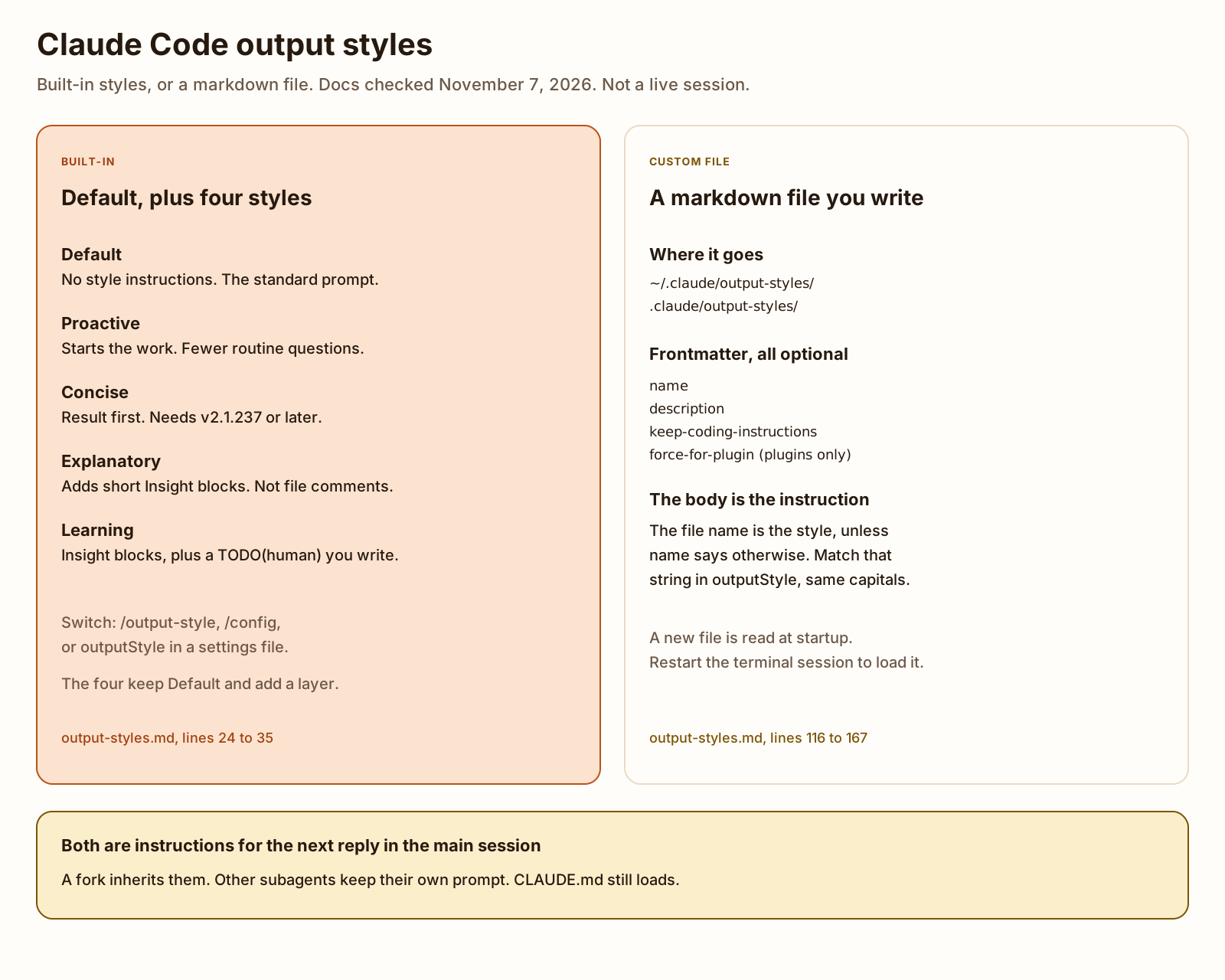
An output style is a set of instructions for Claude’s role, tone, and response format on every reply in the session. The output styles page, saved on November 7, 2026 as output-styles.md (204 lines, sha256 74bc7dfd0e61dc4a2cd5ffaca349f40702b49c33f9fba7cb4334b1d623a1bda1), says Claude Code includes four built-in styles besides Default, and that you can write your own. You set it once so you do not repeat the request in every prompt. A custom style can also make Claude something other than a software engineer. The page’s examples are a writing assistant and a data analyst.
The Learning output style is the built-in for hands-on practice. The Claude Code output styles examples in this post are one custom file, checked line by line against that page. That file is a Claude Code custom output style you can copy. Claude Code output styles were also deprecated once: changelog 2.0.30 turned the feature off, and 2.0.32 turned it back on. The lines are in the last section.
The page says a style gives Claude instructions to follow. It does not guarantee that something always happens. Facts about the project belong in a Claude MD file. A step that has to happen every time, such as formatting after an edit or blocking a command, is a hook. A procedure for one kind of task is a skill.
Claude Code sends the active style’s instructions with every request. On the full system prompt, a custom style leaves out the built-in software engineering section (how to scope a change, write comments, and verify work) unless keep-coding-instructions is true. The shorter system prompt has no such section, so the field does nothing there. To rely on it, set CLAUDE_CODE_SIMPLE_SYSTEM_PROMPT to 0, which selects the full prompt. I did not set that variable.
The style applies to the main conversation and to a fork, which inherits the parent’s conversation and system prompt. Other subagents run their own system prompt, so the style does not change how they reply. Claude Code subagents is that other file. Explanatory and Learning are written to produce longer replies than Default, which uses more output tokens. Concise is written to keep replies short. A custom style’s length is whatever the file asks for. The page says the instructions add input tokens, and that prompt caching cuts that cost after the first request in a session. I did not measure tokens.
Built-in output styles, including the Learning output style
Claude Code starts in Default. The page’s table, lines 30 to 35 of the file I saved, lists the other four. Each of those four keeps the standard software engineering instructions and adds its own. default still appears in the /output-style list, so you select it the same way as the others.
| Style | What the page says | Source |
|---|---|---|
| Default | No output style is selected. Claude Code adds no style instructions. Claude uses the standard system prompt for software engineering. | output-styles.md lines 37 to 41 |
| Proactive | Starts implementing when you send a task. Makes routine assumptions instead of stopping to ask, and does not switch to plan mode unless you ask. Asks in the conversation before deleting data or changing a shared or production system. Does not change your permission mode. | output-styles.md lines 32 and 43 to 49 |
| Concise | The first sentence states the result. Leaves out the lead-in, the narration, and the closing recap. A simple question gets one to three sentences. The engineering work stays as thorough as Default. Needs Claude Code v2.1.237 or later. | output-styles.md lines 33 and 51 to 58. Changelog 2.1.237, line 4481 |
| Explanatory | Does the task as Default does, and adds short Insight blocks on why it chose what it chose. The blocks sit in the conversation, not in your files as comments. | output-styles.md lines 34 and 60 to 70 |
| Learning | Same Insight blocks as Explanatory, and it leaves a few lines for you when the decision is real: error handling, a data structure, or business logic with more than one valid approach. Marks the spot with a TODO(human) comment and waits. | output-styles.md lines 35 and 73 to 89. Released in changelog 1.0.81, line 9571 |
Default
Default means no output style is selected. There is no extra instruction block. The settings reference, lines 691 to 699 of the copy I saved the same day, says outputStyle defaults to unset, which is this style.
Proactive
Proactive starts the work and assumes its way through routine decisions. You can redirect it. The check before a destructive or production change is an instruction in the conversation. Permission prompts still follow your permission mode. Switching to Proactive does not change that mode.
The changelog file I saved (10,126 lines, sha256 7c124cc46a362ab85dddb66b6b9b18efef761578def15c761c164447a125ad03, newest heading 2.1.319) has no “Added Proactive output style” line. The first line that names Proactive is a bugfix in 2.1.257, line 3995: sessions in that style were busy-looping instead of idling while a background command or Monitor was still running. The style is in the docs table today. I do not have a changelog line for the version that introduced it.
Concise
Concise leads with the result and skips the preamble. The changelog’s 2.1.237 line says the same thing and tells you to select it under Output style in /config. The docs add two cases where Claude still writes at full length: anything you asked to have explained, and anything you need in order to act safely (error reports, failing tests, security warnings, and confirmations for destructive actions).
Explanatory
Each explanation is a short block in the conversation, labeled Insight, with two or three points about the codebase or the code Claude wrote. The page’s sample, after an API endpoint, says every route goes through a withAuth wrapper and that rate limits live per route in limits.ts. That sample is the docs’ example. I did not receive an Insight block.
Changelog 2.1.311, line 554, added a tip for this style, shown when you ask Claude for explanations. I did not see the tip.
Learning output style
Learning adds those Insight blocks and then hands you a small piece. Claude writes a TODO(human) comment in the file and a note the page titles “Learn by Doing”: what is already built, what you should write, and what to weigh. The page’s sample asks you to implement the document branch of validateFile() in upload.js. You write that code and tell Claude you are done. Claude answers with one Insight about your code and continues. I did not run this, so the sample is the page, not a transcript.
Explanatory and Learning shipped together. Changelog 1.0.81, line 9571: “Released output styles, including new built-in educational output styles Explanatory and Learning.”
How to switch output styles
The command, the terminal menu, and the VS Code menu save the choice to .claude/settings.local.json at the local project level. That is output-styles.md lines 91 to 100.
| Where | What you do | Version note on the page |
|---|---|---|
| Terminal command | /output-style concise switches. With no argument, the command lists styles and marks the current one. The command ignores case. | v2.1.269 or later. Also works in non-interactive mode, Agent SDK sessions, and Remote Control. |
| Terminal menu | Run /config and select Output style. | The page does not add a version on this row. |
| VS Code | Open the command menu with / and select Output styles. Custom styles are in that menu. v2.1.261 or later can also create the file from the menu. | Selection requires v2.1.257 or later. Changelog 2.1.257 line 4054 added it. Changelog 2.1.261 line 3814 added the walkthrough that writes a file. |
| Desktop app | Set outputStyle in a settings file. /config opens Settings, not the terminal menu. | The page does not add a version on this row. |
| Settings file | Set outputStyle yourself. Built-in names are Proactive, Concise, Explanatory, and Learning. A mismatch such as explanatory selects Default. | User default is ~/.claude/settings.json. A project settings file wins over that. |
On the mobile app or the web, through Remote Control, the page says you can list and select only built-in styles. I did not open Remote Control, VS Code, or the desktop app.
A mid-session switch applies on your next message. The prompt caching page, lines 235 to 239, says Claude Code delivers the new style’s instructions as a message, so that request still reads the system prompt and the earlier conversation from the cache. Before v2.1.251, the same pages say the switch kept the cache and did not apply until /clear or a new session. I read the 2.1.251 section of the changelog (it starts at line 4069) and it does not mention output styles. The version is from the docs, not from a changelog bullet I can quote. I did not measure a cache hit.
/output-style and /config are slash commands. The built-in list, and where a command you invent now lives, is a different page.
The same output styles page says /output-style also works in non-interactive mode. Changelog 2.1.269, line 3457, added /output-style [name] for Remote Control and for cloud and other headless sessions. Claude Code headless mode is claude -p and the flags. Passing a prompt still needs a login. Mine stopped before that, which is in What we tested.
The bar under the prompt is a different setting. A statusline script prints a line from session JSON. It does not change the wording of the reply.
Claude Code custom output style examples
A custom output style is a markdown file: frontmatter, then the instructions. Save it in one of three places. The file name is the style name unless name is set.
| Folder | Who it is for |
|---|---|
~/.claude/output-styles | You, on every project on this machine. |
.claude/output-styles | This project. Commit it if the team should share it. |
.claude/output-styles inside the managed settings directory | An organization policy. |
Project styles load from every .claude/output-styles/ between the working directory and the repo root. When two of those define the same name, the one closest to the working directory wins. That rule is also changelog 2.1.178, line 5723. Plugins can ship styles in an output-styles/ directory. I did not install a plugin.
The frontmatter fields are all optional. Names are lowercase words with hyphens. A misspelled field is ignored, with no error. If the YAML does not parse, the style still loads under the file name and no fields are set. claude --debug prints the parse error. I did not pass --debug.
| Field | What the page says |
|---|---|
name | Picker name. Default: the file name. |
description | Picker line. |
keep-coding-instructions | true keeps the built-in software engineering section on the full system prompt. Default: false. Set it when you are changing how Claude talks and you still want it coding the same way. |
force-for-plugin | Plugin styles only. true applies the style whenever the plugin is enabled and overrides the user’s outputStyle. If several plugins set it, the first one loaded wins. Default: false. |
The docs’ own sample is named “Diagrams first”. It sets keep-coding-instructions to true and tells Claude to lead an explanation with a Mermaid diagram. The file below is a different instruction. It is a template. I did not watch Claude follow it.
Copy review-notes.md to .claude/output-styles/review-notes.md, or to ~/.claude/output-styles/review-notes.md. The same file is on Templates.
---
name: Review notes
description: End each coding reply with the file, the change, and the check
keep-coding-instructions: true
---

After you change a file, close the reply with three lines and nothing after them:

File: the path you changed.
Change: one sentence on what changed.
Check: the command to run, or "none" if you did not change a file.

Do not open with a greeting. Do not restate the task. If you did not change a file, the File line is "none".-
Save the markdown file in .claude/output-styles.
Put
review-notes.mdin the project folder or the user folder above. The directory name isoutput-styles. The file sits inside it. -
Set name, description, and keep-coding-instructions.
nameisReview notes. That is the picker label, and it is the string the settings file has to match.descriptionis the line under the name in the picker.keep-coding-instructionsis true because this file changes the closing lines and should leave the coding instructions in place.force-for-pluginis absent on purpose. This file is not a plugin style. -
Set outputStyle to that name.
Save this next to the markdown, or merge the key into the settings file you already use. The copy I passed to
claude --settingsis settings.output-style.json.settings.output-style.json { "outputStyle": "Review notes" }Review notesmatchesname, including the capital R and the space. The built-in names on the page use the same rule:Explanatory, notexplanatory. -
Restart Claude Code if the file is new.
The terminal reads style files when it starts. Edit one during a session and the running process keeps the old text until you restart. Then run
/output-style Review notes, or/configand select Output style. The next message uses the new style.
| Line | Text | Docs check |
|---|---|---|
| 1 | --- | Frontmatter starts at the top of the file. Line 160. |
| 2 | name: Review notes | Optional picker name. Line 164. This is the string outputStyle must match. Line 110. The file name would have been the style if this line were missing. Line 124. |
| 3 | description: End each coding reply with the file, the change, and the check | Optional picker line. Line 165. It is not the instruction. The body is. |
| 4 | keep-coding-instructions: true | Optional. True keeps the coding section on the full system prompt. Lines 134 and 166. The default, if you leave it out, is false. Changelog 2.0.37 line 9210 added the field. Changelog 2.1.94 line 7359 added it for plugin styles. |
| 5 | --- | Closes the frontmatter. Line 160. |
| 7 to 13 | The closing-lines instruction | The body is what Claude is told. Line 118. Nothing in the file calls the API. Following it is the model’s job, and I did not run a prompt. |
There is no force-for-plugin line. Line 167 limits that field to plugin styles and says the default is false. A parser on this file printed three keys, name, description, and keep-coding-instructions, and no unknown key. The settings string matched name. That run is in What we tested.
Output styles vs CLAUDE.md, slash commands, and subagents
The output styles page, lines 169 to 184, matches the job to the feature. An output style covers every response. It is an instruction, so nothing enforces it.
| You want | Use | Why the page says it fits |
|---|---|---|
| Every response in a certain voice, length, or format, or Claude in a different role | An output style | It applies to the whole session, and you switch with one command. |
| Claude to know the project’s conventions, commands, and structure | CLAUDE.md | It stays loaded whichever style you pick. |
| Instructions for one kind of task, such as a release checklist | A skill | It loads when you invoke it or the task matches, so it does not shape unrelated replies. |
| Something that must happen every time, such as formatting after an edit | A hook | Claude Code runs the hook itself. It does not depend on Claude following an instruction. |
| A helper with its own instructions, model, and tools | A subagent | It runs in a separate context and returns a summary. |
| Text you pass on the command line, added to the system prompt | --append-system-prompt | It appends to the system prompt and does not remove the rest. |
Those combine. CLAUDE.md can hold what Claude should know, an output style can hold how it replies, and a hook can hold anything that has to be guaranteed. How to write a Claude MD file is the standing file: where it loads, and a template from 100 public copies. A skill you type as /name is Claude Code slash commands. A worker with its own window is Claude Code subagents. The subagent page says a non-fork worker does not receive your output style. That matches the output styles page: only the main conversation and a fork use it.
--append-system-prompt is the flag the comparison table names for a one-off addition. The headless write-up quotes the help line for that flag. Changelog 2.0.30, when it deprecated output styles, pointed at --system-prompt-file, --system-prompt, --append-system-prompt, CLAUDE.md, or plugins. 2.0.32 took the deprecation back. The flags are still real. They are a different mechanism from a style file.
Were Claude Code output styles deprecated?
No. The docs page is current, and it documents the five styles above plus custom files. The changelog did turn the feature off, and then back on, and it later deprecated the slash command and then added that command again.
I saved CHANGELOG.md from https://raw.githubusercontent.com/anthropics/claude-code/main/CHANGELOG.md on November 7, 2026. 1,176,779 bytes, 10,126 lines, sha256 7c124cc46a362ab85dddb66b6b9b18efef761578def15c761c164447a125ad03. The newest heading is 2.1.319, which is the version claude --version printed the same day. I searched the file for output style, output-style, and outputStyle. The history that answers the deprecation question is these lines. Wording that contained a special dash is paraphrased. The line numbers are the file.
| Version | Line | What the line says |
|---|---|---|
| 1.0.81 | 9571 | Released output styles, including the built-in educational styles Explanatory and Learning. |
| 2.0.30 | 9262 | Deprecated output styles. Review options in /output-style and use --system-prompt-file, --system-prompt, --append-system-prompt, CLAUDE.md, or plugins instead. |
| 2.0.32 | 9241 | Un-deprecate output styles based on community feedback. |
| 2.0.37 | 9210 | Added the keep-coding-instructions frontmatter option. |
| 2.0.41 | 9203 | Plugins can share and install output styles. |
| 2.1.73 | 7940 | Deprecated the /output-style command. Use /config instead. Output style is fixed at session start for better prompt caching. |
| 2.1.237 | 4481 | Added the built-in Concise style. Select it under Output style in /config. |
| 2.1.269 | 3457 | Added /output-style [name] to list and switch styles, including over Remote Control and in cloud and other headless sessions. |
The 2.1.73 line deprecated the command, not the feature. The feature’s own deprecation is the 2.0.30 line, reversed two versions later. I did not find a line that says the command, or the feature, was removed. Later lines still talk about the command: 2.1.286 line 2205 improved the picker, and 2.1.295 line 1488 fixed /output-style saving its setting without asking a plugin’s config.set hook.
Today’s docs and today’s changelog agree on the current command. /output-style is documented, and it requires v2.1.269 or later. /config still sets the style. outputStyle in a settings file still sets it.
What we tested
Checked
I installed the CLI and read the docs. I did not start a session, and I did not capture a reply.
npm i -g @anthropic-ai/claude-code --prefix /home/ubuntu/.local2.1.319 (Claude Code)claude doctor printed Running: npm-global (2.1.319) and Not signed in to claude.ai. No API key was set. claude --help printed 313 lines and exited 0. I searched that text for output style. The only hit is --safe-mode, which lists output styles among the customizations it disables, next to CLAUDE.md, skills, plugins, hooks, MCP servers, custom commands, and agents. There is no --output-style flag in that help text.
claude -p "Reply with the single word pong." exited 1. Stdout was Not logged in · Please run /login. Stderr was empty.
I then passed the template settings file:
Not logged in · Please run /loginExit 1. Stderr was empty. A copy of the same command with a settings file of broken JSON still printed the login line on stdout, and stderr said the file did not load: Invalid or malformed JSON. A third run set outputStyle to review notes, all lowercase. Stderr was empty and stdout was the same login line. The docs say a mismatched value selects Default. I did not get far enough to see which style would have been used.
A parser read review-notes.md and printed three keys: name = Review notes, description = End each coding reply with the file, the change, and the check, keep-coding-instructions = true. Unknown keys: none. force-for-plugin: absent. The settings value equalled name.
The docs file and the changelog file are the hashes in the sections above. Both were fetched on November 7, 2026.
Not tested: a Claude Code session, any model reply, a before-and-after, /output-style, the /config menu, VS Code, the desktop app, Remote Control, a plugin style, force-for-plugin, claude --debug on a broken frontmatter file, token counts, and whether Concise, Explanatory, Learning, or Proactive change a real reply.
More on this topic lives under AI agents and tools. The same guide is listed on Guides.
FAQ
Are Claude Code output styles deprecated?
No. The changelog deprecated the feature in 2.0.30 and un-deprecated it in 2.0.32. The output styles page, checked November 7, 2026, still documents Default, Proactive, Concise, Explanatory, Learning, and custom files. The /output-style command was deprecated in 2.1.73, with /config as the replacement, and 2.1.269 added the command again. I searched that changelog file for a Removed line about output styles and did not find one.
Where do custom output style files live?
A personal file goes in ~/.claude/output-styles. A project file goes in .claude/output-styles. A managed policy can ship the same folder inside the managed settings directory. The file name is the style name unless frontmatter sets name. On November 7, 2026 the output styles page said project styles load from every .claude/output-styles folder between the working directory and the repo root, and the closest one wins when names collide.
What does the Learning output style do?
It keeps the usual coding behavior, adds the same Insight blocks as Explanatory, and leaves a TODO(human) comment where you write a small piece of the code. Claude then waits. That description is the output styles page, checked November 7, 2026. I did not run the style, so I did not see an Insight block or a TODO(human) comment in a file.
Should I use an output style or CLAUDE.md?
Use an output style for how every reply should sound, or for a role other than software engineer. Use CLAUDE.md for facts about the project: commands, layout, and conventions. The output styles page says a style is an instruction Claude follows, not a guarantee. A step that must run every time is a hook. A procedure for one kind of task is a skill. How to write a Claude MD file is the project file.