
Pick Cloudflare Pages when static transfer is the worry: 500 builds a month, and static requests are free. Pick Netlify for built-in forms, inside 300 credits.
On this page
The short answer
Pick Cloudflare Pages when the site is static and transfer is the worry: static asset requests are free and unlimited, and the Free plan allows 500 builds a month. Pick Netlify when you need a built-in form, or a commercial site that can live inside 300 credits. Those 300 credits buy 15 GB of bandwidth only when every credit is spent on bandwidth.
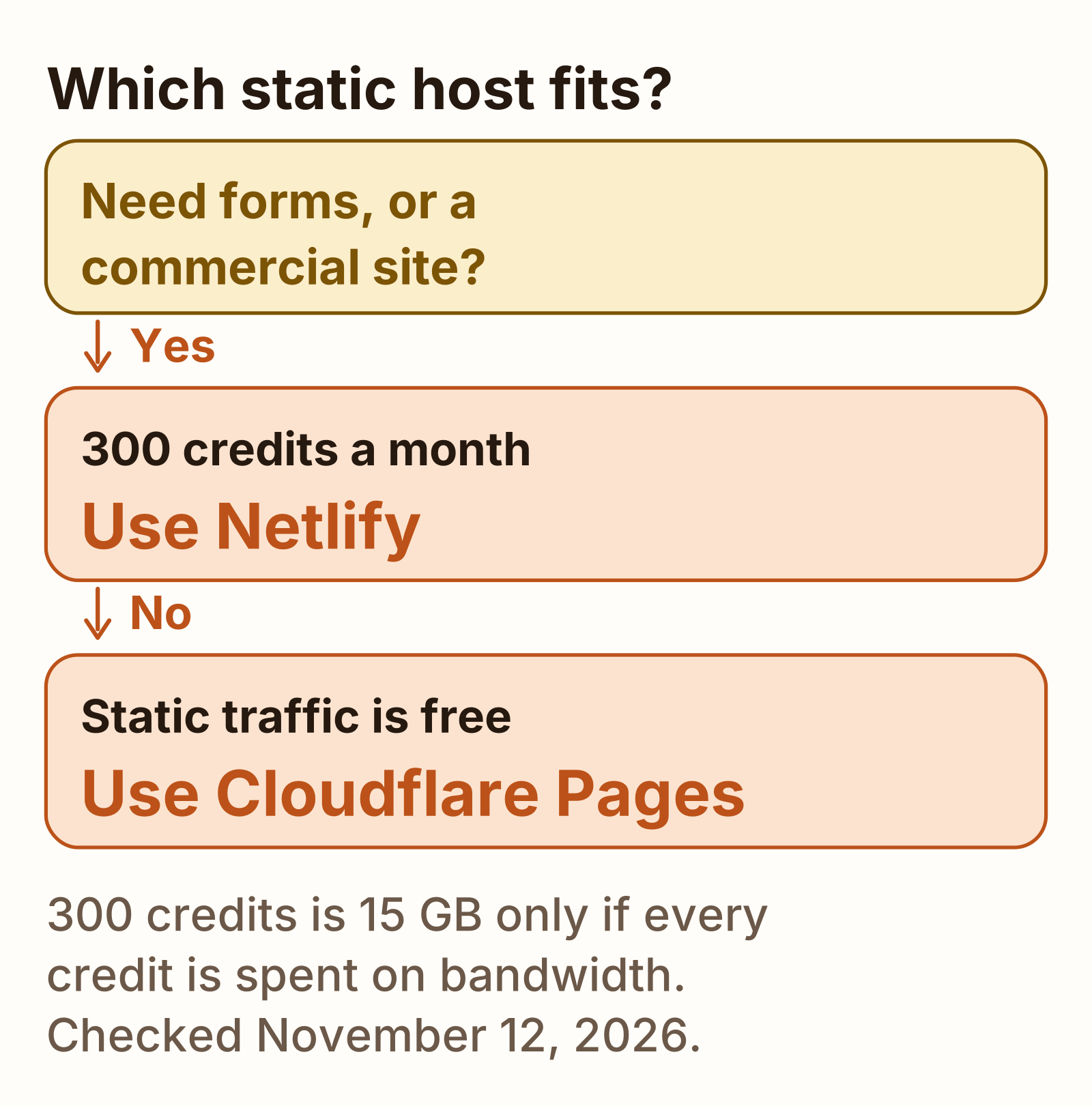
Netlify vs Cloudflare Pages is the choice for a static site that deploys from Git, and Cloudflare Pages vs Netlify is the same choice. What that site costs next to the other small-app hosts is in app hosting cost. Vercel’s free cap is a different meter, in Vercel vs Netlify.
Free limits side by side
Every cell is a vendor page read on November 12, 2026. Where a page does not print a figure, the cell says so. The Cloudflare limits page says it was last updated September 5, 2026. Netlify’s credit docs fetched today do not print a last-updated line.
The three Netlify “if every credit” rows are exclusive. Spending a credit on a deploy leaves fewer credits for bandwidth.
| Line | Netlify Free | Cloudflare Pages Free |
|---|---|---|
| Monthly price | $0. 300 credits, hard limit, no auto recharge | $0. The limits page does not print a Pages subscription fee |
| Bandwidth or static transfer | 20 credits per GB of bandwidth. 300 divided by 20 is 15 GB, if every credit is bandwidth | Requests to static assets are free and unlimited, when the request does not invoke Functions. The limits page does not print a gigabyte cap |
| Web requests | 2 credits per 10,000 requests, including pages, assets, redirects, and functions. 300 divided by 2 is 150, times 10,000 is 1,500,000 requests, if every credit is requests | Static requests are outside the Functions quota. Functions share 100,000 Workers requests a day |
| What happens at the cap | Every web project pauses. Visitors get a Site not available page. Unused monthly credits do not roll over | The functions pricing page does not say a static site pauses at a transfer cap. Functions stop counting once the daily Workers quota is used |
| Builds | A production deploy is 15 credits. Build minutes are no longer calculated. Previews and branch deploys are 0 credits. 1 concurrent build for the whole team | 500 builds a month, 1 at a time, timeout 20 minutes. Concurrent builds are counted per account. Preview deployments are unlimited |
| Commercial use | The November 12, 2024 announcement says commercial projects can deploy. The credit pages read today do not add a personal-use-only rule | The limits page and the functions pricing page do not print a personal-use-only rule |
| Files | No limit on the number of files per deploy. A directory inside the publish folder fails the deploy past 54,000 files. The deploy overview does not print a per-file byte cap | 20,000 files. One file: 25 MiB |
| Projects | 500 projects | 100 projects per account. New accounts can be blocked from creating projects for the first 48 hours |
-
500
Cloudflare Pages Free builds a month
-
300
Netlify Free credits a month
-
15 GB
Netlify Free, if all 300 credits are bandwidth
-
100k
Pages Functions requests a day, shared, on Free
Accounts created before September 4, 2025 can still be on a legacy plan. The legacy pricing page, read the same day, lists Free and Starter at 100 GB of bandwidth and 300 build minutes, with a hard limit on Free. That is not the 300 credit plan in the table. New accounts from September 4, 2025 use credits. This page uses the credit plan for the verdict.
A public repository that can stay on github.io, with a soft bandwidth cap, is a third static host. That pair is Cloudflare Pages vs GitHub Pages.
Builds
Netlify’s credit plan does not meter build minutes. How credits work says a production deploy is 15 credits, and that build minutes are no longer calculated. Failed deploys and a rollback to a previous production deploy do not consume credits. Deploy previews and branch deploys are 0 credits. The credit-based plans page says Free includes 1 concurrent build, so only one build runs at a time for the team. Personal stays at 1, with an option to buy more. Pro includes 3. The pricing page prints the same 15 credit production deploy.
Twenty production deploys, 300 divided by 15, spend the month and leave 0 credits for bandwidth. One production deploy leaves 285 credits. 285 divided by 20 is 14.25 GB of bandwidth, with no requests and no compute in that arithmetic.
Cloudflare’s limits page sets Free at 500 builds a month and 1 build at a time. Pro is 5,000 builds and 5 concurrent. Business is 20,000 builds and 20 concurrent. Builds time out after 20 minutes. The page says concurrent builds are counted per account.
Functions and edge
| Line | Netlify | Cloudflare Pages |
|---|---|---|
| Where it runs | Functions default to region cmh (US East, Ohio). Edge Functions run at the edge | Pages Functions run on the Workers runtime. The pricing page bills them as Workers requests |
| Free quota | Compute is 10 credits per GB-hour. 300 divided by 10 is 30 GB-hours, if every credit is compute. The edge limits page says the monthly invocation count depends on the team plan and does not print a Free number | Free: Functions and Workers share 100,000 requests a day, resetting at midnight UTC. The pricing page’s example is 50,000 of each. CPU time on Workers Free is 10 ms per invocation, on the Workers limits page |
| Memory and duration | Default 1024 MB and a synchronous limit of 60 seconds. Background functions can run 15 minutes. Raising memory, from 1024 MB to 4096 MB, is a Credit-based Pro and Enterprise feature. Edge Functions: 512 MB for the set, 50 ms of CPU per request, 40 second response-header timeout, 20 MB bundle after compression | Workers limits, read the same day: 128 MB of memory on Free and on the standard paid column. A 0.5 GB process does not fit in that memory limit |
| Payload | Buffered request or response: 6 MB. Streamed response: 20 MB | The Pages limits page does not print a function payload cap. It does print 25 MiB for one site asset |
| What does not count | Edge functions do not contribute to the compute GB-hour meter. They count as web requests | A static request that does not invoke Functions is free on free and paid plans |
The two 50 ms and 10 ms figures are CPU caps, on different products. Netlify’s 50 ms is the per-request Edge Functions cap, and waiting on the network does not count. Cloudflare’s 10 ms is the Workers Free CPU time per invocation. They are not the same clock.
Forms, redirects and extras
Netlify Forms are the feature the credit docs price at zero. How credits work says submissions are free and unlimited for all credit-based plans. The forms setup page says a form request that uploads a file has a maximum size of 8 MB, and file uploads time out after 30 seconds. Only one file per field is supported. The usage page says credit-based plans are free and unlimited, and that legacy plans are metered.
Cloudflare Pages does not document that inbox. The Static Forms plugin intercepts a form that sets data-static-form-name, and your respondWith function decides what to do with the FormData. That runs as a Pages Function, so the submission spends the Workers quota. The HTML form tutorial builds the same idea as functions/api/submit.js. Its live demo is submit.pages.dev.
Redirects are a file on both hosts, with different caps.
| Line | Netlify | Cloudflare Pages |
|---|---|---|
| Redirects | A _redirects file, or redirects in the Netlify config. The overview does not print a hard rule count. If the serialized rules are too large, the deploy might fail. At 10,000 redirects or more, the page says to use wildcards. The default status is 301 | A _redirects file: 2,000 static and 100 dynamic, stated as a combined 2,100. The limits page says to use Bulk Redirects past that |
| Custom headers | A _headers file, or headers in the config. The headers page does not print a rule count. Custom headers apply to files Netlify serves itself, not to a function or edge function response | A _headers file: 100 rules. One header: 2,000 characters. Headers in that file are not applied to Function responses |
| Custom domains | The pricing page lists custom domains with SSL. It does not print a count | 100 custom domains per project on Free, on the limits page |
Cloudflare’s migrating from Netlify guide, last updated April 21, 2026, says a _redirects file in the publish directory can be used as-is, and that redirects stored only in netlify.toml have to be copied over. It also says to remove the Netlify form attribute and handle the post in a Pages Function.
Our TTFB check
The limits above are the docs. The only clock in this post is a fetch of six public homepages that were already deployed.
Three are on netlify.app, and each is a Netlify-owned starter. Astro Quickstart is the live URL in Netlify’s own Astro post, and the repo is netlify-templates/astro-quickstart. Astro Toolbox is the homepage linked from netlify-templates/astro-toolbox. Next.js starter is the demo linked from Netlify’s Next.js starter template page.
Three are on pages.dev, and each is named in a Cloudflare Pages tutorial. submit.pages.dev is the form tutorial’s live demo, from the cloudflare/submit.pages.dev repo. formspree-example-cloudflare-html.pages.dev and formspree-example-cloudflare-react.pages.dev are the live demos in the HTML and React Formspree tutorials. They are not one template deployed twice.
What we tested
Checked
Six public homepages, from this VM, on November 12, 2026. One warmup request per URL, not in the table. Then 12 measured requests, interleaved in the order Astro Quickstart, Astro Toolbox, Next.js starter, form demo, Formspree HTML, Formspree React, one new curl process each time so the connection was not reused. curl 8.5.0. Every measured response was HTTP 200 and HTTP/2. The User-Agent was shipmunks-ttfb/1.0. curl was not passed --compressed, so these are the uncompressed HTML sizes.
The command, with the timing field this post uses:
curl -sS --max-time 25 -A shipmunks-ttfb/1.0 -o /dev/null -D - -w '%{time_starttransfer} %{http_code} %{size_download}\n' URLTTFB is time_starttransfer, in seconds from curl. The tables below are milliseconds. Both TTFB and total time include DNS, TCP, and TLS. For 12 samples, the median is the mean of the 6th and 7th sorted values, then rounded to 0.1 ms. The run, including the six warmups, started at 2026-11-12T09:13:58.322Z and the last measured request finished at 2026-11-12T09:14:11.131Z.
ipinfo.io, checked at the start of the run, reported Ashburn, Virginia, Amazon AS14618, address 54.158.128.7, hostname ec2-54-158-128-7.compute-1.amazonaws.com. Every pages.dev cf-ray ended in IAD. Every Netlify response included x-nf-request-id. No pages.dev response included cf-cache-status or cache-status, so this post does not call those 36 responses hits or misses.
Trimmed output, the first measured request of two URLs, seconds:
astro-quickstart.netlify.app  0.068550  200  15713  cache-status fwd=miss  x-nf-request-id set
submit.pages.dev               0.064235  200  2538   no cf-cache-status  cf-ray ended IAD
Builds were not timed. Nothing was deployed, and no form was submitted. A Function was not invoked on purpose. The form demo’s homepage is the static HTML. The POST handler was not called. Any city other than this VM in Ashburn, on this day, was not measured. This is one machine and one run.
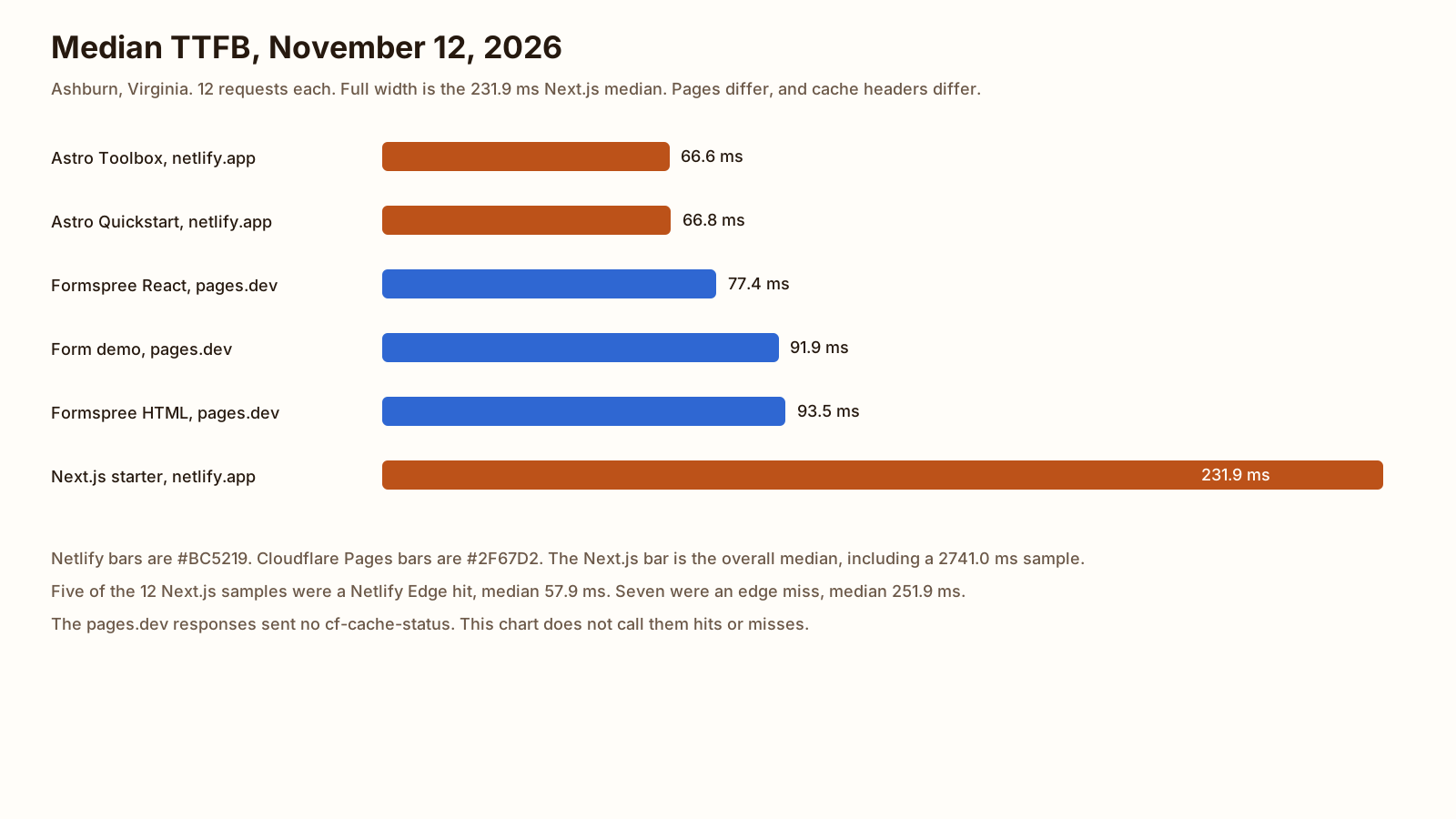
| Page | Host | Bytes | Median TTFB | Min | Max | Median total | Cache on the 12 |
|---|---|---|---|---|---|---|---|
| Astro Toolbox | netlify.app | 4,208 | 66.6 | 30.4 | 80.2 | 66.7 | cache-status hit on 2, fwd=miss on 10. No cf-cache-status. x-nf-request-id on all 12. server Netlify. |
| Astro Quickstart | netlify.app | 15,713 | 66.8 | 54.9 | 82.9 | 68.9 | fwd=miss on 11, hit on sample 9. No cf-cache-status. x-nf-request-id on all 12. |
| Formspree React | pages.dev | 644 | 77.4 | 64.4 | 91.3 | 77.4 | No cf-cache-status and no cache-status. server cloudflare. cf-ray ended IAD. cache-control public, max-age=0, must-revalidate. |
| Form demo | pages.dev | 2,538 | 91.9 | 64.2 | 122.4 | 91.9 | Same pages.dev headers as the Formspree React page. Not labeled hit or miss. |
| Formspree HTML | pages.dev | 703 | 93.5 | 70.5 | 124.4 | 93.6 | Same pages.dev headers. Not labeled hit or miss. |
| Next.js starter, all 12 | netlify.app | 13,700 | 231.9 | 46.8 | 2741.0 | 233.8 | Netlify Edge hit on 5. Next.js hit with Netlify Edge fwd=miss on 7. Age about 202,407 to 202,418 seconds on the edge hits. |
| Next.js, edge hits only | netlify.app | 13,700 | 57.9 | 46.8 | 72.5 | n=5 | Samples 2, 6, 7, 10, and 11. Median is the middle of those five, 57.854 ms, rounded to 57.9. |
| Next.js, edge misses only | netlify.app | 13,700 | 251.9 | 223.3 | 2741.0 | n=7 | The other seven. Median is the 4th of the seven, 251.916 ms, rounded to 251.9. Sample 4 was 2741.005 ms. Its TLS time was 36.9 ms, so the wait was after the handshake. |
The two middle Astro Quickstart samples are 65.627 ms and 67.996 ms. The mean is 66.8115 ms, which rounds to 66.8. Toolbox is 65.991 and 67.307, mean 66.649, rounds to 66.6. Next.js overall is 223.315 and 240.385, mean 231.85, rounds to 231.9. The form demo is 89.035 and 94.762, mean 91.8985, rounds to 91.9. Formspree HTML is 90.972 and 96.089, mean 93.5305, rounds to 93.5. Formspree React is 75.925 and 78.824, mean 77.3745, rounds to 77.4.
On this run the lowest median was the Astro Toolbox and the highest was the Next.js starter. These six medians do not choose the host. The pages are different sizes, from 644 bytes to 15,713, and the cache state is not the same. The choice is the limits in the short answer.
| Sample | Quickstart | Toolbox | Next.js | Form demo | Formspree HTML | Formspree React |
|---|---|---|---|---|---|---|
| 1 | 68.550 | 68.973 | 304.392 | 64.235 | 90.972 | 87.512 |
| 2 | 55.350 | 80.177 | 47.995 | 94.762 | 124.398 | 88.200 |
| 3 | 61.490 | 69.699 | 223.315 | 89.035 | 70.533 | 72.944 |
| 4 | 61.383 | 60.642 | 2741.005 | 122.376 | 73.596 | 81.918 |
| 5 | 81.601 | 79.413 | 486.018 | 119.367 | 105.996 | 65.353 |
| 6 | 67.996 | 30.420 | 72.516 | 110.256 | 79.972 | 74.325 |
| 7 | 71.707 | 60.705 | 62.358 | 66.642 | 101.848 | 75.925 |
| 8 | 82.934 | 59.430 | 251.916 | 119.849 | 78.095 | 91.278 |
| 9 | 54.883 | 65.991 | 240.385 | 68.567 | 99.077 | 64.368 |
| 10 | 73.060 | 33.339 | 57.854 | 81.870 | 72.571 | 78.824 |
| 11 | 63.428 | 67.307 | 46.767 | 77.001 | 96.089 | 70.347 |
| 12 | 65.627 | 72.501 | 246.461 | 95.049 | 97.468 | 87.254 |
Which to pick
If you are choosing Netlify or Cloudflare Pages, use the row you actually need.
- The site is static and a transfer cap is the thing you want to avoid: Cloudflare Pages. Static asset requests are free and unlimited when they do not invoke Functions. Free allows 500 builds a month.
- You need a form in the dashboard, with no function of your own: Netlify. Submissions are free and unlimited on the credit plan. A file upload request stops at 8 MB.
- The site takes payment or is a business, and 300 credits is enough: Netlify Free. The 2024 announcement says commercial projects can deploy. Vercel Hobby is a different rule, in Vercel vs Netlify.
- You are about to open a new project on Cloudflare and you are not sure Pages is the product: read Cloudflare Workers vs Pages before you create it.
- The site is a public repository and github.io is enough: Cloudflare Pages vs GitHub Pages.
- The thing you are hosting is a process that stays on, with Postgres: that bill is Heroku alternatives, not this pair.
- The domain answers and you want Google to fetch it: how to get a new website indexed.
FAQ
Is Cloudflare Pages really unlimited bandwidth?
The Pages Functions pricing page, read November 12, 2026, says requests to static assets are free and unlimited on free and paid plans, when the request does not invoke Functions. The Pages limits page does not print a gigabyte cap for those static requests. A request that does invoke Functions counts toward the Workers quota. On the Free plan that quota is 100,000 requests a day, shared with Workers, resetting at midnight UTC. Netlify Free is the other shape: bandwidth is 20 credits per GB, drawn from 300 credits a month.
Can I move from Netlify to Cloudflare Pages?
Yes. Cloudflare’s migrating-from-Netlify guide, last updated April 21, 2026, says to copy the build command and the publish directory, then connect the Git repo with the Pages Git integration. A _redirects file in the publish directory can be reused. Redirects that live only in netlify.toml have to be copied into that file. Past 2,000 static redirects or 100 dynamic ones, the guide points you at Bulk Redirects. Remove data-netlify from forms. Netlify Forms do not move. The form becomes a Pages Function. Custom headers in _headers do not apply to Function responses.
Is Netlify free for commercial sites?
The Free plan announcement, dated November 12, 2024, and still up on November 12, 2026, says you can deploy commercial projects, personal sites, or other work you want to share. The credit-plan pages read the same day do not add a personal-use-only rule. The cap is still 300 credits. When the balance is used up, every web project pauses. The announcement’s 100 GB and 300 build minutes are the older meter, not the credit plan.
Does Cloudflare Pages have forms like Netlify?
Not as a built-in inbox. Netlify’s how-credits-work page says form submissions are free and unlimited on credit-based plans. Cloudflare’s Static Forms plugin, and the HTML form tutorial, run the submission in a Pages Function. That request counts toward the Workers quota. The forms tutorial’s live page is submit.pages.dev, which is one of the homepages in the timing check.
Sources
- Netlify pricing Checked
- Credit-based pricing plans (Netlify) Checked
- How credits work (Netlify) Checked
- Introducing Netlify's Free plan Checked
- Configuration for functions (Netlify) Checked
- Edge Functions limits (Netlify) Checked
- Forms setup (Netlify) Checked
- Forms usage and billing (Netlify) Checked
- Redirects and rewrites (Netlify) Checked
- Custom headers (Netlify) Checked
- Deploy overview (Netlify) Checked
- Make and Deploy an Astro Project in Minutes (Netlify) Checked
- Astro Toolbox template (Netlify) Checked
- Next.js starter template (Netlify) Checked
- Limits (Cloudflare Pages) Checked
- Pricing (Cloudflare Pages Functions) Checked
- Redirects (Cloudflare Pages) Checked
- Headers (Cloudflare Pages) Checked
- Static Forms (Cloudflare Pages) Checked
- Create a HTML form (Cloudflare Pages) Checked
- Migrating from Netlify to Pages (Cloudflare) Checked
- Add an HTML form with Formspree (Cloudflare Pages) Checked
- Add a React form with Formspree (Cloudflare Pages) Checked