
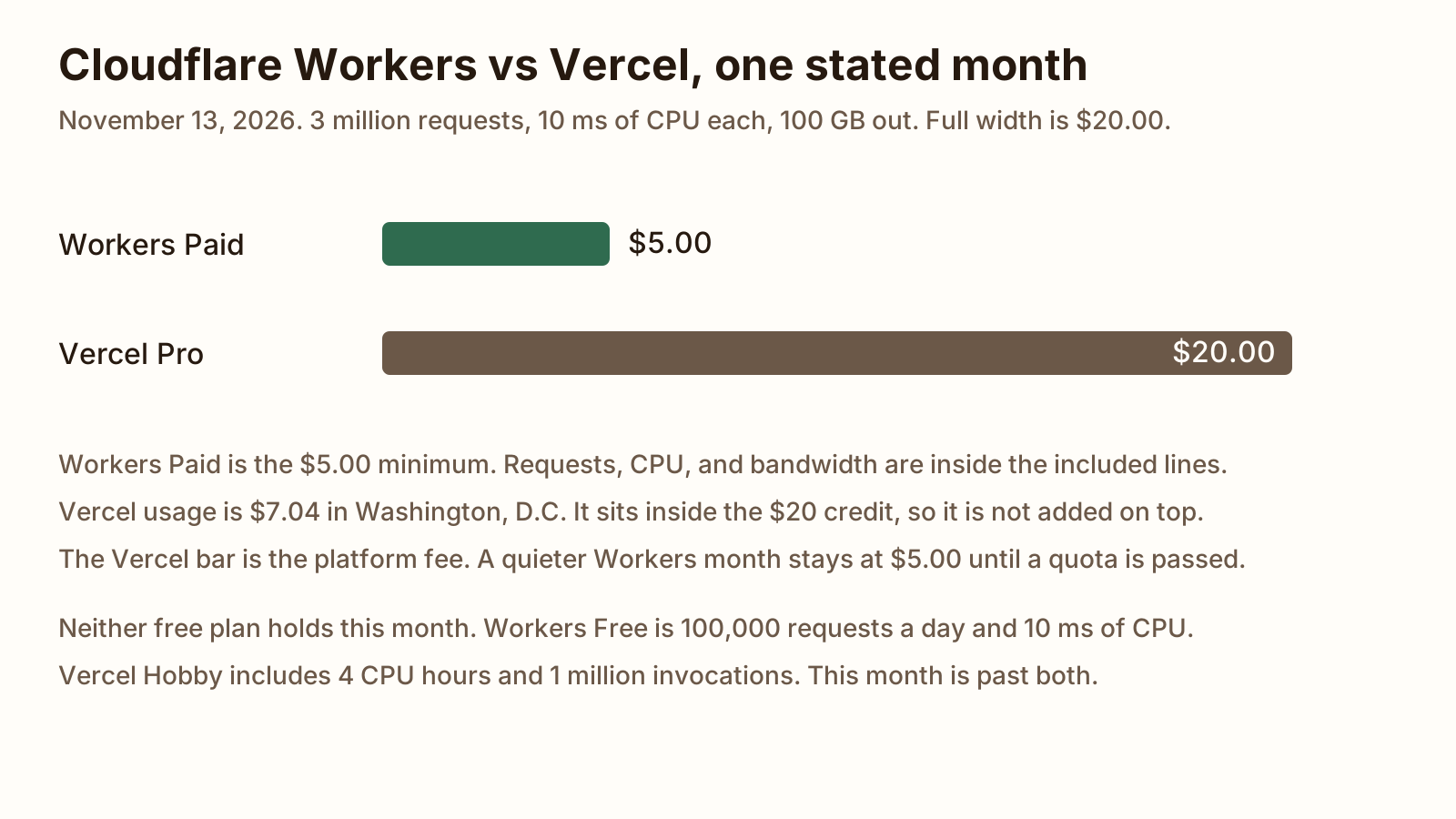
For 3 million requests at 10 ms of CPU and 100 GB out, Workers Paid is $5.00. Vercel Pro is $20.00, because that usage sits inside the credit.
On this page
The short answer
Cloudflare Workers vs Vercel, for this API, is $5.00 on Workers Paid and $20.00 on Vercel Pro. The workload is 3 million requests, 10 ms of CPU on each, and 100 GB of bandwidth. Pick Workers when that API is the product and 128 MB is enough. Pick Vercel when the app is Next.js, or when a request needs more memory than 128 MB.
Cloudflare Workers vs Vercel is the host decision for a small app or an API, and Vercel Functions vs Cloudflare Workers is that same decision. Where this month sits in the wider hosting bill is what a small web app costs to host.
What we tested
Checked
The figures on this page are the vendor pages read on November 13, 2026. The workload is fixed: 3 million inbound requests, 10 ms of CPU on each request, and 100 GB of bandwidth. No account was opened, nothing was deployed, and no invoice was paid. Latency was not measured. The cold-start sentences later are the docs, not a clock from this page. Fast Origin Transfer has no size in the workload, so it is not in the bill. The Vercel memory line uses the 2 GB default and assumes the request does not wait on I/O, so the instance is alive for the same 10 ms. The fair use page, the Hobby page, and the plans page do not print a personal-use-only rule, so this post does not use one. Where a page does not print a figure, the cell says so.
Cloudflare Workers vs Vercel pricing side by side
Cloudflare vs Vercel pricing is this table. Every cell is a page read on November 13, 2026. The Workers pricing page and the Workers limits page were both last updated November 13, 2026. Vercel’s pricing docs were last updated September 14, 2026. The Pro plan page was last updated September 15, 2026. The fluid pricing page was last updated June 16, 2026.
Workers Paid is a $5 minimum for the account, not a fee per Worker. The standard usage model includes 10 million requests and 30 million CPU milliseconds. Requests past that are $0.30 per million. CPU time past that is $0.02 per additional million CPU milliseconds. The pricing page says there is no charge for duration, and no charge for data transfer or bandwidth, on that plan. Requests to static assets are free and unlimited. Subrequests you make from the Worker are not billed. The limits page lists Paid requests as “No limit,” which is the hard cap, not a promise that the 10 million are endless and free.
Workers Free is $0. The pricing page includes 100,000 requests a day and 10 milliseconds of CPU time per invocation. The limits page says that daily request limit resets at midnight UTC. The pricing page does not print a Free bandwidth price or a Free bandwidth cap.
Vercel Hobby is $0. It includes 1 million function invocations, 4 CPU hours, 360 GB-hours of provisioned memory, 100 GB of Fast Data Transfer, 10 GB of Fast Origin Transfer, and 1 million CDN requests. Passing a usage limit means waiting until 30 days have passed before you can use that feature again. You cannot buy the overage on Hobby.
Vercel Pro is a $20 a month platform fee. That fee includes one deploying seat and $20 of usage credit. The credit applies to managed infrastructure from the first unit you use, and unused credit expires at the end of the month. Flat Rate CDN, included at no extra cost, covers 1 million CDN requests and 1 TB of data transfer. Past that, the pricing docs list Fast Data Transfer at $0.15 per GB and CDN requests at $2.00 per million. Those two on-demand rates match the Washington, D.C. (iad1) page. Active CPU and provisioned memory vary by region. In iad1 they are $0.128 per hour and $0.0106 per GB-hour. The fair use page prints function invocations at $0.60 per million once you use the credit. The fluid pricing table’s on-demand invocations cell says N/A. This bill uses the $0.60 the fair use page and the fluid page’s own example both print.
| Line | Workers Free | Workers Paid | Vercel Hobby | Vercel Pro |
|---|---|---|---|---|
| Monthly price | $0 | $5.00 minimum for the account | $0 | $20.00 platform fee, with $20.00 of usage credit and one deploying seat |
| Included requests | 100,000 a day, resetting at midnight UTC | 10 million a month, then $0.30 per million. The limits page hard cap says no limit | 1 million function invocations and 1 million CDN requests | Invocations at $0.60 per million, drawn from the credit. Flat Rate CDN includes 1 million CDN requests, then $2.00 per million |
| CPU time | 10 ms per invocation. No charge for duration | 30 million CPU ms included, then $0.02 per million CPU ms. Default 30 seconds, max 5 minutes. No charge for duration | 4 CPU hours included. Active CPU only, not time spent waiting on I/O | No included CPU hours. iad1 active CPU is $0.128 per hour, drawn from the credit |
| Max duration | No hard limit on HTTP wall-clock time. The CPU cap is 10 ms | No hard limit on HTTP wall-clock time. CPU default 30 seconds, max 5 minutes | 300 seconds, default and maximum | 300 seconds default, 800 seconds maximum, 1,800 seconds extended maximum in beta |
| Memory | 128 MB per isolate | 128 MB per isolate | 2 GB and 1 vCPU. Hobby cannot change it | 2 GB and 1 vCPU by default. Maximum 4 GB and 2 vCPU |
| Bundle size | 64 MiB uncompressed. No compressed size limit | 64 MiB uncompressed. No compressed size limit | 250 MB uncompressed, or 500 MB for Python. Large functions up to 5 GB are in beta | Same 250 MB uncompressed cap. Large functions up to 5 GB are in beta |
| Bandwidth | The pricing page does not print a Free bandwidth price or cap | No charge for egress or bandwidth | 100 GB Fast Data Transfer and 10 GB Fast Origin Transfer | Flat Rate CDN includes 1 TB of data transfer. On demand, iad1 Fast Data Transfer is $0.15 per GB and Fast Origin Transfer is $0.06 per GB |
The two bundle caps are not in the same unit. Workers says 64 MiB. Vercel says 250 MB and does not say whether that MB is 1,000,000 bytes or 1,048,576. This page does not convert one into the other.
A static site on Vercel or Netlify is a different meter, with a TTFB check, in Vercel vs Netlify.
One worked month at a fixed workload
One set of assumptions covers both bills.
The month has 3 million requests. Each request runs the app for 10 ms of CPU and does not wait on the network. Bandwidth is 100 GB. Caching is off. On Workers, the 3 million are inbound requests that invoke the Worker, so they count as requests and as CPU. Static asset requests are not in the count. On Vercel, each of the 3 million is one function invocation and one CDN request, in iad1, at the default 2 GB. The 100 GB is Fast Data Transfer. One Pro seat. No add-ons. No tax. Workers is the Paid plan on the standard usage model.
| Line | Arithmetic | Amount |
|---|---|---|
| Workers subscription | Paid plan minimum for the account | $5.00 |
| Workers requests | 3 million is inside 10 million included | $0.00 |
| Workers CPU | 10 ms times 3 million is 30 million CPU ms, equal to the included 30 million | $0.00 |
| Workers bandwidth | Paid plan does not charge egress | $0.00 |
| Workers Paid bill | 5.00 + 0.00 + 0.00 + 0.00 | $5.00 |
| Vercel active CPU | 30,000 seconds divided by 3,600, times $0.128, rounded to the cent | $1.07 |
| Vercel provisioned memory | 2 GB for those same 30,000 seconds, times $0.0106, rounded to the cent | $0.18 |
| Vercel invocations | 3 times $0.60 | $1.80 |
| Vercel CDN requests past 1 million | 2 times $2.00 | $4.00 |
| Vercel Fast Data Transfer | 100 GB is inside the 1 TB included on Flat Rate CDN | $0.00 |
| Vercel usage, lines rounded | 1.07 + 0.18 + 1.80 + 4.00 + 0.00 | $7.05 |
| Vercel usage charged | CPU and memory added before each is rounded, then plus $1.80 and $4.00, then rounded once | $7.04 |
| Vercel on-demand after credit | $7.04 and $7.05 both sit inside the $20.00 credit | $0.00 |
| Vercel platform fee | One deploying seat | $20.00 |
| Vercel Pro bill | 20.00 + 0.00 | $20.00 |
The two usage rows differ by one cent because $1.07 and $0.18 are each rounded. The bill uses $7.04, which is the sum rounded once. Either figure is inside the credit, so the Pro total stays $20.00.
30,000 seconds is 8 hours and 20 minutes. Hobby includes 4 CPU hours, so the CPU line alone does not fit on Hobby. Three million invocations do not fit inside one million. The 100 GB of Fast Data Transfer is equal to Hobby’s included 100 GB, so that one meter fits and the other two do not. Hobby does not hold this month, and you cannot pay for the overage.
Workers Free does not hold it either. 3 million divided by 30 is 100,000, so a 30-day month sits on the daily cap only when every day is exactly 100,000. One extra request on any day is over the cap. The CPU average is 10 ms, which is the Free per-invocation cap, so a request over that average does not fit.
-
$5.00
Workers Paid for this month
-
$20.00
Vercel Pro, usage inside the credit
-
$7.04
Vercel usage charged against the $20 credit
-
$0.00
Workers Paid bandwidth, which is not metered
A request that waits on a database changes the Vercel memory line and does not change the Workers CPU line. Waiting is not CPU on either platform. On Vercel, provisioned memory keeps billing until the last in-flight request finishes. This bill sets that wait at zero. A longer wait is a larger Vercel memory charge, and it can still sit inside the $20 credit or it can pass it. This page does not print that longer bill, because the defined request does not wait.
If the app also needs a process that stays up, plus Postgres, that is a different host. The worked month for Next.js, Postgres, and one cron is Vercel vs Railway.
Limits: CPU time, duration, memory, bundle size
CPU time and duration are different clocks.
On Workers, CPU time is the time the CPU spends in your code. Waiting on fetch(), KV, or a database does not count. Free allows 10 ms per HTTP request. Paid allows 5 minutes, and the default is 30 seconds. You can raise the Paid default to 5 minutes, which is 300,000 ms, in the Wrangler limits or in the dashboard. The limits page says the average Worker uses approximately 2.2 ms per request, and that heavier work such as auth, server rendering, or a large payload often uses 10 to 20 ms. This bill uses 10 ms because that is the stated workload. The same page says an isolate has some flexibility for an infrequent overrun, and that a Worker which hits the limit consistently is terminated.
On Vercel, active CPU is the same idea: you are billed while the code runs, not while it waits. Duration is the other clock. It is the longest a function invocation can run before Vercel stops it, including the time spent sending the response. Hobby is 300 seconds and cannot go higher. Pro defaults to 300 seconds, can go to 800 seconds, and can go to 1,800 seconds in beta on supported Node.js, Bun, and Python versions. A function that does not finish returns a 504.
Memory is the sharpest limit for a small app that renders a page or holds a model. Workers allow 128 MB per isolate, including the JavaScript heap and WebAssembly. That limit is per isolate, not per request, and one isolate can handle many requests. Vercel Functions default to 2 GB and 1 vCPU. Hobby cannot change that. Pro can go to 4 GB and 2 vCPUs. Projects created before November 8, 2019 keep an older default. This comparison uses the current default.
The Worker bundle limit is 64 MiB uncompressed on Free and on Paid. There is no compressed size limit. The gzip size Wrangler prints is a reference, not a cap. A Worker must also parse and run its global scope within 1 second, or the deploy is rejected. That 1 second is a startup limit on the script, not a request timeout.
A Vercel Function’s uncompressed bundle limit is 250 MB, including layers, or 500 MB for Python. The limits page says these limits are enforced by AWS. Eligible projects can opt into large functions, up to 5 GB, in beta, on Node.js, Bun, and Python. Fluid compute has to be on, and it is the default for new projects created on or after April 23, 2025.
Workers Free allows 50 subrequests per request. Paid allows 10,000. Both plans allow 6 simultaneous outgoing connections per request. This month’s bill has no subrequests in it.
Runtime and framework fit
Pick Vercel when the app is Next.js and you want the platform that ships it. Vercel runs the server code as Functions. With Next.js or SvelteKit, dynamic code is bundled into as few functions as possible. Fluid compute is on by default for new projects. One instance can handle more than one request, and you do not pay for an idle hour with no requests.
You can deploy Next.js on Cloudflare. The Workers Next.js guide, last updated November 5, 2026, recommends vinext, a Vite plugin that reimplements the Next.js API. The page says vinext is in beta, and it tells you to run the compatibility check before you adopt it for a production app. App Router, Pages Router, React Server Components, Server Actions, and server rendering are listed as supported. Image optimization is listed as partial. OpenNext is still documented for an app that cannot move yet. A static export can go to Pages instead. The same guide has a page for moving an existing Next.js project from Vercel. That path is the adapter and the check, not a second copy of this bill.
Pick Workers when the API is Hono, or any small handler that fits in 128 MB. Hono’s Workers guide, read November 13, 2026, starts from the cloudflare-workers template. The app is a Hono instance, the fetch handler is export default app, and the deploy command is Wrangler’s. The same guide shows static assets by pointing assets.directory at a folder. Hono’s docs also list a Vercel getting started page, so the framework is not Workers-only. The empty-route rates for Hono, Express, and Fastify on one VM, with no deploy, are in Hono vs Express.
Cold starts and regions
Workers run on Cloudflare’s network. The how Workers works page, last updated September 18, 2026, says that network is thousands of machines across hundreds of locations, and that the runtime uses V8 isolates. It says an isolate is created inside an existing environment, and that this model eliminates the cold starts of the virtual machine model. It also says an isolate can start around a hundred times faster than a Node process on a container or a virtual machine, and that it uses an order of magnitude less memory on startup. Those sentences are the page’s comparison.
Placement decides which of those locations runs the Worker. By default, Workers and Pages Functions run in the data center closest to where the request was received. If the Worker calls a database in one known cloud region, a placement hint runs it in the data center with the lowest latency to that region. Smart Placement, on every plan, can move the Worker toward the backend after it has seen traffic. Static assets are still served from the location nearest the request.
Vercel Functions run in one region unless you set more. The configuring regions page, last updated August 11, 2026, says new projects execute in Washington, D.C. (iad1), and that Hobby is a single region. That page lists Pro at 5 regions and Enterprise at all regions. The fluid compute defaults table, last updated August 24, 2026, leaves Hobby’s multi-region cell blank and prints “Up to 3” for Pro. Both pages were read on November 13, 2026. This post does not pick one Pro number over the other. Static files on Vercel are cached at the CDN location closest to the user, separate from the function region.
The runtimes page says a traditional serverless function uses a microVM, which is slower to start. Fluid compute shares one instance across invocations, pre-warms production functions, and caches bytecode on Node.js 20 and later so a later cold start skips recompilation. The same page says the first request is not cached yet. It also says an archived function, unarchived on the next invoke, can make that initial cold start at least 1 second longer than usual. Production functions are archived when they have not been invoked for 2 weeks. Preview functions are archived after 3 days. That 1 second is Vercel’s floor for the unarchive case. It is not a median from a test on this page.
Which to pick
- The product is this API, 3 million requests, 10 ms of CPU, 100 GB out, and 128 MB is enough: Workers Paid. The month is $5.00.
- The app is Next.js, or a request needs 2 GB: Vercel Pro. This same month is $20.00.
- The handler should run in the data center closest to the user, with no region picked by you: Workers. That is the default placement.
- The handler should sit next to a database in one cloud region: set a Vercel function region, or a Workers placement hint. Use the region list that matches the database.
- The API is Hono and you want the Workers template: Workers. The Node rates, on an empty route, are in Hono vs Express.
- The site is static files, not an API: that choice is Cloudflare Workers vs Pages, or Netlify vs Cloudflare Pages when the other host is Netlify.
- You also need a process that stays on, and Postgres on that host: Vercel vs Railway. Heroku, Render, Fly.io, and a small VPS for that same shape are in Heroku alternatives.
FAQ
Is Cloudflare Workers cheaper than Vercel?
For this workload, yes. Workers Paid is $5.00. Vercel Pro is $20.00, because the usage sits inside the $20 credit and you still pay the platform fee. The workload is 3 million requests, 10 ms of CPU on each, and 100 GB of bandwidth. A smaller month on Workers stays at the $5.00 minimum until you pass 10 million requests or 30 million CPU milliseconds.
Cloudflare Workers vs Vercel Functions: what is the difference?
Workers bill inbound requests and CPU time. On the Paid plan there is no charge for wall-clock duration or for bandwidth. Vercel Functions on fluid compute bill active CPU, provisioned memory, and invocations, and Pro adds a $20 platform fee with $20 of credit. Workers cap memory at 128 MB per isolate. Vercel Functions default to 2 GB. Workers run in the data center closest to the request unless you set placement. New Vercel projects run in Washington, D.C. (iad1) unless you change the region.
Can I deploy Next.js on Cloudflare instead of Vercel?
Yes. Cloudflare’s Next.js guide, read November 13, 2026, recommends vinext, and that page says vinext is in beta. The same page still documents OpenNext, and a static export to Pages. Vercel runs Next.js as Vercel Functions without that adapter. Run the compatibility check on the app before you move it.
Is the Cloudflare free tier better than Vercel’s free tier?
Not for this month. For the Cloudflare vs Vercel free tier, neither plan holds the workload. Workers Free allows 100,000 requests a day and 10 ms of CPU per invocation. Vercel Hobby includes 1 million invocations and 4 CPU hours, and this month is past both. Under those caps, pick Workers Free for a small API that stays under 10 ms, and Vercel Hobby for a Next.js project that needs 2 GB of memory.
Sources
- Workers pricing (Cloudflare) Checked
- Workers limits (Cloudflare) Checked
- How Workers works (Cloudflare) Checked
- Placement (Cloudflare Workers) Checked
- Next.js (Cloudflare Workers) Checked
- Pricing on Vercel Checked
- Vercel Pro plan Checked
- Vercel Hobby plan Checked
- Fair use guidelines (Vercel) Checked
- Fluid compute pricing (Vercel) Checked
- Washington D.C. (iad1) pricing (Vercel) Checked
- Vercel Functions limits Checked
- Configuring memory for Vercel Functions Checked
- Configuring duration for Vercel Functions Checked
- Configuring regions for Vercel Functions Checked
- Fluid compute (Vercel) Checked
- Runtimes (Vercel Functions) Checked
- Cloudflare Workers (Hono) Checked