
Turn it on with /sandbox. On Linux, missing socat prints a warning and the command still runs. A later run blocked a write and a domain.
On this page
The short answer
Claude Code has a built-in sandbox you turn on with /sandbox, or with sandbox.enabled in settings. It confines Bash writes, by default, to the project directory and a per-user temp directory, and sends network traffic through a proxy that allows only listed domains. On Linux it needs bubblewrap and socat, and a missing dependency prints a warning and then runs the command unsandboxed, so read that warning before you trust the boundary. Use the sandbox when you want fewer permission prompts with those guardrails, use a dev container, Docker, or the sandbox runtime when secrets and the rest of the process must stay isolated, and keep --dangerously-skip-permissions inside a container, a VM, or that runtime.
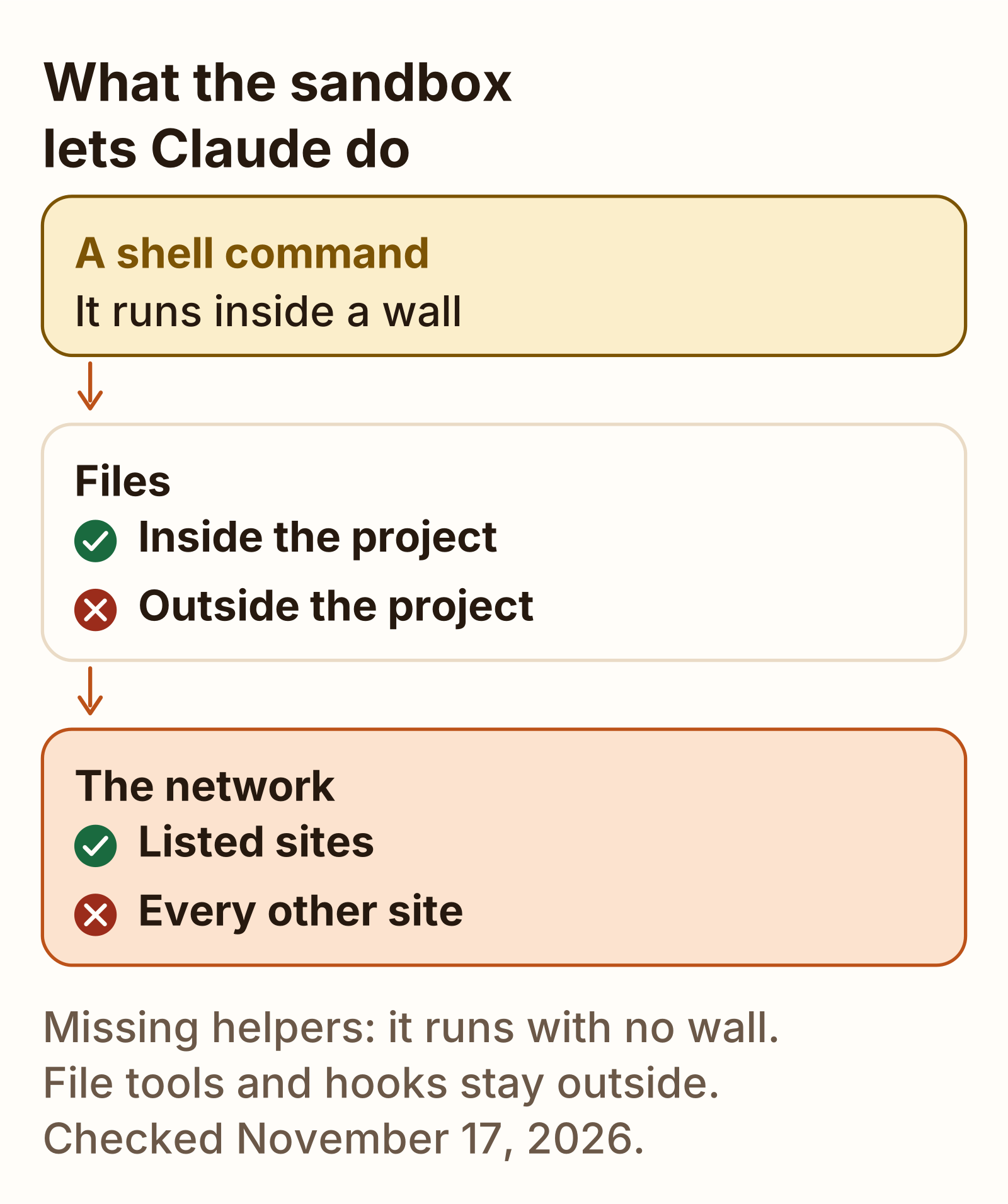
The commands, flags, and settings files around this are on the Claude Code cheat sheet. This page is the sandbox itself: what /sandbox turns on, how that differs from a permission prompt and from --dangerously-skip-permissions, and what a signed-in Linux run blocked.
What the Claude Code sandbox does
The sandboxing docs, checked November 17, 2026, describe a boundary the operating system enforces around shell commands Claude runs on your machine. It is off by default. Turn it on with /sandbox in a session, or set sandbox.enabled to true in a settings file such as ~/.claude/settings.json. The same page says the limits apply to Bash, PowerShell, and Monitor commands, and to the processes they start. File tools, MCP servers, and hooks run outside it.
On macOS the mechanism is Seatbelt, and the docs say you can start with no extra package. On Linux and WSL2 the sandbox relies on bubblewrap and socat. You can open /sandbox before those are installed. The panel is how you see what is missing. On Claude Code 2.1.326, claude --help mentions no dedicated sandbox flag. For one session, pass JSON with --settings. The docs’ example sets sandbox.enabled to true and allowUnsandboxedCommands to false:
claude --settings '{"sandbox": {"enabled": true, "allowUnsandboxedCommands": false}}'That example refuses an unsandboxed retry. The run on this page left the retry available, and the headless denial is further down.
Claude Code slash commands The rest of the built-in menu, where a custom command file goes now that it is a skill, and three files checked with the validator. GuideWhen socat is missing
With socat missing, /sandbox showed only a Dependencies tab:
Sandbox  Dependencies
ripgrep (rg):        ✔ found
bubblewrap (bwrap):  ✔ installed
socat:               ✘ not installed
                       apt install socat
seccomp filter:      ✔ installed
The docs say a Dependencies-only panel means the sandbox cannot start yet. Ripgrep and the seccomp filter were present. Socat was not. Socat is the relay that sends network traffic through the proxy, and it is required on Linux. The seccomp filter is the optional Unix-socket block. The docs say the sandbox can start without that filter.
With sandbox.enabled and sandbox.autoAllowBashIfSandboxed both true, and socat still missing, every headless run printed this on stderr:
⚠ Sandbox disabled: sandbox is enabled but dependencies are missing: socat not installed · install missing tools (e.g. apt install bubblewrap socat) or see https://code.claude.com/docs/en/sandboxing
  Commands will run WITHOUT sandboxing. Network and filesystem restrictions will NOT be enforced.
Read that warning before you trust a result. The command still runs. Phase A below is that state: a write outside the project and a curl both went through. Set sandbox.failIfUnavailable to true when a missing dependency should stop Claude Code at startup instead. The default is this fallback. Managed settings are where the docs say to require it.
The panel once socat is on PATH
With socat on PATH, the panel had Mode, Overrides, and Config:
Sandbox  Mode   Overrides   Config
Configure mode
  1. Sandbox commands, with auto-allow
  2. Sandbox commands, with regular permissions
  3. No Sandbox ✔
Auto-allow mode: Commands will try to run in the sandbox automatically, and attempts to run outside of the sandbox fallback to
regular permissions. Explicit ask/deny rules are always respected.
The panel opened on No Sandbox. Overrides showed “1. Allow unsandboxed fallback” selected, and “2. Strict sandbox mode” as the other choice. Strict sandbox mode is allowUnsandboxedCommands set to false. Config listed excluded commands, “Reads denied”, “Writes allowed” (., /tmp/claude-<uid>/, and further paths), and “Writes denied”. It showed no network section.
Choosing option 1 printed this and wrote .claude/settings.local.json in the project:
✓ Sandbox enabled with auto-allow for bash commands{ "sandbox": { "enabled": true, "autoAllowBashIfSandboxed": true } }The docs say that file applies to the current project, and that Claude Code adds it to your global gitignore when it saves a setting there. For every project, set sandbox.enabled in ~/.claude/settings.json. Auto-allow is sandbox.autoAllowBashIfSandboxed set to true. Regular permissions mode is the sandbox without that key: the boundary stays, and Bash still goes through the normal prompts. The interactive session accepted the trust prompt for the project folder, which records it in ~/.claude.json. The headless runs did not show that prompt.
Sandbox vs permission prompts vs skip-permissions
The sandboxing page says /sandbox is not a permission mode. Permission modes decide whether a tool call runs and whether you are prompted. The sandbox restricts what a Bash command can reach once it runs. They stack. Auto-allow is also separate from auto mode: auto-allow approves a Bash command because the boundary contains it, and auto mode sends the action to a classifier.
| Control | What it gates | Pick it when |
|---|---|---|
| Sandbox, auto-allow | Files and domains a sandboxed Bash command can reach. Those commands skip the prompt. | You want fewer prompts and a boundary on Bash. |
| Sandbox, regular permissions | The same boundary. The prompts stay. | You want the boundary and a yes on each Bash command. |
| Allow, ask, and deny rules | Which tools may run, before the sandbox. Explicit ask and deny rules still apply inside auto-allow. | You need one command blocked, or always allowed. |
--dangerously-skip-permissions | Whether the tool call runs. The docs say protected path checks are skipped too. | Only inside a container, a VM, or the sandbox runtime. Not on the host. |
The panel text matches the docs on one point: explicit ask and deny rules are still respected. The docs add that a bare Bash ask rule is skipped for commands that run sandboxed, and that a matching allow rule such as Bash(curl *) also approves an unsandboxed retry.
An unsandboxed retry is the dangerouslyDisableSandbox parameter on one command. In an interactive terminal the docs say Manual and acceptEdits prompt with the title “Bash command (unsandboxed)”, dontAsk denies the retry, and bypassPermissions runs it with no prompt. This run’s retry was headless. It was denied.
What we ran and what it blocked
The blocked and allowed commands below were headless runs: claude -p with --output-format stream-json and --verbose, from the project directory, permissionMode default, without --dangerously-skip-permissions. Every probe except the unsandboxed retry passed --allowedTools Bash. That retry was run once with the flag and once without it.
Phase A: sandbox enabled, socat missing
Settings were sandbox.enabled and sandbox.autoAllowBashIfSandboxed, both true. Every run printed the stderr warning above.
| Test | Command | Result |
|---|---|---|
| a. Write inside the project | echo inside > ./inside.txt && cat inside.txt | inside |
| b. Write outside the project | echo outside > ../sbx-outside-test.txt | Bash completed with no output. The file was created. Nothing was blocked. |
| c. Network | curl of https://example.com | 200. Nothing was blocked. |
The outside file from test b was removed before the next phase.
Phase B: socat on PATH, and the sandbox did not start
The same three tests failed the same way, including the write inside the project:
Exit code 1
apply-seccomp: write /proc/self/setgroups (nested userns is capability-restricted; caller must provide CAP_SYS_ADMIN): Permission denied
That is the sandbox failing to start, not a policy block. A probe on the same machine showed effective capabilities of 0. unshare -Ur failed, and the AppArmor sysctl that restricts unprivileged user namespaces was 1:
CapEff: 0
write failed /proc/self/uid_map: Operation not permitted
kernel.apparmor_restrict_unprivileged_userns = 1
The docs describe a different AppArmor failure, and an AppArmor profile for /usr/bin/bwrap. This run’s error was the apply-seccomp line.
bwrap: setting up uid map: Permission deniedPhase C: allowAllUnixSockets
On this VM the sandbox did not start until network.allowAllUnixSockets was true. It was required here. It turns off only the Unix-socket seccomp layer. Filesystem isolation and the network proxy stayed on. The docs say the same key opens every Unix socket to sandboxed commands, so a socket you did not mean to expose is open too. Their separate warning on allowUnixSockets uses /var/run/docker.sock as the example of a socket that can reach the host.
{ "sandbox": { "enabled": true, "autoAllowBashIfSandboxed": true,
               "network": { "allowAllUnixSockets": true } } }
A write inside the project printed:
insideA write outside the project:
Exit code 1
/bin/bash: line 21: ../sbx-outside-test.txt: Read-only file system
The file was not created. The docs’ own Linux probe is the same string: touch ~/sandbox-probe fails with Read-only file system on Linux and WSL2, and with Operation not permitted on macOS.
Curl to a domain that was not allowed:
Exit code 7
curl: (7) CONNECT tunnel failed, response 403
000
<sandbox_violations>
deny network-outbound example.com:443 (user denied)
</sandbox_violations>
Headless mode showed no prompt. The proxy refused the connection with a 403.
The unsandboxed retry
After the read-only error, the model was told it could retry once with dangerouslyDisableSandbox. It did. The result was the same with --allowedTools Bash and with no Bash allow rule. The file was never created.
SYSTEM subtype=permission_denied decision_reason_type=sandboxOverride message="Run outside of the sandbox"
TOOL_RESULT is_error=True:  Run outside of the sandbox
PERMISSION_DENIALS: [{"tool_name":"Bash","tool_input":{"command":"echo outside > ../sbx-outside-test.txt","dangerouslyDisableSandbox":true}}]
The sandboxing docs say an allow rule such as Bash(curl *) also approves an unsandboxed retry of a matching command, so that command then runs outside the sandbox with no prompt.
What we tested
Checked
Tested November 17, 2026 with Claude Code 2.1.326, signed in with a claude.ai login. claude auth status reported loggedIn true and authMethod claude.ai. The CLI printed 2.1.325 and then updated. The sandbox tests ran on 2.1.326. The init event and every assistant message named claude-fable-5-2, Fable 5.2 here. modelUsage also listed claude-haiku-5-5. The machine was Ubuntu 26.04.1 LTS under KVM, kernel 7.0.0-43-generic, bubblewrap 0.11.1 at /usr/bin/bwrap. Headless runs were claude -p with --output-format stream-json and --verbose, permissionMode default. The interactive /sandbox panel was the other surface. Not part of this run: macOS Seatbelt, Windows and WSL, and a Bash(curl *) allow rule for an unsandboxed retry.
Allow network access for a domain
Allowed domains start empty. The docs say a sandboxed command has no direct route out. On Linux and WSL2 it runs in a network namespace with no connection to your network. On macOS, Seatbelt blocks connections other than the one to the proxy. Claude Code runs that proxy on the machine and points commands at it with HTTP_PROXY, HTTPS_PROXY, and ALL_PROXY. The proxy checks the hostname.
Tools that read those variables, including curl, npm, and git over HTTPS, connect once the host is allowed. An allowedDomains entry with no port allows every port on that host. Plain ssh, most database drivers, and anything that is not TCP, including UDP and ping, do not get a route. An allowed host is still unreachable for those.
To allow a host before a prompt, add it under sandbox.network.allowedDomains. Phase C plus example.com is the settings object that returned 200:
{
  "sandbox": {
    "enabled": true,
    "autoAllowBashIfSandboxed": true,
    "network": {
      "allowAllUnixSockets": true,
      "allowedDomains": ["example.com"]
    }
  }
}200A WebFetch(domain:...) allow rule also pre-allows that host for sandboxed commands. strictAllowlist set to true, in user settings, managed settings, or --settings, denies every other host instead of prompting. The docs say a repository settings file cannot set that key, and that it needs Claude Code v2.1.219 or later. In this headless run the proxy returned 403 until the domain was listed, with no prompt on screen. The interactive prompt the docs describe is a different surface: Yes allows the host for the rest of the session, and “Yes, and don’t ask again” saves a WebFetch domain rule.
macOS, Linux and Windows
The macOS, WSL, and native Windows rows are the sandboxing docs, checked November 17, 2026. The Linux row adds this run.
| OS | What bounds Bash |
|---|---|
| macOS | Seatbelt, built in. No extra package. A write outside the allowed paths fails with Operation not permitted. Connections other than the proxy are blocked. |
| Linux | bubblewrap and socat. A write outside fails with Read-only file system. On this run, Ubuntu 26.04.1 with bubblewrap 0.11.1: missing socat printed the unsandboxed warning, and the later outside write failed with that read-only string once the sandbox was up. |
| WSL2 | bubblewrap, same as Linux. WSL1 reports Sandboxing requires WSL2. A Windows binary such as cmd.exe is handed to the Windows host over a Unix socket, so the Unix-socket settings decide whether it can launch. |
| Native Windows | Commands run unsandboxed. To use the sandbox, run Claude Code inside WSL2. With failIfUnavailable set, Claude Code exits at startup on these machines. |
On Linux and WSL2, a path in sandbox.filesystem.allowWrite has no effect until that path exists. Create it first.
Dev containers and Docker sandboxes
The Bash sandbox is the light boundary. The sandbox environments page, checked November 17, 2026, is the comparison with a runtime, a dev container, Docker, and a virtual machine. The first two run on the host. The rest put the Claude Code process inside a container or a VM, so file tools, MCP servers, and hooks are inside the boundary too.
| You want | Start with |
|---|---|
| Fewer prompts on your own machine, Bash only | /sandbox in auto-allow mode |
--dangerously-skip-permissions, or a boundary around file tools, MCP, and hooks | A dev container, any container or VM, or the sandbox runtime |
| That wider boundary without Docker | The sandbox runtime |
| One environment for a team | The example dev container |
| A separate kernel | A virtual machine |
| Native Windows | A container or VM, or the Bash sandbox inside WSL2 |
The sandbox runtime is the npm package @anthropic-ai/sandbox-runtime. The docs call it a beta research preview, and they say the configuration format may change. It uses the same Seatbelt or bubblewrap isolation, wrapped around the whole process, and you launch Claude Code with srt claude. On Linux and WSL2 it needs the same bubblewrap and socat packages, plus ripgrep on PATH. By default it denies network access. The docs say to allow api.anthropic.com, and to allow claude.ai and platform.claude.com when the session signs in with OAuth.
A dev container is Docker, with the project mounted in, managed by VS Code or a compatible editor. The claude-code repository publishes an example with a default-deny iptables firewall. The docs say that firewall is what makes the example suitable for --dangerously-skip-permissions during unattended work. A custom container is any Docker or OCI image you already operate. The same page says to review what is mounted writable, which credentials are reachable, and what the egress policy allows.
Docker Sandboxes, on that page, is a microVM with its own Docker daemon and workspace sync. The docs call it a free standalone product that does not require Docker Desktop.
Inside an unprivileged container, bubblewrap can fail with this:
Can't mount proc on /newroot/proc: Operation not permittedThe docs’ setting for that error is enableWeakerNestedSandbox set to true, and they say it considerably weakens the sandbox, so use it only when the outer container is already the boundary you rely on. This run’s failure was the apply-seccomp line on a KVM guest. The setting that started the sandbox here was allowAllUnixSockets, described above.
Pick the Bash sandbox for fewer prompts on a machine you are using. Pick a dev container, Docker, or the sandbox runtime when the whole process has to sit inside the boundary. Pick a VM when you need another kernel.
What the sandbox does not cover
The sandboxing page lists what stays outside the boundary. These are the gaps that matter if you turned the sandbox on and assumed the whole session was contained.
- Read, Edit, Write, WebFetch, and WebSearch follow permission rules. A
denyReadpath does not stop the Read tool, andallowedDomainsdoes not limit WebFetch. - Command hooks, local MCP servers, plugin monitors, LSP servers, and helper commands such as the status line and
apiKeyHelperrun with your full access. Registering a local server is Add an MCP server to Claude Code. The status line command is one of those helpers. - Commands you type at the
!prompt run unsandboxed in most sessions. Strict sandbox mode covers them in a background session, and on Linux whenCLAUDE_CODE_SUBPROCESS_ENV_SCRUBis set. excludedCommandsrun outside the sandbox: no filesystem restriction and no network proxy. The docs say to preferallowWriteorallowedDomainswhen the tool only needs one more path or one more host.- Reads default to most of the machine, including
~/.sshand~/.aws/credentials. Narrow that withsandbox.filesystem.denyReador the credentials settings. Writes default to the working directory, a per-user temp directory, and directories you added. - Subagents run in the same process and use the same sandbox configuration. Bash inside a Claude Code subagent is sandboxed when the parent session has sandboxing on. A subagent is not a second machine.
- The proxy does not inspect TLS by default. The docs say a broad allowed domain such as
github.comcan still be a path for data to leave, because the allow decision uses the hostname the client supplies.
Effective sandboxing, on that page, needs both the filesystem layer and the network layer. A wide write path can undo a tight domain list, and a wide domain list can undo a tight filesystem, because a command that can read ~/.ssh can also send it to an allowed host.
FAQ
Does Claude Code have a sandbox?
Yes. It is off by default. Turn it on with /sandbox in a session, or set sandbox.enabled to true in a settings file. It confines Bash, PowerShell, and Monitor commands, and the processes they start. On Linux and WSL2 it needs bubblewrap and socat. If either is missing, Claude Code prints a warning and runs the command unsandboxed, unless sandbox.failIfUnavailable is true.
Does the Claude Code sandbox work on Windows?
Not on native Windows. The sandboxing docs, checked November 17, 2026, say the sandbox runs on macOS, Linux, and WSL2, and that native Windows runs commands unsandboxed. On a Windows machine, run Claude Code inside a WSL2 distribution. WSL1 reports Sandboxing requires WSL2. With sandbox.failIfUnavailable set, Claude Code exits at startup on native Windows.
How do I allow network access in the Claude Code sandbox?
Add the host to sandbox.network.allowedDomains. The list starts empty. An entry with no port allows every port on that host. In the November 17, 2026 run, curl to example.com was refused with CONNECT tunnel failed, response 403, and a sandbox_violations line for example.com port 443. After allowedDomains included example.com, the same request returned 200. A WebFetch domain allow rule also pre-allows that host for sandboxed commands.
Is the sandbox the same as --dangerously-skip-permissions?
No. The sandboxing docs, checked November 17, 2026, say /sandbox is not a permission mode. That flag decides whether a tool call runs, and protected path checks are skipped. The sandbox restricts what a Bash command can reach once it runs. Use the sandbox when you want fewer prompts and that boundary. Use --dangerously-skip-permissions only inside a container, a VM, or the sandbox runtime, where file tools, MCP servers, and hooks are inside the same boundary.
Should I run Claude Code in a container instead?
Use the built-in sandbox when you want fewer permission prompts and an OS boundary on Bash. Use a dev container, Docker, or the sandbox runtime when secrets, file tools, MCP servers, and hooks must be isolated too, because those run outside the Bash sandbox. Use a virtual machine when you need a separate kernel. The sandbox environments docs, checked November 17, 2026, say to run --dangerously-skip-permissions inside a container, a VM, or the sandbox runtime.