
Slash commands, CLI flags, settings keys, and file locations. Tables from 2.1.319. Signed-in checks on 2.1.321.
On this page
The short answer
The commands on this Claude Code cheat sheet include /help, /init, /memory, /config, /model, /compact, /clear, /agents, /hooks, and /output-style. The flags beside them include -p (--print), --model, --effort, --permission-mode, --output-format, --allowedTools, and --settings. User settings are ~/.claude/settings.json, shared project settings are .claude/settings.json, and standing instructions are CLAUDE.md.
On November 9, 2026 I installed @anthropic-ai/claude-code 2.1.319 with npm install -g --prefix /tmp/cc-cli @anthropic-ai/claude-code. The binary was /tmp/cc-cli/bin/claude. claude --version printed 2.1.319 (Claude Code). claude --help exited 0. The Options section has 66 flags. The Commands section has 18 subcommands. The signed-in checks are in What we tested.
The other agent posts are on AI agents and tools.
Slash commands
Slash commands are names you type at the start of a message. The commands page, saved that day as commands.md (57,504 bytes), says type / to see what this session can run, and type letters after the slash to filter. A command is recognized only at the start. Text after the name is the arguments.
The All commands table has 121 rows. 20 are marked Skill. One row, /deep-research, is marked Workflow. Three say Removed: /pr-comments, /ultraplan, and /vim. The other 97 rows are unmarked. The 20 rows below are from those 97. The one-line purpose is shortened from the page. This is not a third-party list.
The skills page names six bundled skills in one sentence: /doctor, /code-review, /batch, /debug, /loop, and /claude-api. Those are prompts handed to Claude. They are not in the table below. /doctor is the in-session checkup. The shell command claude doctor is a different line, in the flags section.
| Command | What it does |
|---|---|
/help | Show help and available commands. |
/init | Initialize the project with a CLAUDE.md guide. |
/memory | Edit CLAUDE.md files, and turn auto memory on or off. |
/skills | List available skills. |
/reload-skills | Re-scan skill and command directories without restarting. |
/config | Open Settings. Alias /settings. key=value sets a key. |
/status | Status tab: version, model, account, and connectivity. |
/model | Switch the model. With no argument, opens a picker. |
/effort | Set the effort level: low to xhigh, max, or auto. |
/context | Visualize current context usage. |
/compact | Summarize the conversation so far. |
/clear | Start a new conversation. Aliases /reset and /new. |
/diff | Review the working tree, including edits Claude has made. |
/permissions | Manage allow, ask, and deny rules. |
/agents | Reminder to edit .claude/agents/ or ~/.claude/agents/. |
/hooks | View hook configurations. |
/output-style | List styles or switch. Requires v2.1.269 or later. |
/statusline | Configure the status line. |
/resume | Resume a conversation, or open the session picker. |
/rewind | Rewind the conversation, the code, or both. |
/permissions manages allow, ask, and deny rules. /sandbox is a different control: it turns on an OS boundary around Bash. How the Claude Code sandbox works shows the panel, the warning when socat is missing, and a write and a domain it blocked.
/mcp manages MCP server connections. The page says that running it with no argument opens the interactive list. In claude -p on November 10, 2026, /mcp exited 0 and printed 29 MCP server(s): 13 connected, 14 not connected, 2 not configured, 0 disabled. Registering a server is Add an MCP server to Claude Code. If Claude Code feels slow to start, timing 3 and 10 connected servers found servers were the biggest measured cost on one machine.
How a custom /name is a skill now, and where the file goes, is the Claude Code slash commands guide.
CLI flags
The program starts an interactive session by default. -p or --print is the non-interactive form. That is the first paragraph of claude --help on 2.1.319. The CLI reference is the docs page for the same flags. It says claude --help does not list every flag, so a missing help line is not proof the flag is gone. Every flag in this table is one the help text printed.
Help listed six choices for --permission-mode: acceptEdits, auto, bypassPermissions, manual, dontAsk, and plan. The CLI reference also accepts default, and says manual is an alias for default. Help on this install prints manual and does not print default.
Help lists --effort as low, medium, high, xhigh, or max. The CLI reference also lists ultracode. I am quoting the help line in the table.
| Flag | What the help says |
|---|---|
-p, --print | Print response and exit. |
-c, --continue | Continue the most recent conversation in the current directory. |
-r, --resume | Resume a conversation by session ID or name, or open a picker. |
--model | Model for this session. An alias such as fable, opus, or sonnet, or a full name. |
--effort | Effort level: low, medium, high, xhigh, or max. |
--permission-mode | acceptEdits, auto, bypassPermissions, manual, dontAsk, or plan. |
--output-format | With --print: text, json, or stream-json. |
--allowedTools | Tool names to allow. The long form --allowed-tools is the same flag. |
--settings | A settings JSON file, or a JSON string, loaded in addition. |
--add-dir | Extra directories to allow tool access to. |
-h, --help | Display help for command. |
-v, --version | Output the version number. |
claude doctor is a subcommand, not a flag. Help says it checks the health of the installation and reads settings files in the current directory without a trust prompt. For a checkup that can also fix issues, help says to run /doctor in a session. In claude -p, /doctor exited 0 and reported that the audit was mostly blocked outside the project folder.
The Commands section lists 18 subcommands: agents, attach, auth, auto-mode, doctor, gateway, import, install, logs, mcp, plugin, purge, respawn, rm, setup-token, stop, ultrareview, and update. plugins is an alias of plugin. kill is an alias of stop. upgrade is an alias of update.
Settings and config files
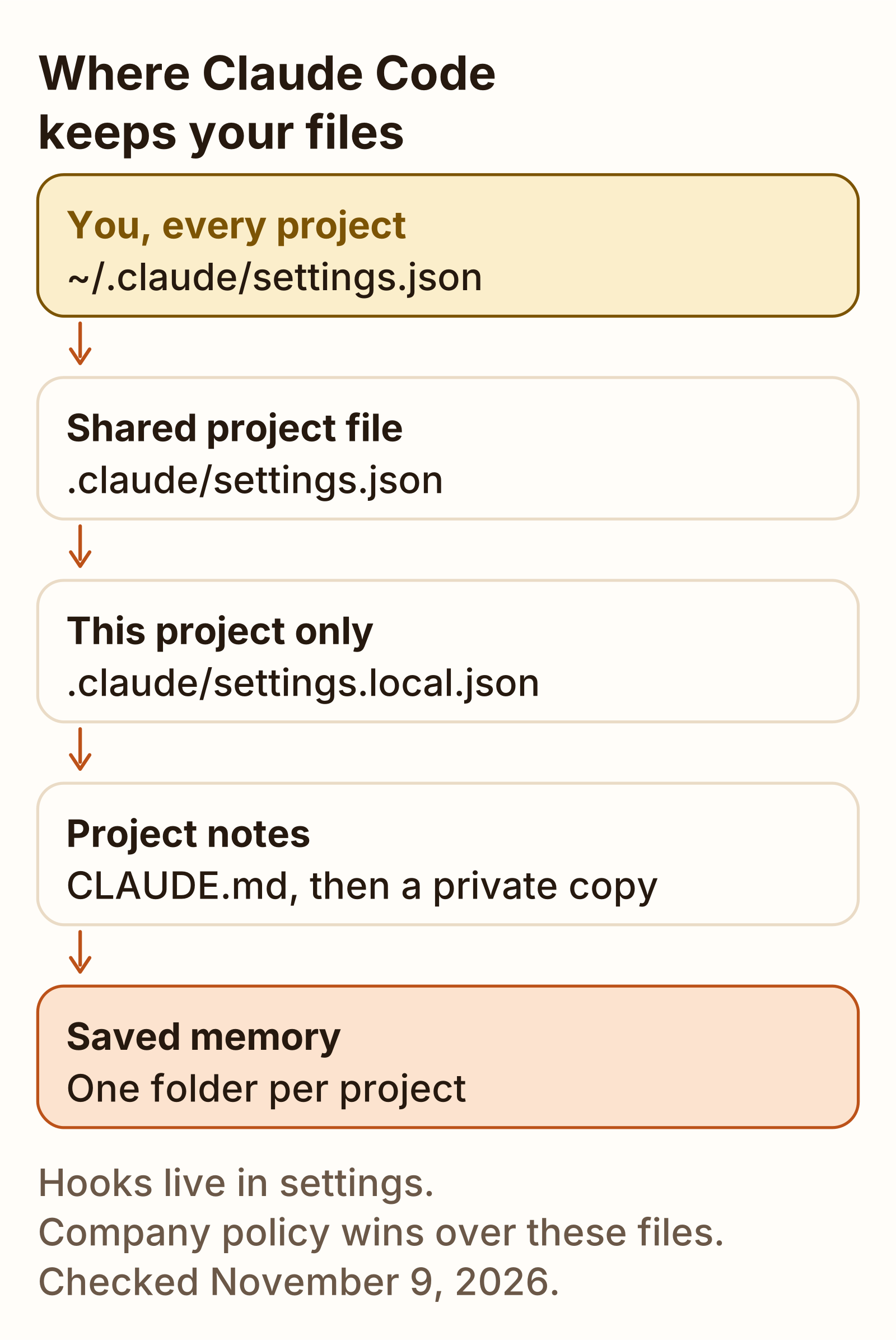
Claude Code reads settings from JSON files. The settings page, checked November 9, 2026, names four of them, plus managed delivery from the claude.ai console.
| Scope | File | Who it affects |
|---|---|---|
| User | ~/.claude/settings.json | You, in every project on this machine. |
| Shared project | .claude/settings.json | Everyone in that folder. Commit it so teammates get it. |
| Project local | .claude/settings.local.json | You, in this one project. Add it to .gitignore if you create it by hand. |
| Managed | managed-settings.json | Everyone your organization deploys it to. Other managed sources exist too. |
On Windows, ~/.claude means %USERPROFILE%\.claude. To put the home-directory files somewhere else, set CLAUDE_CONFIG_DIR. Claude Code then stores settings, session history, and plugins there.
Precedence, highest first, from that page: managed settings, command line, project local, shared project, user. Command line means JSON you pass with --settings for that session. A flag such as --model is not a level in that stack. The page says a key at a higher level overrides the same key lower down. Environment variables are not a level. Which one wins, for a key that also has a shell variable, is decided per pair.
~/.claude.json is a fifth file. The page says Claude Code writes it, and you do not need to edit it. It holds account details, per-project state such as trust decisions, and the global config keys that /config writes.
The settings reference index lists 248 keys. I counted the rows. These seven are the ones a printed sheet needs. Each description is shortened from that index. Each of these seven says scope Any file, which means user, project, local, and managed.
| Key | What the index says |
|---|---|
model | The model new sessions start with. |
effortLevel | Default effort for models without a saved level of their own. |
language | Have Claude respond in a language other than English. |
outputStyle | Role, tone, and output format. |
permissions | Allow, ask, and deny rules, and the default permission mode. |
statusLine | Your own command for a status line below the prompt. |
hooks | Your own commands at points in the lifecycle. |
statusLine is the object the status line post saves. The default on the index is unset, so there is no custom line until you set one.
The script, the sample JSON, and the Windows notes are in the statusline post.
/config opens Settings. /status opens the same dialog on the Status tab, which lists the settings sources the session loaded. The settings page says that line shows which files were read. It does not show which file supplied each key.
CLAUDE.md and memory files
CLAUDE.md is the markdown file of standing instructions. The memory page, checked November 9, 2026, lists the launch files from the broadest scope to the most specific. They are concatenated. A later file does not erase an earlier one.
| Scope | Path |
|---|---|
| Managed, macOS | /Library/Application Support/ClaudeCode/CLAUDE.md |
| Managed, Linux and WSL | /etc/claude-code/CLAUDE.md |
| Managed, Windows | C:\Program Files\ClaudeCode\CLAUDE.md |
| User | ~/.claude/CLAUDE.md |
| Project | ./CLAUDE.md or ./.claude/CLAUDE.md |
| Local | ./CLAUDE.local.md |
The page says to add CLAUDE.local.md to .gitignore. Ancestor copies, in folders above the working directory, load at launch. A CLAUDE.md in a subfolder loads when Claude reads a file there. /init can draft a starting file.
A project CLAUDE.md that said to end every reply with DONE was applied by claude -p on November 10, 2026. The reply to “What is 2+2?” was 4, then DONE on its own line. With the file moved aside, the same prompt replied 4 and stopped. Asked to quote the rule, the model quoted it and then wrote DONE.
Auto memory is a different folder. The page says it is on by default in local sessions, and names cases where a session starts with it off. Each project gets a memory folder under ~/.claude/projects/, named from the git repository. The folder holds MEMORY.md, an index, and one topic file per memory. autoMemoryDirectory in a settings file stores that folder somewhere else. /memory lists the CLAUDE.md files and can toggle auto memory. In claude -p, /memory exited 0 and printed /memory isn't available in this environment. In the interactive session it opened a menu of user instructions and project instructions.
What to put in the project file, from 100 public copies, is how to write a claude.md file.
claude.md file: how to write one Where CLAUDE.md loads, what 100 public root files contain, and a blank template. GuideSubagents, hooks and output styles
A subagent is a markdown file in .claude/agents/ or ~/.claude/agents/. Claude Code subagents is the file format, and when a rule belongs in CLAUDE.md instead.
A hook is a command, prompt, HTTP call, or other handler on the hooks key of a settings file. User, project, and local settings can each hold hooks. /hooks views that configuration. The event list is the hooks reference.
An output style is a built-in name, or a markdown file in .claude/output-styles/ or ~/.claude/output-styles/. Claude Code output styles is the built-in list and a custom file. The output styles page saved on November 9, 2026 matched the copy from November 7. On Claude Code 2.1.321, /output-style listed five built-ins: default, Proactive, Concise, Explanatory, and Learning. /output-style Pirate printed Output style set to Pirate and wrote .claude/settings.local.json with "outputStyle": "Pirate".
Headless mode
Headless, in the docs URL, is a non-interactive run. Help on 2.1.319 does not use that word. It says the CLI starts an interactive session by default, and -p or --print prints a response and exits. --output-format json is one of the three formats help lists for that flag.
On November 10, 2026, claude -p "Reply with the word ok" printed ok and exited 0. --output-format json put ok in result, with num_turns 1. The object includes total_cost_usd. This page does not print that value. --max-turns 1 on a prompt that had to run a tool exited 1 with subtype error_max_turns and num_turns 2. Without stdin closed, the CLI waits 3 seconds and warns on stderr.
The longer flag list, the JSON, and a workflow that was checked and not executed are in Claude Code headless mode.
A status line is a script in settings, and it does not run under claude -p. After the folder was trusted, an interactive session rendered [Fable 5.2] plus the directory name and the working directory. The settings section above links the script.
What we tested
Checked
Tested November 10, 2026 with Claude Code 2.1.321, model Fable 5.2, on Ubuntu 26.04, signed in with a claude.ai account. claude auth status reported loggedIn true and authMethod claude.ai. The default model id was claude-fable-5-2. The runs were not a clean lab: a user-level CLAUDE.md, about 29 MCP servers, skills, and plugins loaded. This page does not quote a dollar cost from those calls.
| Check | Result |
|---|---|
claude -p "Reply with the word ok" | exit 0, stdout ok |
--output-format json | type result, subtype success, result ok, num_turns 1 |
--max-turns 1 on a tool prompt | exit 1, error_max_turns, num_turns 2 |
/hello world | ARGS_RECEIVED=[world] |
/help in -p | exit 0, not available in that environment |
/model in -p | Current model: Fable 5.2 (default) |
/cost on a claude.ai login | plan usage, not dollars |
/output-style | default, Proactive, Concise, Explanatory, Learning |
status line under -p | the calls log was never created |
| status line after trust | [Fable 5.2] plus the directory and the working directory |
project CLAUDE.md in -p | replies ended with DONE; the control without the file did not |
Not tested: /init, /login, /logout, /review, --bare, stream-json without --verbose, and claude doctor the subcommand. The 121-row commands table was not re-counted on November 10. The flag table is still the November 9 help text from 2.1.319.
Download the sheet
The Claude Code cheat sheet (Markdown) is the same commands, flags, keys, and paths, in one file you can print or paste. The other downloads are on Templates.
The slash-command files from October 31, 2026, including the three starter skills, stay with the slash commands guide. They are a quick reference for custom /name files. They are not this sheet.
FAQ
Where is the settings file?
User settings are ~/.claude/settings.json. On Windows, ~/.claude means %USERPROFILE%\.claude. Shared project settings are .claude/settings.json. Personal overrides for one project are .claude/settings.local.json. The settings page, checked November 9, 2026, lists precedence highest first: managed settings, then command line, then project local, then shared project, then user. Command line here means JSON passed with --settings for that session. Claude Code also writes ~/.claude.json for itself.
How do I see all commands?
Type / at the start of a message. The commands page, checked November 9, 2026, says that lists what this session can run, and letters after the slash filter it. Not every command appears for every user. In an interactive session, /help opens a Help dialog. In claude -p, /help exits 0 and prints that it is not available in that environment. Outside a session, claude --help prints CLI flags and subcommands, not that menu. The All commands table on November 9 had 121 rows. This Claude Code cheat sheet prints 20 of the built-in rows.
Which version is this for?
The command and flag tables were taken from Claude Code 2.1.319 on November 9, 2026. claude --version that day printed 2.1.319 (Claude Code). The commands, CLI, settings, memory, hooks, subagents, output styles, headless, and skills docs were downloaded the same day. A signed-in session on November 10, 2026 used Claude Code 2.1.321 and model Fable 5.2. A later release can add a command this Claude Code cheat sheet does not list.
Sources
- Commands (Claude Code Docs) Checked
- CLI reference (Claude Code Docs) Checked
- Settings files and precedence (Claude Code Docs) Checked
- All settings (Claude Code Docs) Checked
- How Claude remembers your project (Claude Code Docs) Checked
- Hooks reference (Claude Code Docs) Checked
- Create custom subagents (Claude Code Docs) Checked
- Output styles (Claude Code Docs) Checked
- Run Claude Code programmatically (Claude Code Docs) Checked
- Extend Claude with skills (Claude Code Docs) Checked