
Three connected MCP servers added about 1.2 seconds before a one-word reply on one machine, and ten added about 3.8. Check the status page before you change the project.
On this page
The short answer
When Claude Code is slow to start, the extra time on this machine came from MCP servers: Model Context Protocol programs Claude Code connects to at launch so it can call their tools. Three connected servers added about 1.2 seconds at the median (the middle value of five runs), and ten added about 3.8 seconds. Remove the ones this session does not need with claude mcp list and claude mcp remove, or start with --strict-mcp-config and a small config. If it is slow for everyone today, check the Claude status page before you change that setup.
The commands in that fix, including claude mcp list and --strict-mcp-config, are on the Claude Code cheat sheet. The timings are from Claude Code 2.1.322 on November 16, 2026, signed in with a claude.ai account. The JSON named the model Fable 5.2.
Is Claude Code slow or is Claude down
Claude Code slow on one machine can be your setup. Claude down means the service itself. Those are different problems, and they feel the same from one prompt.
Open the Claude status page before you edit a config file. Read the Claude Code row. If it is anything other than Operational, wait. Removing a server will not fix an incident.
On November 16, 2026 I opened that page. The Claude Code row read Operational. An earlier incident the same day, elevated errors for Claude Sonnet 5.5 and Claude Fable 5.2, named Claude Code among the affected surfaces. The impact window was 07:32 UTC to 08:45 UTC, and the page marked it resolved at 09:04 UTC. The timings below were taken at about 16:24 UTC, after that resolved update.
MCP servers and startup time
Wall clock here means the seconds from starting the claude -p process to the process exiting, measured by a script around the CLI. The bar below is the median of five runs, and the whisker is the minimum to the maximum.
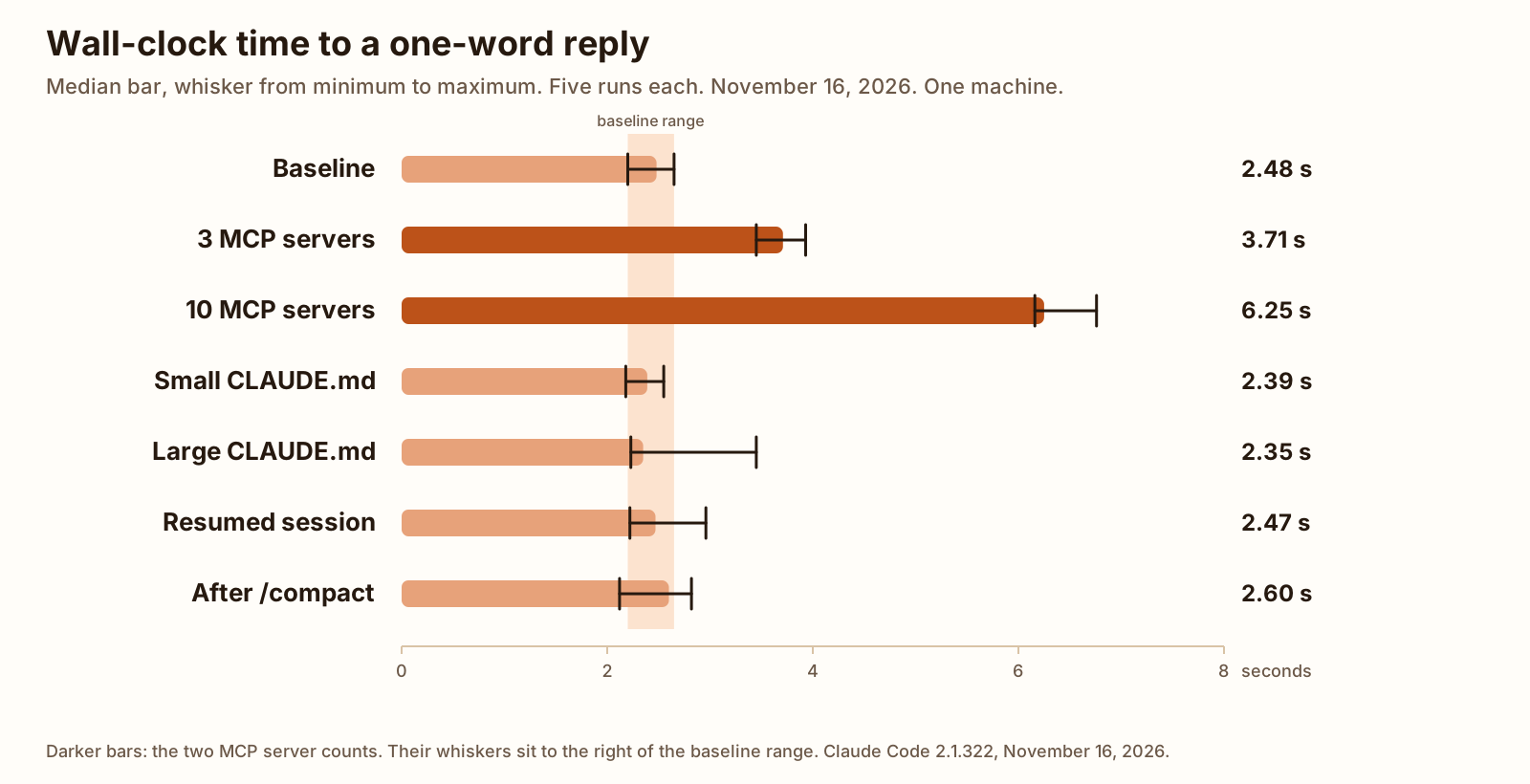
The baseline, an empty folder, was 2.48 seconds at the median, from 2.20 to 2.65. Three connected servers were 3.71 seconds, from 3.45 to 3.93. Ten connected servers were 6.25 seconds, from 6.16 to 6.76. Those two ranges sit entirely above the baseline. The gap at the median is about 1.2 seconds for three servers and about 3.8 seconds for ten. Dividing those gaps by the server count comes to roughly 0.4 seconds per server. What we tested shows that division. It is arithmetic on the medians, not a separate measurement of each server.
The other four whiskers cross the baseline band.
The servers in the test were stdio servers: local programs the CLI starts and talks to over standard input and output. Three connected, with 77 tools in the init listing. Ten connected, with 161 tools: five memory servers, four filesystem servers, and one everything server.
The CLI reference, checked November 16, 2026, says that passing --mcp-config with -p makes Claude Code wait for still-pending servers to connect before the first turn, up to MCP_TIMEOUT, 30 seconds by default. A server with a cached tool list skips that wait and connects on first use. These runs passed --mcp-config on every state, including the empty baseline. The measured gap is the wall clock on the chart.
To drop the startup cost, keep only the servers this session needs.
claude mcp list prints each configured server with a health status. The MCP docs, checked the same day, name statuses such as Connected, Needs authentication, and Failed to connect.
claude mcp remove, followed by the server name, deletes that server. If the same name is stored in more than one scope, pass --scope. The same page describes that case.
For one session, without editing the saved config, pass --strict-mcp-config with --mcp-config and a small file. The CLI reference says that pair skips servers configured in places such as .mcp.json, ~/.claude.json, or a plugin, and loads the ones in the file you pass.
How a server gets into the config in the first place, and the three scopes, is Add an MCP server to Claude Code.
Add an MCP server to Claude Code The claude mcp add command, the three scopes, and claude mcp list when a server does not connect. GuideCLAUDE.md size and a long session
CLAUDE.md is the markdown file of standing instructions Claude Code reads at the start of a session. Where it loads, and what a normal file looks like, is the claude.md file guide.
The small file in this test was 36 lines, 274 words, and 1,646 bytes. The large file was 3,000 lines, 31,971 words, and 212,579 bytes. On the chart, both whiskers cross the baseline band. The large file’s maximum is 3.45 seconds, above the baseline maximum of 2.65, and its minimum is 2.23 seconds, inside the baseline range. The ranges overlap.
Input tokens did change. The median was 33,280 on the baseline, 109,675 with the large file, 187,550 on the resumed session, and 36,585 after /compact. The wall clock did not follow that change. That is a measured result, not an explanation of why.
The resumed session used --resume and --fork-session on a session of about 187,550 input tokens. That session had read a file of 6,285 lines, 60,011 words, and 420,004 bytes with the Read tool. Its whisker also crosses the baseline band.
/compact frees context by summarizing the conversation so far. The commands page, checked November 16, 2026, is that description, and the slash commands guide is the longer list. The compact in this test ran in -p mode, took 27.08 seconds, and kept the session in place. Context went from about 187,554 tokens to 36,585. The five timed replies after that are the After /compact bar. That whisker crosses the baseline band too. The 27.08 seconds is the compact itself. The bar is the reply after it. Prompt cache means input the service had already accepted on a recent call. No difference is claimed for CLAUDE.md size, the resumed session, or /compact in this test, for a one-word reply with that cache already warm.
Other things to check
/status opens the Status tab: version, model, account, and connectivity. The commands page, checked November 16, 2026, is that line. It is the local view. The outage view is still the status page.
/model switches the model. /effort sets the effort level. The same page describes both. The runs here passed no --model flag and no --effort flag. The model the JSON named for the work was Fable 5.2.
The timings were claude -p in a terminal on Linux. Headless mode is that command. A status line under an interactive prompt is a different script. The statusline post is the script and the settings key. How the reply is worded is an output style. claude update updates the CLI to the latest version, which is the CLI reference’s line for that subcommand. The binary on these runs was 2.1.322.
How to time your own setup
Run the same shape from a folder of your own. The path below is a stand-in.
cd /home/you/project
claude -p "Reply with the single word OK." \
  --output-format json \
  --strict-mcp-config \
  --mcp-config /home/you/project/mcp.json \
  --setting-sources project \
  --permission-mode default \
  </dev/null
-p prints a response and exits. --output-format json is one of text, json, or stream-json. --strict-mcp-config with --mcp-config loads only the file you pass. --setting-sources project loads the project source from the list the CLI reference names: user, project, local. --permission-mode default is one of the modes that page accepts. Stdin came from /dev/null. No --model flag was passed. Each state ran from its own empty folder. The baseline file had no servers in it.
A resumed run added two flags. The session id is not printed here.
claude -p "Reply with the single word OK." \
  --output-format json \
  --strict-mcp-config \
  --mcp-config /home/you/project/mcp.json \
  --setting-sources project \
  --permission-mode default \
  --resume <session id> \
  --fork-session \
  </dev/null
--resume returns to a session. --fork-session mints a new session id instead of reusing the original. The CLI reference, checked November 16, 2026, says to use it with --resume or --continue.
Time the whole process from the outside if you want the same clock as the chart. duration_ms and duration_api_ms are different fields in the JSON. The reading of those fields for these 35 runs is in the next section.
What we tested
Checked
Tested November 16, 2026 with Claude Code 2.1.322, signed in with a claude.ai login, on Linux x86_64 (Ubuntu). The JSON modelUsage named claude-fable-5-2, called Fable 5.2 here, and claude-haiku-5-5. Haiku appeared on every run, including the baseline, so it is not specific to any state. No --model flag was passed.
Seven states, five rounds, 35 runs. The rounds were interleaved: round 1 across every state, then round 2, and so on. Within a round the order was fixed, S0 through S6, not randomized. Every run returned OK, num_turns 1, with no errors and no reruns. The npx cache was already warm, so a download is not in the times. Each state ran from its own empty folder, with stdin from /dev/null, and with the flags in How to time your own setup. One machine, one network, not a benchmark. This page measured Claude Code only.
One change from the baseline on each state. S0 was an empty folder, no CLAUDE.md, and an empty MCP config. S1 was 3 stdio servers, all connected, 77 tools. S2 was 10 stdio servers, all connected, 161 tools (memory five times, filesystem four times, everything once). S3 was a CLAUDE.md of 36 lines, 274 words, 1,646 bytes. S4 was a CLAUDE.md of 3,000 lines, 31,971 words, 212,579 bytes. S5 resumed a session of about 187,550 input tokens, from a Read of a 6,285-line, 60,011-word, 420,004-byte file, using --resume and --fork-session. S6 was that kind of session after /compact. The compact ran in -p mode, took 27.08 seconds, and kept the session in place. Context before it was about 187,554 tokens, and after it was 36,585. The five timed S6 runs are the replies after that compact.
Connections for S1 and S2 were confirmed in separate untimed stream-json runs just before the timed rounds, and were not re-checked after.
duration_ms and duration_api_ms are fields in the CLI’s JSON, in milliseconds in the CSV and in seconds here. Wall clock is the outside measurement. Its per-run values were not saved, so the wall-clock table is the median and the minimum to the maximum only.
| State | Median (s) | Min (s) | Max (s) | Median minus baseline (s) |
|---|---|---|---|---|
| S0 baseline | 2.48 | 2.20 | 2.65 | 0.00 |
| S1, 3 MCP servers | 3.71 | 3.45 | 3.93 | 1.23 |
| S2, 10 MCP servers | 6.25 | 6.16 | 6.76 | 3.77 |
| S3, small CLAUDE.md | 2.39 | 2.18 | 2.55 | -0.09 |
| S4, large CLAUDE.md | 2.35 | 2.23 | 3.45 | -0.13 |
| S5, resumed session | 2.47 | 2.22 | 2.96 | -0.01 |
| S6, after /compact | 2.60 | 2.12 | 2.82 | 0.12 |
| State | Servers | Median minus baseline (s) | Divided by servers (s) |
|---|---|---|---|
| S1 | 3 | 1.23 | 0.41 |
| S2 | 10 | 3.77 | 0.38 |
| State | duration_ms median (s) | Min (s) | Max (s) | duration_api_ms median (s) | Min (s) | Max (s) |
|---|---|---|---|---|---|---|
| S0 baseline | 1.23 | 1.13 | 1.57 | 2.08 | 1.81 | 2.39 |
| S1, 3 MCP servers | 1.43 | 1.08 | 1.64 | 2.40 | 2.10 | 2.47 |
| S2, 10 MCP servers | 1.28 | 1.02 | 1.92 | 2.10 | 1.72 | 2.84 |
| S3, small CLAUDE.md | 1.26 | 1.13 | 1.39 | 1.97 | 1.80 | 2.43 |
| S4, large CLAUDE.md | 1.21 | 1.11 | 2.38 | 2.10 | 1.87 | 3.17 |
| S5, resumed session | 1.34 | 1.08 | 1.74 | 15.70 | 15.44 | 16.08 |
| S6, after /compact | 1.37 | 1.03 | 1.52 | 39.92 | 39.58 | 40.07 |
For S5 and S6, duration_api_ms (median 15.70 seconds and 39.92 seconds) is not one call’s API time. It matches the earlier setup run’s API time carried over by the resumed session: 14.5 seconds for the S5 setup, and 11.9 seconds plus 27.1 seconds of /compact for the S6 setup. Do not read those two columns as the cost of the one-word reply, and do not draw a conclusion from them. The resumed runs read mostly from cache, because the runs were close together.
| State | Median | Min | Max |
|---|---|---|---|
| S0 baseline | 33,280 | 33,277 | 33,281 |
| S1, 3 MCP servers | 35,382 | 35,381 | 35,387 |
| S2, 10 MCP servers | 36,711 | 36,710 | 36,712 |
| S3, small CLAUDE.md | 34,046 | 34,044 | 34,051 |
| S4, large CLAUDE.md | 109,675 | 109,670 | 109,678 |
| S5, resumed session | 187,550 | 187,545 | 187,553 |
| S6, after /compact | 36,585 | 36,583 | 36,588 |
The 35 CLI rows are the run CSV. Wall-clock per-run values are not in that file.
Not in these 35 runs: ChatGPT, a long answer, a cold prompt cache, a second machine, a second network, an IDE, a model switch, an effort change, a server that failed to connect, and whether a cached tool list skipped the connect wait.
FAQ
Why is Claude Code so slow today?
Check the Claude status page first. A slowdown that showed up today is an outage until that page lists Claude Code as Operational. On November 16, 2026 the Claude Code row read Operational, and a Fable 5.2 error incident that morning was already marked resolved at 09:04 UTC. If the row is Operational, the startup cost measured on this page is MCP servers: about 1.2 seconds for 3 connected servers and about 3.8 seconds for 10, at the median, on one machine.
Why is Claude so slow compared to ChatGPT?
This page measured Claude Code only. No ChatGPT timing was taken, so there is no comparison figure. The extra time measured here is MCP servers at startup: about 1.2 seconds for three connected servers and about 3.8 seconds for ten, at the median, on one machine, for a one-word reply.
Is Claude Code down right now?
Open the Claude status page and read the Claude Code row. Checked on November 16, 2026, that row read Operational. The page is the live record. This post is not.
Do MCP servers slow down Claude Code?
Yes, at startup, in this test. Three connected stdio servers added about 1.2 seconds of wall-clock time at the median, and ten added about 3.8 seconds. Those ranges did not overlap a baseline with no servers. The CLI’s duration_ms ranges did overlap, so the difference shows up on a clock around the process. Remove servers this session does not need with claude mcp remove, or start with --strict-mcp-config and a small config. Add an MCP server to Claude Code is the setup those commands reverse.
Does a long CLAUDE.md slow Claude Code?
Not in this test. A 3,000-line CLAUDE.md, 31,971 words, had a wall-clock range that overlapped an empty folder, and so did a 36-line file. Input tokens rose from a median of 33,280 to 109,675. The wall clock did not follow. The reply was the single word OK, and the runs were close enough together that the prompt cache was warm. How to write the file is a separate question from this clock.
Sources
- Claude status Checked
- CLI reference (Claude Code Docs) Checked
- Connect Claude Code to tools via MCP (Claude Code Docs) Checked
- Commands (Claude Code Docs) Checked